
edmkmhjmailjclmhjkhklabnecnejhio
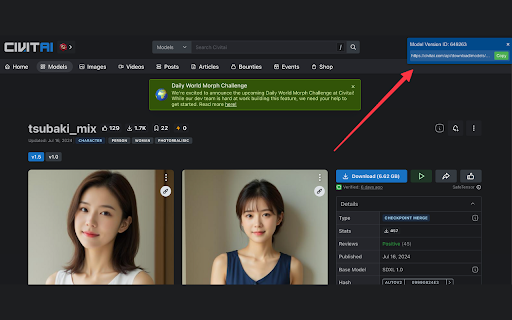
Finds download links for Civitai models Simplify your Civitai browsing experience with this handy extension. Instantly locate and copy download links for models on Civitai.com. Key Features: • Automatically detects and displays the Model Version ID for any Civitai model page. • Provides a convenient, one-click copy function for the download URL. • Discreet display that doesn't interfere with your browsing experience. • Works only on Civitai model pages, ensuring focused functionality. How it works: When you visit a Civitai model page, a small overlay appears in the top-right corner of your browser. This overlay shows the Model Version ID and the corresponding download link. With a single click, you can copy the download URL to your clipboard, making it easy to use in your favorite AI image generation tools. Perfect for: • AI artists and enthusiasts who frequently download models from Civitai. • Users who want to streamline their workflow when working with multiple Civitai models. • Anyone looking to save time and reduce the hassle of manually locating download links. Respect your privacy: This extension only activates on Civitai model pages and doesn't collect or store any personal data. Enhance your Civitai experience today with the Civitai Download Link Finder!

AI Meta Viewer
View AI-generated image metadata (prompts, settings) directly in your browser. AI Meta Viewer automatically detects AI-generated images on web pages and displays their generation parameters (Positive Prompt, Negative Prompt, Steps, Seed, Model, etc.). Key Features: - Supports Stable Diffusion (WebUI, ComfyUI), NovelAI, Tensor.art, Midjourney - Supports *.safetensors (civitai, huggingface) - Detects metadata in PNG (tEXt/iTXt), JPEG, WebP, AVIF - Supports "Stealth PNG Info" (metadata hidden in alpha channel) - Works on local files. In this case, please check the 'Allow access to file URLs' option in the extension settings. - **Action-Triggered Downloader**: - Click the extension icon to scan the entire page. - Bulk download detected images. - **Flexible Folder Naming**: Automatically organize downloads by Page Title, Domain, or Flat structure. - **Smart Filtering**: Toggle between viewing only AI images or all discoverable images. - Privacy-focused: All processing is done locally in your browser. No data is sent to external servers. ---

puicopy - Copy to clipboard via infotext
AIイラスト・AIフォト・AIグラビア専用の投稿サイトである『chichi-pui(ちちぷい)』で公開されている呪文・プロンプトを、infotext形式でクリップボードにコピーすることができる機能を提供するChrome拡張機能です。 AI専用の画像投稿サイトである『chichi-pui(ちちぷい)』で公開されている呪文・プロンプトを、infotext形式でクリップボードにコピーすることができる機能を提供するChrome拡張機能です。 この拡張機能を有効にした状態、かつchichi-pui(ちちぷい)にログインした状態で、ちちぷいの投稿画像の閲覧画面にアクセスすると、『生成情報をコピー』ボタンが追加されます。 こちらのボタンを押すと、infotext形式でクリップボードに呪文内容がコピーされるので、Stable Diffusion web UIのプロンプト欄にペーストし、Web UI上の画面右側の矢印ボタンをクリックすることで、各項目に対してペースト内容を一度に適用できます。 以下のページで画像付きでの説明が載っており、またソースコードも公開されています。 https://github.com/shinshin86/puicopy

TryYourAI
Help you to easily try the newest and most popular StableDiffusion models in CivitAI, and create your own artwork on TryYourAI.com. This extension provides image generation service for CivitAI. To get started, install this extension and open CivitAI. With just a simple click on the “TRY” button, you can use the most popular StableDiffusion models to create your own artworks on TryYourAI.com.

Civit model downloader
Extension for download models with full metadata from Civitai 🤖 Civit downloader - Download models from Civitai with Metadata and Pictures 🖼️ Tired of searching for AI models and manually gathering metadata and pictures? Look no further! Introducing Civit downloader, the ultimate Chrome extension designed to simplify the process of downloading models along with their accompanying metadata and pictures One click and folder with model, metadata and pictures is ready in your downloads folder The format of metadata is compatible with "civitai shortcut" extension for automatic1111 so you can easily add downloaded models/loras to it
