
edjkpdncopbajiibaphfeelnaegkfipd

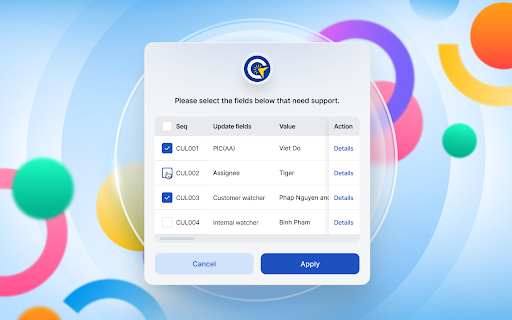

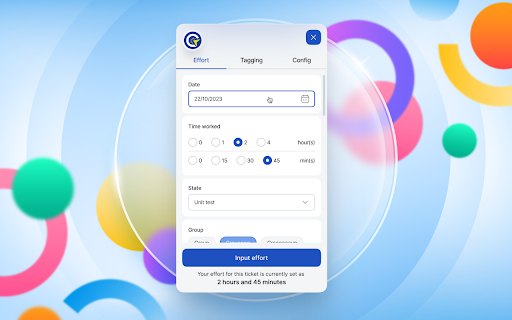
GSD Assistant Extension Introducing “GSD Operation” – Your Efficient Ticket Management Extension. GSD Operation is a Chrome extension designed to streamline ticket processing for Global Service Desk (GSD) members. It simplifies the process by automating the filling of ticket fields through predefined rules, reducing the need for manual data entry. In addition to its automation capabilities, GSD Operation serves as a reminder system for ticket handlers to input effort for each ticket. It also facilitates collaboration by automatically tagging tickets for both GSD and development team members upon resolution. Specifically optimized for the ServiceNow website, it aims to enhance efficiency in the effort input process. Experience a more straightforward approach to ticket management with GSD Operation – your solution for a more efficient workflow with fewer manual tasks.

JSON Wrangler
This extension makes it so JSON files are displayed in a much nicer and more interactive way in the browser. There already exist various extensions to do this, but they all suffered from being old and unmaintained, or buggy, or missing features I consider vital. In particular they could not cope at all with large files, which this extension can (up to hundreds of megabytes). * Extremely fast compared to the other JSON extensions, and is the only extension that copes with large files. * The display is aesthetically pleasing but also compact (e.g. small objects and arrays are displayed on one line), and automatically adapts to dark or light mode. * Toggle objects and arrays closed, including doing so automatically to all children of the item you click on (ctrl-click to do this). * Displays the JSONPath of the item the mouse is over. * You can search using regular expressions (type a JavaScript regular expression literal in the search box to do this). * URLs in strings (including property names) are detected automatically and made clickable.

PromptGuru for ChatGPT, Bard & 100+ Tools
World's No.1 Prompt Search Engine. Save, Bookmark & Share your prompts in 1-click Introducing the ultimate productivity companion for content creators, marketers, and professionals - PromptGuru! 🚀 - Access a vast collection of 1 million+ curated prompts across 20+ categories, covering SEO, marketing, product management, health, and more. - Perfect for both beginners and seasoned professionals looking for inspiration and guidance. - Effortlessly bookmark your favorite prompts for quick and easy access. - Discover top AI tools for over 40 different categories to enhance your workflow. - Create and save custom or private prompts tailored to your specific needs. - Share your prompts with the community or keep them private for personal use. - Seamlessly switch between light and dark modes for a comfortable browsing experience. - 100% FREE access to all features, ensuring you get the most out of your creative process. - No hidden prompts - we provide full transparency, allowing you to edit prompts manually as needed. - Unlimited bookmarking capabilities, so you never miss out on valuable inspiration. - No intrusive code injections that disrupt the original UI/UX of your favorite tools and websites. - We respect your inbox - no spam, no promotions, just a clean and efficient plugin experience. Elevate your content creation, marketing strategy, and professional endeavors with the PromptGuru Chrome Plugin. Install Now and unlock a world of limitless inspiration!

Google Search Boost
vim-like keyboard shortcuts for search page Add Vim-like keyboard shortcuts for search page in Google. ## Kyes Select next link Select previous link Go to next page Go to previous page Open link Open link in new tab Open link in new window Focus on search bar You can also set keybindings with Ctrl key combinations. Please open settings by clicking extension icon.

Search Tabs - Google Sheets
This tool helps you quickly find and manage tabs in Google Sheets. 📊 User Guide: Search Tabs - Google Sheets Extension 🎯 Introduction This extension helps you quickly and efficiently search and manage tabs in Google Sheets — especially useful when working with spreadsheets that contain many sheets. Open the Search Tool **3 ways to open:** 1. Purple Button: Click the "Show All Tabs (Ctrl + S)" button in the bottom-right corner of the screen 2. Shortcut Key: Press Ctrl + S in Google Sheets 3. Toolbar Icon: Click the All Sheets icon on the Google Sheets toolbar 🔍 Quick Tab Search - Type the tab name in the search box - Auto-suggestions are supported (including abbreviations) - Use ↑ / ↓ to navigate - Press Enter to switch to the tab **Contact support:** - Email: nvthai02032000@gmail.com - Feedback: via Chrome Web Store --- *🎉 Wishing you a productive experience with Google Sheets!*
