
edilbbjmcenabeecljloiiddlikhmpji
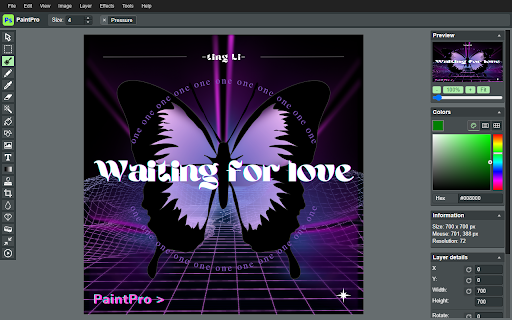
PaintPro is a powerful Chrome extension that provides users with professional-grade drawing tools and image editing capabilities. PaintPro offers a wide range of features, including: 1. Comprehensive Drawing Tools: PaintPro provides a diverse set of drawing tools, including various brush styles, an eraser, shape tools (such as rectangles, ellipses, and lines), and a text tool. You can choose the appropriate tool to suit your creative needs. 2. Layer Management: With PaintPro's layer functionality, you can easily create, manage, and control multiple layers within your images. Adjust the order, opacity, and visibility of layers to achieve precise image editing and composition effects. 3. Advanced Image Adjustments: PaintPro offers a variety of advanced image adjustment options, such as color correction, curve adjustments, and levels adjustments. You can exercise precise control over colors and exposure to achieve professional-level results. 4. Effects and Filters: PaintPro includes a collection of effects and filters, including blur, sharpening, and lighting effects, enabling you to add unique styles and visual effects to your artwork. 5. Import and Export: You can effortlessly import local image files into PaintPro for editing, and export your edited images in various common formats, such as PNG and JPEG. PaintPro is a professional-grade drawing tool that is also suitable for beginners and non-professional users. Whether you're performing simple image enhancements or creating complex art pieces, PaintPro will meet your needs and help you showcase your creativity flawlessly.

Draw Online
Online draw on page: add text, create shapes, sketch lines and curves, take notes, and draw arrows. Capture, share, or print Draw Online: Transform web pages into Your Canvas Discover the boundless creativity of web paint online tool, the ultimate browser extension that turns any web page into your digital canvas. - Unleash your creativity by drawing on any web page using a range of versatile tools and a spectrum of vibrant colors. - Seamlessly save your artwork directly within your browser, providing easy access to your creations. - Enjoy the convenience of a lightweight and user-friendly interface. - Elevate your browsing experience, adding a new dimension of creativity and personal expression. - Install web paint online tool from your browser's app store. - Visit the web page you wish to transform into your canvas. - Click the web paint tool icon in your browser's toolbar to access the intuitive drawing interface. - Unleash your artistic prowess using the diverse range of tools and colors. - Save your artwork effortlessly with a single click. Draw Online empowers you to redefine web pages and infuse them with your unique touch. Whether you're an artist seeking an outlet, a diligent note-taker, or simply someone who loves to have fun, this browser extension provides the ideal platform for boundless creativity. There's no need to wait—download web paint online tool now and let your digital masterpiece come to life!

Paint Online - Drawing Tool
Sketch fun drawings directly on web pages using the paint tool. Capture your art with a quick screenshot. Classic MS Paint in the browser, with extra features. The paint on tab tool has a simple and easy-to-use design. It is not confusing, and easily recognizable icons are used in the app, which makes it easy for everyone to use. Paint Tool is a fun extension on Google Chrome which lets you annotate any page you want and share it with your friends. Paint enables you to draw on any webpage with various tools to express your thoughts, make a point or edit. The plus points of Paint extension are: - Draw on any webpage in your browser. - Make shapes with the magic marker. - Write with the text tool. - Take screenshot to share your creativity. Using this Paint Online, you can share your feelings about a webpage and then share it with your friends.

Sketheditor for Chrome
Sketheditor is an award-winning sketching, painting, and drawing app for anyone who loves to draw... Sketchbook for Chrome Unleash your creativity with Sketchbook, an award-winning app for sketching, painting, and drawing. Enjoy a professional-grade feature set, customizable tools, and an elegant interface for a seamless drawing experience. Upload, edit, and save your artwork with ease!

Paint Tool by Painty
Paint tool to draw shapes, add text on web pages in real-time, make a screenshot, and download or share the screenshot with friends. Paint Tool is the perfect tool for anyone looking to express their creativity. Draw on any web page quickly and easily and add a new level of expression to your browsing experience. With Painty tools, you can turn any web page into your canvas. Take your creativity to the next level with our tool. This powerful paint tool allows you to draw on any web page with a variety of tools and colors. Plus, it's lightweight and easy to use, adding a new level of creativity and expression to your browsing experience. With Painty, you can quickly and easily create beautiful illustrations, take notes, and have fun. Simple, easy, and fun to use the Painty app, you can enjoy and learn drawing on this Chrome extension. Our extension has a simple and easy-to-use design. It is not confusing and easily recognizable tool icons (pencil, highlighter, arrows, paint bucket, eraser, and other tools) are used in the app which makes it easy for everyone to use. The best multitool for paint online includes: 🖍️ Pencil - draw a custom line with the selected line width and color. 🖌️ Highlighter - the easiest way to highlight text on any webpage. 🎨 Color Picker - pick a color from the web page or your drawings and use it for drawing. ➖ Line - paint a straight line with the selected line width, transparency, and color. ➡️ Arrow - paint a straight line with an arrow on the end of the selected line width, transparency, and color. 🔗 Polyline - the best way to paint an arbitrary figure. 🔳 Rectangle - draw a rectangle with the selected line width, transparency, and color. 🟡 Circle - draw a circle or an ellipse with the selected line width, transparency, and color. 🔺 Polygon - paint a polygon with the selected line width, transparency, and color. 🔤 Text - add text to the web page with the selected color and transparency. 😀 Emoji - add fun emoji to the web page. 👁️🗨️ Blur - blur sensitive or personal information on screenshots or images. 🧽 Eraser - erase part of your drawings. 🎨 Paint Bucket - fill an area with selected color and transparency. and more! But that's not all - with the Painty New Tab, you can enable additional features such as adding/removing bookmarks and storing saved screenshots. Screenshots aren’t just handy, they’re also revolutionary to getting more work done, faster, they can be extremely helpful when you need to demonstrate something that would otherwise be difficult to explain in words. A screenshot can help you get more work done. 1. Share Does your coworker want your input on a new webpage they’ve put together? Or do they need you to look over a brochure they’re having printed? Instead of writing a lengthy email with edits, take a screenshot and wow your coworker with excellent, efficient feedback. 2. Demonstrate Don’t just tell. Show. Demonstrate exactly what you’re talking about with a screenshot. By using a screenshot that shows exactly what you mean, there’s less chance that you’ll be misunderstood. And that means less confusion, less time explaining, and more time back in your day. For example, explain to a new employee how to log in. Instead of telling them, you can quickly send them a screenshot that they can reference again and again without having to repeatedly ask you. A screenshot with numbered steps is quick to make and easy to understand 3. Show If you’ve ever contacted your IT or Web Support Team to report a bug, you’ve likely been asked to provide a screenshot. That’s because not everyone’s computer is the same. Depending on your machine, the operating system it’s running, and the browser version you’re on, the way something appears for you could be completely different for others. Providing a visual example of what you’re looking at helps others see exactly what’s going on and identify what might be going wrong. Whether you're a student, a professional, or just someone who loves browsing the web, Painty is a must-have extension. You'll have access to an array of advanced annotation tools, including a pencil, highlighter, color picker, arrow, polygon, text, emoji, and more. With Painty, you can easily create informative content by drawing online arrows and shapes that focus on the most significant parts of a text or website. Plus, you can edit the content on the web page or screenshot with the blur, eraser, or paint bucket tools. In short, Painty is an all-in-one tool for anyone who wants to take their web browsing experience to the next level. Try it out today and see for yourself how easy it is to annotate and customize any webpage! We value your feedback! Our team is dedicated to offering you the best Chrome experience possible. If you find our extension helpful, please consider giving it a 5-star rating.
