
edgejglbmeppigpebgokkjnkpeigghih
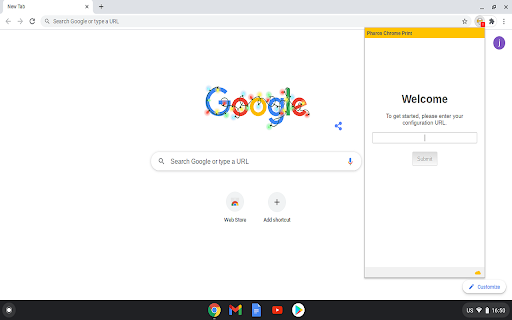

Chrome Extension for Pharos Print Management Systems The Pharos Chrome Print extension makes it easy to print from your Chromebook into any Pharos print management system. This is especially useful for K-12 schools, colleges, and companies who manage their Chromebooks. Site administrators can distribute the extension pre-configured via their Google Administration console.

Easy Extension Manager
Effortlessly Manage Your Chrome Extensions Easy Extension Manager is your all-in-one tool for optimizing and organizing Chrome extensions. Easily search, sort, snapshot, export, and import your extension setups in JSON format—all with a user-friendly interface. ☆ Complete List: View all your installed extensions from a single popup. ☆ Snapshot: Save and load your extension setups with a single click. ☆ Export & Import: Backup or restore your extension configurations in JSON format ☆ Toggle Extensions: Easily enable or disable extensions to improve performance. ☆ Sort Options: Sort extensions alphabetically or by enabled/disabled status for quick access. ☆ Quick Search: Find specific extensions quickly and easily. ☆ Dark Mode: Switch between dark and light themes for better viewing. ☆ Context Menu: Right-click for powerful options ☆ Disable All Extensions to temporarily boost performance. ☆ Enable All Extensions with one click. Effortlessly back up and restore your extension snapshots in JSON format. Export & Import Highlights: ☆ Backup Snapshots: Export your extension setups as JSON files for safekeeping. ☆ Restore Setups: Import your saved configurations and apply them instantly. ☆ Auto Save Snapshots: Automatically back up your latest extension setup, ensuring it's always up to date. ============================== Why Choose Easy Extension Manager? Easy Extension Manager simplifies managing Chrome extensions. Stay organized, perform backups and restores easily, and streamline your workflow. With powerful search and sorting with features like Snapshots, Export & Import, and Auto Save, managing extensions has never been simpler. Take control of your extensions today with Easy Extension Manager—the smarter way to manage Chrome.

Tiling Window Manager for Chrome OS™
Tiling Window Manager for Chrome OS™ Automatically arranges your Windows to efficiently use your desktop space. Allows multiple tiling layouts, across one or more monitors.

Avro (অভ্র) for Chrome
Avro extension for chrome. Write Bangla instantly. Avro (অভ্র) for Chrome . Write Bangla instantly. Avro (অভ্র) extension for chrome works with any chromium based browser that supports installing extensions from chrome web store. v2.0.0 -------------------------- Cleanup unused codes. v2.0.0 -------------------------- - You can now pin avro to your sidebar. ⚠️⚠️ Just to be safe, please make a backup of your drafts before updating the extension. I am not responsible for any data loss that may occur after the update.⚠️⚠️ v1.2.8 -------------------------- People were wondering if I was still active and if the project was still alive. Yes, here are two major updates for you to enjoy. Along with a ton of changes / fixes. - You can now add unlimited drafts. - You can now copy your text directly. - Migrated to manifest v3 - Visual refresh - "Removed unnecessary blank lines and reformatted README.md for better readability. Fixed Chrome Web Store Link" - Remove "Bangla Font Fixer", no one really use it anymore. Create a git issue if you need it in future release. - Removed deprecated permission. v1.2.7 -------------------------- - switched to activeTab permission to better comply with chrome security policy. v1.2.4: -------------------------- Introducing iconic "Avro Font Fixer". Now you can apply default Bangla font and fix Bangla font problem in Chrome. Features: -------------------------- - It works offline. - It’s fast and instant, there is no round-trip delay for processing every word you type. - Save "Unlimited 5 Draft Items" for later use. - It respects privacy. Whatever you write or save in drafts doesn't leave your browser unless you want it to. - Drafts are only saved locally on your device and aren't sent anywhere. - It doesn't collect any personal information, including your IP address. No analytics code has been explicitly added to the code. - It's open source. As a developer, you are free to integrate Avro (অভ্র) for Chrome in your application under the terms of MPL 2.0. We hate vendor locking as much as you do. License -------------------------- Avro (অভ্র) for Chrome is licensed under Mozilla Public License 2.0 (“MPL”), an open source/free software license. Submit Issues -------------------------- Create Issues at https://github.com/saif71/avro-for-chromium/issues Github Repo -------------------------- https://github.com/saif71/avro-for-chromium/

Chrome Font Super Enhancer
Chrome Font Super Enhancer is an add-on to increase the readability of texts in Chrome, especially in those websites which use thin fonts. For many users, the Chrome browser renders these fonts too lightly, and in some case they're very difficult to read. This add-on has an intelligent function that calculates the exact amount of darkness to apply to characters (based on their color and luminance), which results in a perfect rendition. If you enjoy this extension and you would like to use additional features reserved for donors, please send me a donation! Thanks (pin extension to your toolbar or go to options to see the donation button) NEW in v2.10: Dark mode support! NEW in v2.11: Fallback for dynamic content! NEW in v2.12: Auto page refresh when changing options! NEW in v2.13: Fix for bad rendering in Google search form NEW in v2.14: Added unlock code field (in options) to remove Paypal button after donation. You'll receive the unlock code to your Paypal address NEW in v2.15: Fix for Google Calendar. Better support for dynamic content pages. NEW in v2.16: Faster rendering and bugfix NEW in v2.17: Text enhancing applied also to INPUT elements NEW in v2.18: Added a slider to further increase char thickness NEW in v2.19 (minor update) Reordered options page, added "NEW" badge on icon for update notifications NEW in v2.22: (minor update) Avoided unnecessary filter application on certain input types NEW in v2.23: Added website exclusion list (feature reserved for donors) NEW in v2.24: Added letter spacing option (feature reserved for donors)
