
edajhbhiclefalpdcgiaebeikgfafonp
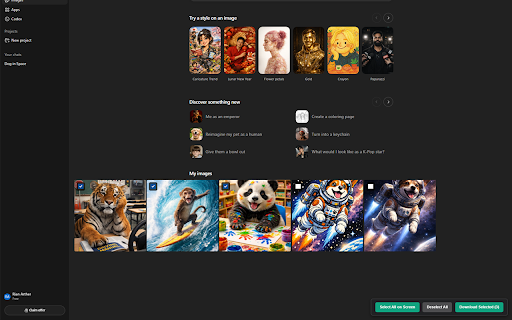
Bulk select and download high-res images from the ChatGPT gallery. Stop clicking "Download" 50 times a day. GrabGPT Image makes saving your ChatGPT image generations fast, easy, and completely frictionless. If you generate dozens of images in ChatGPT, you know how tedious it is to manually hover, click the download icon, and wait for each individual file. GrabGPT Image is a lightweight, secure Chrome extension built specifically for the chatgpt.com/images gallery that lets you batch-download your original, high-fidelity images in seconds. Whether you are putting together multi-angle reference sheets, assembling 3x3 pose grids for character bibles, reverse-engineering specific aesthetics (like pulp noir or manga filters), or just backing up a long session of creative prompting, GrabGPT Image streamlines your workflow. Drag-to-Select Lasso Tool: Just click and drag on the background to draw a selection box over multiple images at once. Original High-Res Quality: GrabGPT Image doesn't scrape low-quality thumbnails. It simulates the native download click, ensuring you get the original, uncompressed .PNG files exactly as ChatGPT generated them. Smart Selection Panel: Easily "Select All on Screen" or "Deselect All" with a persistent, unobtrusive floating menu. Seamless Integration: Designed to feel like a native part of the ChatGPT interface. It stays hidden when you are in regular text chats and only activates when you open your image gallery. Navigate to your ChatGPT Images page (chatgpt.com/images). You will see a small checkbox appear on the top left of every image. Click and drag your mouse across the screen to quickly lasso and select multiple images, or use the "Select All on Screen" button. Hit "Download Selected" and watch them save directly to your computer! 🔒 Privacy First: GrabGPT Image runs 100% locally in your browser. It does not track your data, it does not communicate with external servers, and it only requests the bare minimum permissions needed to interact with the ChatGPT DOM and trigger your downloads.

Image Downloader - Save pictures
Find, choose and download images you need from any web pages or select all to bulk image download at once. Image Downloader - Save pictures for Chrome is a tool that helps you find the images published on a web page. The images may be protected by copyright and you should always assume that they are. It's a free tool that works without registrations and sign ups. Just make a few clicks and here you go! Images will be saved to your PC in seconds. A powerful Extension that gives you fast and convenient access to all images on any web page. Just click and download image on popular web sites such us Instagram, Facebook, Pinterest and also on others sites, simple as that! Image Downloader easy to use with responsive and intuitive design, so you don't need a special skills to use it properly. Just a single click to download all the images and colors available of any webpage. You can now with this Image downloader click on a single image to download or click on the - Select All - button to select and download all images at once. Alternatively, you can select a single image to download. With a bulk image saver, it becomes possible to download all website images simultaneously with simple clicks. What do you get by installing this Chrome Extension: ✔️ Filter based on pixel width and height ✔️ Download location (create folder directly to your images) ✔️ Display images in two columns ✔️ Filter based on url ✔️ Bulk download all images in once ✔️ Select what images you want to download ✔️ Check the size of each image ✔️Copy the url of the original image ✔️ Supporting all principal websites Now you can download all the images you might ever need. Every image format can be downloaded by this Picture Downloader extension. Our new application doesn't weigh a lot but simply does the job. Don't wait and install brand new extension and you'll get something special. Simple bulk image download extension, filter by resolution and file type, download photos from multiple tabs in one click. After installing this powerful Photo Downloader extension you will see a great improvement. You won't find a better tool to simplify the process than application. Privacy Policy You can read our privacy policy here: https://imagenloader.com/privacy-policy.html Website For more information about the extension, visit: https://imagenloader.com Before reusing an image, make sure you check its license and the specific terms of reuse. Do not use any image, illustration or photograph without researching its copyright status first.

Bulk Image Downloader - HImage
Through this browser extension, you can capture and download images in bulk from web pages, helping to automate your workflow. Features: 1. Supports filtering images based on their size, shape, and format. 2. Allows filtering images from specific domains to avoid unwanted interference. 3. Supports searching for similar images using "Google Lens." 4. Automatically converts downloaded images to the specified format if you specify an image output format (JPG, PNG, WEBP). 5. Provides a tab mode that allows you to switch to a wider interface if you find the extension's pop-up window too narrow. It displays and processes captured images in a broader interface. 6. Supports batch renaming. 7. Supports capturing most web image formats, such as JPG, WEBP, PNG, GIF, SVG, ICO, AVIF, BMP. 8. The images to be downloaded will be packaged into a zip file, keeping everything organized.

Bulk Image Downloader - ImgHunt
A modern image downloader extension. Find and download images from any web pages. 🖼️ Smart Image Downloader - Your Ultimate Browser Image Assistant A powerful and intuitive Chrome extension that helps you efficiently discover, manage, and download images from any webpage. Perfect for designers, developers, content creators, and anyone who needs to work with web images! Key Features: ✨ Smart Image Detection: Automatically finds all images on a webpage, including background images and SVG graphics 🎯 Advanced Filtering: Filter images by type, size, and dimensions ⚡ Batch Operations: Select and download multiple images at once 🔄 Format Conversion: Convert images between JPG, PNG, WEBP, and SVG formats 📏 Size Customization: Resize images with preset or custom dimensions Perfect for: • Designers collecting visual inspiration • Developers saving design assets • Content creators gathering media resources • Researchers archiving visual data • Anyone who needs to save web images efficiently Privacy & Security: • All processing happens locally in your browser • No data collection or tracking • No external server dependencies Simple to use, yet powerful in functionality. Install now to transform how you work with web images!

ChatGPT Automation - Auto ChatGPT on chatgpt.com
Auto ChatGPT for your prompts at scale. Batch generate and auto-download responses and images on ChatGPT.com. ChatGPT Automation is an Auto ChatGPT tool built to fully automate your workflow on OpenAI's chatgpt.com. No more manually typing prompts one by one — let ChatGPT run automatically. This extension turns ChatGPT into a batch-processing engine, allowing you to auto-submit prompts, auto-generate content, and auto-download results at scale. 🔥 What ChatGPT Automation does Auto ChatGPT prompts continuously without manual interaction Batch generate AI text, images, and visual content Automatically download results with smart file naming Handle long prompt queues safely with smart random delays 🤖 Auto ChatGPT Batch Processing Queue dozens or hundreds of prompts and let ChatGPT Automation automatically: - Submit prompts to ChatGPT - Wait for generation to complete - Move to the next prompt No clicks. No babysitting. 🎨 Image to Image Transformation Batch transform and enhance images using AI with text prompts Chain mode: automatically use the previous generated image as input for the next prompt 🧩 Ingredients to Text Mode Upload reference images and batch-process them with prompts Auto-add character images based on filename matching ⚙️ Professional Automation Controls - Smart Random Delay System to avoid rate limits - Configurable min/max delay between prompts - Auto Download once generation completes with custom folder organization - Auto-rename files based on prompt content - Max Retries on failure — automatically retry failed prompts 📊 Real-time Queue Monitoring - Live prompt queue with per-prompt status (Queued → Running → Completed) - Visual progress tracking inside the Side Panel - Retry counter per prompt ✅ Perfect for - Content creators and copywriters - AI image and visual producers - Automation & productivity users - Anyone who wants to Auto ChatGPT at scale
