
ecpipjjckcegdmapdifgigmempnikcjg


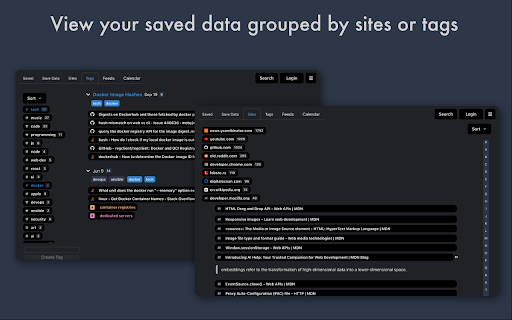
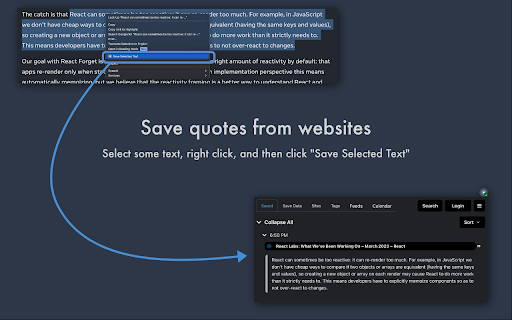

Freezetab is a tool for saving content from the web. Freezetab is a browser extension designed to help you save content from the web. You can use the extension to save links from your tabs and tab groups, articles, quotes from websites, and even RSS and Atom feeds. This extension has a detailed privacy policy which you can read on our website, but the gist of it is that your private data won't be sent to our servers unless you log in to our website. You can absolutely use this extension 100% locally, and even without an internet connection. ★ Save tabs and tab groups Saving tabs and tab groups is the primary feature of this extension. The extension can save and reopen any of your tabs and tab groups. You can also choose to close the tabs after saving. The extension will remember the names and colors of your tab groups as well as the links they contain, and restore them appropriately. While choosing which tabs to save, you can select the current tab, everything except the current tab, everything to the left or right of the current tab, tabs you've highlighted, or just specific tabs you've selected within the extension. The extension allows you to choose tabs from specific windows as well. This extension empowers you to save articles from the web. The extension contains a polished article reader which not only allows you to read content from the web, but to edit that content. The article editor is a full rich text editor with the ability to add notes, highlight text, and apply complex text styling. You can apply all of the traditional text styles like bold, italic, underline, and strikethrough, as well as more complex styling constructs like lists, block quotes, links, and headers. If you've saved an article which contains source code, the article reader will even apply syntax highlighting with support for most popular programming languages! The extension can save quotes from websites. Just select a passage of text on a website, right click, and then click 'Save Selected Text'. The extension will save the selected text, as well as a text fragment link. When you click the link in a browser that supports text fragments, it'll take you to the original website and visually highlight the text you saved. The extension can notify you if it finds an RSS or Atom feed on the current page (by updating the extension's icon with the number of feeds found). If you save a feed, the extension will fetch new links from the feed in the background, and you can choose to save or delete any of the fetched links. Want to find all of your saved data from a specific site, or annotated with a specific tag? This extension allows you to filter your data based on specific sites and tags, as well as view your data chronologically in a calendar view. The extension supports fast full-text search, which you can access quickly from within the extension popup with a keyboard shortcut. You can open the extension by holding Command + Shift + O on a Mac or Ctrl + Shift + O in any other operating system. Once the extension popup is open, you can use shortcuts to: - Save All Tabs - Save the Current Tab - Save Everything Except the Current Tab - Save an Article - Search - Open the extension popup in a new tab - Toggle Privacy Mode Securely and privately share your data with friends! Click the settings icon next to any collection of saved data to share that collection with others. The extension will generate a shareable url which compresses the data and appends it to the hash portion of the url. When you (or someone else) open the link in your browser, the page's code will decompress the data and present it to you. Data stored in the hash portion of a url is never sent to external servers by web browsers, which means only the people you share the link with will ever have access to that data.

Tab Manager v2
Search, group, move, and clean up tabs across browser windows with a keyboard-first workflow See every tab across every window, find what you need fast, move matching tabs in bulk, manage native tab groups where supported by the browser, and clean up duplicates without window hopping. - Search open tabs by title or URL, with optional browser history results in the same search box - Select matching tabs and move, group, or close them in bulk - Manage native tab groups directly where supported by the browser: rename, recolor, collapse, and ungroup them in place - Reorder tabs with drag and drop across windows from one focused view - Highlight duplicate tabs and clean them up quickly, with an option to ignore URL hashes - Stay on the keyboard with shortcuts, focus mode, and the command palette - Adjust theme, tab width, font size, toolbar visibility, URL display, and more - Support Firefox container-aware workflows when the browser exposes those APIs Free and open source. Core functionality runs locally in your browser. Open source: https://github.com/xcv58/Tab-Manager-v2 Support and issues: https://github.com/xcv58/Tab-Manager-v2/issues

Tabli
Tabli is a free tab manager for Google Chrome that provides fast switching between windows and tabs and the ability to save and restore windows. Tabli runs entirely as an extension in your browser. Tabli does not make any outbound data connections and does not send any data whatsoever to any external application, extension or cloud service. You can learn more about Tabli on the Tabli web site (under "Additional Information")

Smart Sessions - Tab Manager
Save & restore your browser sessions. Auto saving, multiple sessions and more. With this tab manager you can group your tabs into a session. Any changes are automatically saved. Close & restore when needed. - Online synchronization with your CHROME account - Multiple active sessions - Persistent size and position of session windows - Multiple windows in a session (you can drag a tab out from active session) - Auto saving - Tags - Tab groups - Incognito mode (should be explicitly allowed for extension) - Search - Export/Import (html document) - Tab navigation/closing To start, click "create" in the top bar, enter new session name and select few tabs. After creation, those tabs will be moved to a new window and all changes to its tab list will be recorded, window size and position too. You can also move any tab out of active session, extension can easily track two or more windows. Apr 22, 2022 (1.6) - Support for tab groups - Incognito mode - Bug fixes Jan 26, 2020 (1.4) - Dark Theme - Improved Search - Export Single Session - Page Context Menu "Add To Session" - Small improvements

TabHamster
Session manager and tabs saver. With sync ► Save opened tabs in the group. ✓ Tab Groups are stored in the sync Chrome storage. Sign in to the browser to get them on other PC. ✓ Assign a group name. ✓ Edit, add new tabs, delete, move the group from the list. ► Session Manager provides quick and convenient access to the latest browser sessions. ✓ Access to the currently open (and earlier) browser session. ✓ Recover any session in one click. ✓ !!! Sessions are not synchronized. ☀ Tips: ● To quickly save all open tabs in a group, open the extension window and press "ENTER." Later you can edit the name of the group. ● "Ctrl + click" on group name (or session) - open tabs in a new window.
