
eckbneglpbjdlaehnlpcmgjofkingcje
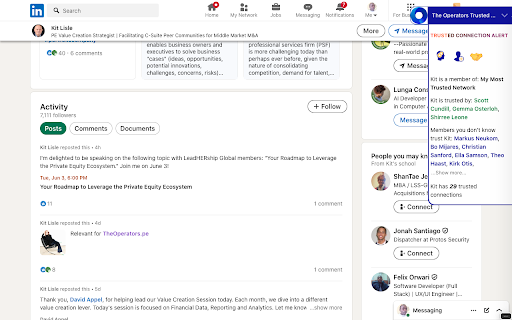


Helps you build a private network of trusted, elite private equity contacts while making introductions a breeze with intelligence Are you ready to dominate the world of trusted leadership networking? The Trusted is your secret weapon! This powerhouse tool and community helps you build a private network of trusted, relevant contacts while making introductions a breeze with intelligent AI-based automation. Networking the easy way! The Operators Trusted Network empowers senior-level professionals to build a private network of trusted connections—fast and effortlessly. Ignore the cold messages and wasted introductions. Leverage the power of AI automation to create introductions and build meaningful relationships seamlessly. Imagine knowing your LinkedIn contacts better than they know themselves. You can read a summarized bio of any LinkedIn profile in seconds. With the powerful AI engine, you’ll get deep insights into personality traits using DISC, Myers-Briggs, and Enneagram analyses—giving you the ultimate advantage. But that’s not all! You’ll gain deep insights into all LinkedIn contacts, giving you the upper hand in every interaction. Get started today and join the robust network of elite connections that drive value creation, influence, and opportunity.

Qvidian for Web (EU Hosting)
Qvidian for Web (EU Hosting) allows you to find and use RFP answers, sales content and more, right from your browser. Now your entire organization can easily access content managed in Qvidian with Qvidian for Web. Help your RFP team respond to online RFPs or find answers easily online and benefit other teams, or infrequent users, by giving them access to approved content stored in a centralized repository in an interface that is easy to use. Qvidian for Web (EU Hosting) allows you to find and use RFP answers, sales content and more, right from your browser. Finding exactly what you’re looking for couldn’t be easier when you take advantage of Qvidian’s suggested filters and learned terms. With Qvidian for Web you can: - Run broad searches across your entire library or focus in to search among selected folders. - Narrow search results with filters using standard properties, like Content ID, Date Last Modified, and Language, or your custom metadata fields. - View, copy and download best matches for quick use. - Search Qvidian or selected text on a page by clicking a button, or copying and pasting, and customize the fields you want to search with. - Participate in the ongoing quality of the content by submitting feedback to the content owners. Upland Qvidian automates away the tedious and frustrating parts of your RFx response and proposal processes. With Qvidian, sales and proposal teams can collaborate effortlessly to quickly deliver polished and compliant proposals, presentations, and sales documents. More than 1,000 companies rely on Qvidian, including eight of the ten largest U.S. banks and six of the ten largest European banks. Worldwide, over 200,000 users trust Qvidian to meet deadlines, tame proposal content chaos, and win more deals. Want to learn more? Request a demo and see how Qvidian can help you craft more persuasive proposals, presentations, and sales documents: https://uplandsoftware.com/qvidian/demo-request/

OS Links +
Improve your experience on opensea with shortcuts to nftscoring.com, gem.xyz and x2y2.io Improve your experience on opensea with shortcuts to nftscoring.com, gem.xyz and x2y2.io

Unicorn Universe
This is more than a tool - it's a movement. Join the ecosystem where collaboration, abundance, and joy drive exponential success. Unicorn Universe is your new favorite Chrome extension for building strategic, life-changing relationships. Designed for purpose-driven professionals, consultants, and business owners, this powerful tool lets you: 🌟 Build a trusted, private network of meaningful connections — effortlessly. 💡 Auto-generate insightful bios for your LinkedIn contacts with AI-enhanced personality assessments. 🔄 Create Golden Connections that drive referrals, revenue, and real results. 🤝 Make aligned introductions using our signature 5 Keys to Golden Connections strategy. 💰 Earn residual income through strategic introductions and partnerships. Whether you're scaling a business or just love connecting great people — Unicorn Universe gives you the automation, insight, and ecosystem of unicorns to make it easy (and joyful!). Say goodbye to cold DMs. Say hello to authentic, profitable relationships. ✨ Join the connector revolution — and start making magic today.

LinkedIn to Airtable
Easily add LinkedIn profiles to Airtable with just one click Our browser extension simplifies adding LinkedIn profile data by allowing users to effortlessly store it in Airtable. With just one click on the LinkedIn profile page, customers can quickly and easily organize their information, streamlining their workflow. Our extension is perfect for anyone who regularly uses LinkedIn to collect professional information. Whether you're a recruiter, salesperson, or researcher, our tool saves you time and effort by automatically capturing essential profile data and sending it directly to Airtable. To use our extension, simply navigate to any LinkedIn profile page and click the "Add to Airtable" button. The extension will automatically pull the individual's name, avatar, job title, location, and other relevant information and add it to your Airtable base. With our browser extension, you can effortlessly add LinkedIn profiles to your Airtable base and manage your professional contacts with ease. Effortlessly Add LinkedIn Profiles to Airtable with our Browser Extension in 4 Simple Steps: 1. Install the browser extension from the Chrome Web Store. 2. Grant the extension access to your Airtable account by signing in. 3. Select the Airtable base and table where you want to store the profile information. 4. Navigate to a LinkedIn profile page. and click the "Add to Airtable" button on the top of the page. the extension will automatically extract the individual's name, job title, company, location, and other relevant information from the LinkedIn profile. If you have any questions, please feel free to contact us anytime via email at support@linkedintoairtable.com.
