
ecfmkkhjjhjkdbnegnnkmbnnajmkgcfe
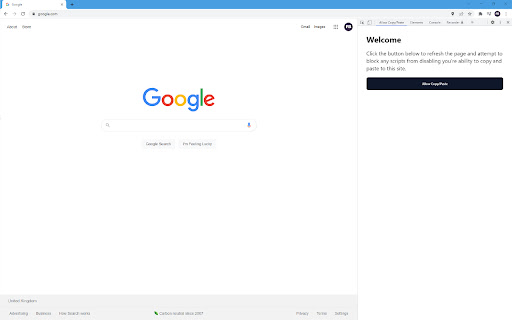

An extension to permit copy and paste on sites that block this feature. Some websites block your ability to copy and paste text and content from them, this extension works to prevent these restrictions from being added. There are two features to attempt to remove the restrictions available with this extension. You can navigate to the page you'd like to copy/paste from and click the extension icon in Chrome and then "Allow Copy/Paste". Generally this should work for most sites and allow you to carry on like normal. The extension will also store your preferences so you'll only need to do this once for each site. However, if that doesn't work you can also open Chrome Developer Tools and select the "Allow Copy/Paste" tab which will then give you a button to reload the page and attempt to prevent the blocking script from being added. https://developer.chrome.com/docs/devtools/open

Enable right click - allow copy & select
Enable context menus on protected websites. Unblock right click menu. Highlight and allow copy option for all pages works again. Enable Context Menu and Select, Allow select, Allow copy, Allow right click in so restricted pages. Installing this free extension enables you to cut, copy, and paste via right-click menus and the ribbon toolbar when using Office on the web. Due to limitations of web browsers, copying and pasting in Microsoft Office for the web through menus requires additional permissions which are provided through this extension. Enable copy and right-click on protected websites. Usage: - Click browser action icon to enter "copy mode" for current site Features: - Unlocks copy (for real) - Remembers which site to unblock for future visits ---> Once this extension is installed you must reload any open tabs in order for it to workIf you change the extension settings any open tabs must be reloaded in order for them to take effect

Blend & Run: Enable copy and paste
Extension to copy & paste text on websites which block it. Blend & Run is a Chrome extension that helps you paste text/code on websites that block copy & paste. Feel free to contribute: https://github.com/HASHCUT69/Blend-n-Run This extension was developed by Sandeep Pani, Sathvik Achanta, and Akash Muriki.

Enable Right Click & Copy
Enable right click and copy functionality on websites that disable it Simple, fast, and respects your privacy. Enjoy the web as it should be – unrestricted! Install now and browse freely. 🖱️📋🔓

Enable Copy Everywhere
Allow right-click for copying text from restricted web pages. Enable copy-paste on all the websites. Unlock the freedom to enable copy-paste on websites with the Enable Copy Everywhere Chrome extension in 2025! This powerful text copy unblocker Chrome tool empowers users to bypass copy restriction Chrome on popular websites, allowing seamless text copying, even from protected websites that have disabled the right-click function. Perfect for researchers, students, and anyone needing to capture content without limitations, this easy-to-use tool makes copying restricted text as simple as a single click. Bypass Restrictions: Effortlessly copy text from protected websites with disabled right-click or copy functions. One-Click Enable/Disable: Instantly turn the extension on or off with a single click from your toolbar. Simple and Free: A free copy-paste Chrome extension that is user-friendly and completely free to install and use. Cross-Browser Support: Available on Chrome and Edge for maximum compatibility. Install the "Enable Copy Everywhere" Chrome extension by clicking on "Add to Chrome." Activate the extension by selecting the icon in your Chrome toolbar. Allow copy-paste everywhere and enjoy unrestricted access to text across the web with Enable Copy Everywhere. This disable copy protection extension is the ultimate Chrome extension for copying restricted text, giving you the power to enable right-click on restricted websites and bypass copy restrictions Chrome effortlessly. 1. What does the Enable Copy Everywhere Chrome Extension do? The extension allows users to copy text from any website, even if the site has disabled right-clicking or copy functions. It's ideal for accessing content without restrictions. Yes, Enable Copy Everywhere is entirely free to download and use. The extension is designed to work on most websites with copy restrictions, though a few heavily protected sites may still block copy functions.
