
ecbklhnbeilcdabliikhpdanaljlpkhe

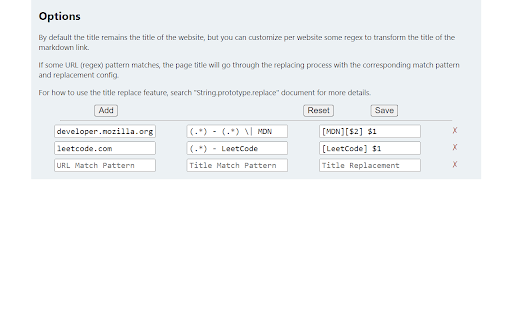
Copy Markdown link for current tab Generate and copy Markdown link of current tab with one click. Just click extension icon, and the string like "[Page Title](https://example.com/some-page)" will be send to your clipboard. You can also use Alt + F (can be changed later) to active this extension. The functionality of link-transform has been added, see extension option page for more information.

Markdown Linker
Make it easy to copy links with markdown-format - ContextMenu > Copy link with markdown-format It works on the page, text link, or image. - "cmd + ctrl + c" to copy page title and url v0.3.1 fix for github issues page v0.3.0 rewrite for manifest v3 v0.2.4 tweak for relative link v0.2.2 tweak no-text link v0.2.1 fix copy page v0.2.0 add selection copy v0.1.6 add shortcut key - "cmd + ctrl + c" to copy page title and url v0.1.5 bug fix - cannot get link text on link with inner tag v0.1.4 bug fix - cannot get link text on Windows

Selection to Markdown Link
Copy selection and a link in Markdown format Chrome extension to copy selection and a link in Markdown. Click the extension icon or press the keyboard shortcut to copy link in Markdown format. Select the text before copying to change the tab title in the link to the selected text instead. The default keyboard shortcut is Ctrl + Shift + C (Cmd + Shift + C for macOS). This can be changed from the browser's extension settings.

Copy as Markdown
Browser extension to copy hyperlinks, images, and selected text as Markdown The extension allows you to copy selected text on a page as Markdown with support for features including the following - Ability to copy links, images, and selected text as Markdown. - Linked images, will have options to individually select link or images. - Formatted text such as Italic, bold, strike-through, and inline code. - Unordered and ordered lists, with task lists support. - Tables, with respect to GFM. - Fenced code blocks, with language detection using info strings. Note: When copying links and images, Chrome doesn’t let you extract images alt text or anchors text content to be used in Markdown, instead the links themselves are used as link title. Firefox doesn’t have this limitation though. The extension requires the following permission from you for working. 1. `contextMenus`: to show option when right-clicking. 2. `activeTab`: to be able to access content on page. The extension can only write to your clipboard and not read from it in any way. File an issue at https://github.com/notlmn/copy-as-markdown/issues for bug reports or requesting new features.

HTML to Markdown Converter
Convert HTML content to Markdown format with advanced formatting support HTML to Markdown Converter is a powerful Chrome extension that transforms web content into clean, well-formatted Markdown text. Whether you're a content writer, developer, technical writer, or working with AI tools, this extension makes it easy to convert web content while preserving its structure and formatting. 🚀 Key Features • Smart Content Detection: Automatically identifies and extracts the main content of any webpage • Full Page Export: Option to convert the entire webpage to Markdown • Selected Content Export: Option to convert only selected page content • Multiple Export Options: Copy to clipboard or download as .md file • GitHub Flavoured Markdown: Full support for GFM syntax • Advanced Formatting: Preserves tables, code blocks, lists, and images • Link Handling: Automatically converts relative links to absolute URLs • Clean Output: Generates clean, well-structured Markdown without clutter • Dark mode support. 💡 Perfect For • Content writers preparing articles for different platforms • Developers documenting code or writing technical content • Technical writers creating documentation • Anyone working with AI tools requiring Markdown input • Bloggers moving content between platforms • Researchers collecting web content for analysis 🛠️ Technical Details • Supports nested lists, tables, code blocks, and images • Handles complex HTML structures • Preserves original formatting • Fast and efficient conversion • Lightweight and easy to use 🔒 Privacy & Security • Works locally in your browser • No data sent to external servers • Minimal permissions required 🗞️ Releases: - 0.5.6: Fixes for name sanitation when using unfriendly characters to a file system file name.
