
ecanpcehffngcegjmadlcijfolapggal
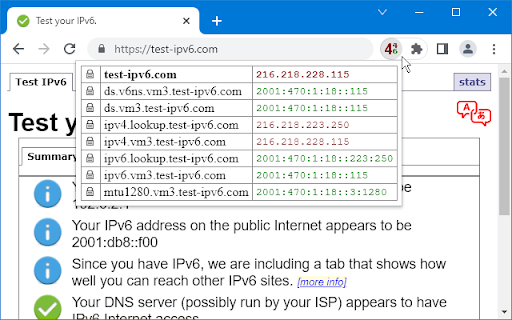
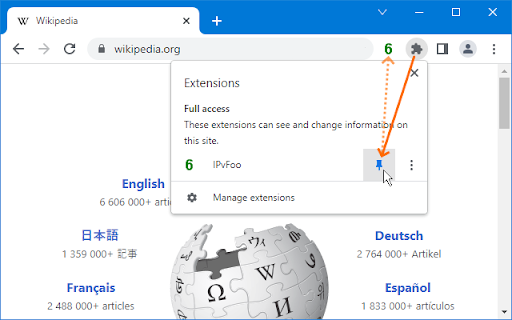
Display the server IP address, with a realtime summary of IPv4, IPv6, and HTTPS information across all page elements. IPvFoo adds an icon to the toolbar, showing a large red 4 or green 6 to indicate whether the outer page was fetched using IPv4 or IPv6. If the page connects to other domains, a smaller 4 or 6 appears alongside. When you click the icon, a table appears with a row for each hostname. See the icon tooltips for more information. Clicking on a hostname or address will select it for convenient copying. There is also a right-click option to look up addresses on bgp.he.net. IPvFoo is Free Software (Apache 2.0 license). I made this to raise everyday awareness of the global IPv4 to IPv6 transition. To respect your privacy, it keeps data in RAM and treats the network as read-only. I can maintain this without ads because there are no server costs.

IP, DNS & Security Tools | HackerTarget.com
Quick access to IP, DNS & Network Tools. Check DNS, Whois, ASN, Traceroute, Ping and more. Tools for technical operators. IP, DNS and Security tools for technical systems operators. Instant access to Whois, GeoIP, DNS, Traceroute, Ping, HTTP Headers, Nmap and more all from your browser. Perfect for: - security professionals - network operators - systems administrators - analysts - or simply those who are curious about technical aspects of the Internet While all these tools are available on HackerTarget.com, our Chrome Extension offers quick and easy access, saving you time. Perform external network queries in a single click. HackerTarget.com is an established provider of hosted open source security scanning services such as Port Scanners (Nmap), Vulnerability Scanners (OpenVAS) and Web application security (WordPress, Nikto) testing. Online Nmap Port Scanning has been available from HackerTarget.com since 2007. While continuing to provide a stable hosted vulnerability scanning service the site continues to evolve and provides tactical information to those who manage Internet connected systems. By using hosted security scanning and network testing tools you are able to probe and troubleshoot your networks, firewalls and servers from an external perspective. This testing from outside the network perimeter or firewall simulates probes and scanning that may be performed by a determined attacker. In addition to finding vulnerabilities and security configuration errors in your systems these types of probes will also enable you to test intrusion detection (IDS / IPS) and even incident response processes.

V2EX Polish
专为 V2EX 用户设计,提供了丰富的扩展功能。 为原网站添加了众多便捷的功能,让你的 V2EX 页面焕然一新 ! ―――――― ◉ 扩展功能 🪄 界面美化 UI 设计更现代化,为你带来愉悦的视觉体验。 📥 评论回复嵌套层级 主题下的评论回复支持层级展示,更轻松地跟踪和回复其他用户的评论。 🔥 热门回复展示 自动筛选出最受欢迎的回复,第一时间了解热评。 😀 表情回复支持 评论输入框可以选择表情,让回复更加生动和有趣。 📃 长回复优化 智能折叠长篇回复,一键展开查看完整内容。 📰 内置主题列表 无需打开网页,插件内即可快速获取最热、最新的主题列表和消息通知。 更多实用功能: ⊙ 便捷回复操作:上传图片、预览回复内容、文字转 Base64。 ⊙ 添加用户信息卡片,快捷查看用户信息。 ⊙ 右键菜单扩展:支持解析页面中 Base64 编码内容。 ⊙ 在主题列表中即可预览内容,无需再进入主题页面。 ⊙ 自动领取每日签到奖励。 ⊙ 用户标签设置,快速标记各类用户。 ⊙ 支持备份个人配置,方便跨设备、跨脚本同步配。 ⊙ 支持自动跟随系统切换浅色/深色主题。 ⊙ 支持预加载多页回复,让嵌套回复更完美。 ⊙ “稍后阅读”功能:添加感兴趣的主题,方便日后浏览。 ⊙ 支持水平分区展示主题内容。 ―――――― ◉ 更多信息 ⊙ 代码开源,在 GitHub 中查看:https://github.com/coolpace/V2EX_Polish ⊙ 任何想法、新功能需求?在此反馈:https://github.com/coolpace/V2EX_Polish/discussions/1 ⊙ 浏览我们的主页,发现更多:👉 https://v2p.leoku.dev 👈 ―――――― 喜欢我们的扩展吗?请在应用商店给我们好评!🥰

Yet Another Flags
Shows country flag for the website near the location bar. ✨ If you want to see a precise location for a domain — country, city, state — displayed with a pixel-perfect country flag icon, try this one! 📝 Extension shows a country flag for the site opened in the current tab. 📍 Precision is achieved with Google's free DNS-over-HTTPS service. The backend that I run at 🔐 https://geoip.furman.im provides country, city, region, and post code data. 🙅♀️ Extension respects user's privacy. Neither it listens to user's network traffic, nor does it collect any data, nor does it track or identify users in any way, and never will. The same applies to the backend service. 🥬 GeoLite2 database created by MaxMind, available from maxmind.com, is updated twice a week – on Tuesdays and Fridays, so geographical data is always as fresh as MaxMind makes it. 🚩 Extension uses excellent "Flags of the World" icons by Mark James (of famfamfam.com fame). Flags are ISO 3166 compliant, so please let me know if some country has the wrong flag displayed. 🟢 April 20, 2023 🆕 Display resolution 🕙 timestamp in the IP address hint in the popup. Hover the mouse cursor over the IP address and wait for the hint to appear. 🟢 April 17, 2023 🆕 Display loading and error states in the page action icon — no more guessing if the data is loaded or resolution has failed — the icon provides visual feedback immediately. 🟢 February 3, 2023 🎉 Extension is back into active maintenance mode. 🇺🇦 Extension includes a link to Ukrainian non-profit SaveLife https://savelife.in.ua; they provide help with the war effort. The link is not featured prominently, so it's not distracting — see if you can find it!

Claire
Shows an orange cloud in the omnibar when you are browsing a site that uses Cloudflare Claire adds an unobtrusive icon to your browser that turns orange when you are browsing a website that uses Cloudflare. You can also see if the website is using modern technologies like HTTP/2, IPv6 and Cloudflare's own Railgun.
