
eahldalhgbpahhllfcgaobhjnmcfmlbd
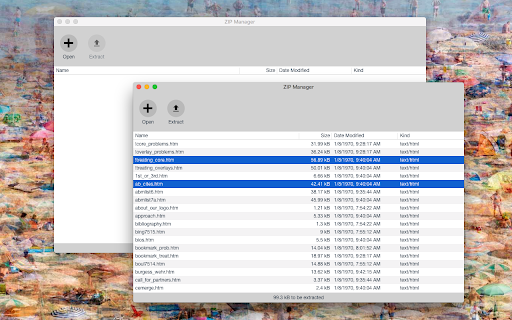

Open a local and remote ZIP, RAR, 7Z, or any other archive format to extract all files or selected ones without any dependencies This extension is a ZIP format viewer and extractor. You can feed this application with one or multiple local files or a single remote link. The extension displays the content of the ZIP archive for you without any dependencies. You can then extract selected files or all files into the default download directory or a directory of your choice without even downloading the actual ZIP archive. Note that this extension keeps the file structure only if your browser supports downloading into subdirectories. The extension adds a context menu item to the ZIP links. To open local files, first, open the manager window and then drag and drop the files into the view. Supported archive formats: 7z, Zip, Tar, GZip, Rar, and many more! Version Logs: 0.1.2: 1. It is now possible to drag a file from the ZIP manager window and drop it into a folder like your Desktop directory. This feature is used to drop a dot file to your local folder as well! 0.1.4: 1. mobile-friendly. The manager UI is now mobile-friendly 0.1.5: 1. The extension now supports native filesystem API, which improves the file writing to the disk

Unzip
⚡️ Fast, Private & Powerful File Unzipper for Chrome Meet the ultimate unzip tool built for Chrome lovers. It lets you unzip files instantly in your browser, so there is no waiting, no clutter, just pure productivity. The smart engine knows every nuance, acting as a zip extractor that powers rapid workflows and decompress zip online in a single click. Use it to scan, preview, and download results directly in your browser. ✅ Key Features - Drag-and-drop simplicity - Lightning-fast in-browser extraction - Smart format detection (RAR, ZIP, 7Z, TAR.GZ, and more) - Privacy-first: All operations like decompress zip online and uncompress rar online run locally - Preview archive structure before extracting - No server uploads, no saved data, no third-party integrations The whole ride works in browser memory, meaning decompress zip online happens without server uploads, the 7z extractor shares the same engine, and even a massive rar file extract finishes before you blink. 1️⃣ Drag and drop simplicity removes friction 2️⃣ Smart extractor detects format instantly 3️⃣ Lightning cache speeds up every rerun 4️⃣ Modern interface keep your workspace fresh 🎯 Supported Use Cases Whether you’re scanning game mods, reviewing code packs, or cleaning downloaded documents, this tool is ready to go: ➤ Click to expand folder structure ➤ Pick only what you need ➤ Extract archives without leaving your browser Need a rar extractor or 7zip for Mac alternative? You’ve got it. Need to extract tar gz online? Done. From quick ZIP jobs to deep archive dives, it covers all formats in seconds. Need to peek inside a compressed content? Our file unzipper works as a perfect zip file opener or unzip online. Need something more? It can work as a 7z file opener or 7z unzip as well! Simply drag-and-drop your file and we’ll unpack it right in the browser—no standalone software required. 🧩 One Extension, Many Formats Ready to free your archives? 🚀 Install now and experience the most versatile file unzip tool available. From launch-day novices to enterprise DevOps, you will never type another command line for unzip tar.gz or uncompress rar online again. Join our users community from different countries, from educators sharing lessons to gamers modding classics, all championing the convenience of one-touch archiver. - unzip files fast in browser - unzip rar files without desktop software - tar unzip and unzip tar.gz in seconds - 7z extractor and zip file opener included by default Instantly preview folder structure before extracting – perfect for quick content checks or selective unpacking. This extension puts your privacy first. All archive operations—including decompress zip online and uncompress rar online—run locally in your browser. No data is sent to external servers. Each file is verified with hash checks, and any suspicious activity—like malicious 7z extractor requests—is blocked immediately. Session keys are cleared automatically, and no raw passwords are ever saved, ensuring full compliance with modern zero-trust standards. 🛡️ Built for Security & Speed View your archive’s contents with a clean file tree preview before extracting. Whether you’re dealing with a rar extractor, zip extractor, or a 7zip for Mac equivalent, everything happens smoothly and securely. There’s no integration with services like Google Drive or Dropbox—just straightforward, private extraction. Use it to open rar files, extract tar gz online, or handle linux unarchive zip workflows with ease. Perfect for tech professionals and casual users alike, our linux unzip (or other os unzip) supports parallel processing, meaning your rar opener or seven zip for Mac actions don’t slow you down—even with large archives. Explore compressed archives safely in a tree view layout, so you know exactly what you’re opening before hitting extract, If you’re dealing with other formats - the built-in functions can also be your rar extractor or rar opener! Whether you need a single document or the whole bundle, while keeping your data private. 🚀 Why Choose This Archiver? Developers will appreciate our WebAssembly-backed tar unzip power. Internal engine can extract tar gz online, unzip tar gz and unzip tarball at near-native Linux speed on any system. Try our lightweight extension and feel the difference: 1️⃣ unzip 7z archive of server logs without terminal 2️⃣ unzip zip from analytics pipelines on the fly 3️⃣ unzip tarball from GitHub releases straight into your project

DOSBox
DOSBox emulates an Intel x86 PC, complete with sound, graphics, mouse, joystick, etc., necessary for running many old MS-DOS games that simply cannot be run on modern PCs and operating systems, such as Google(TM) Chrome OS, Chrome OS Flex. However, it is not restricted to running only games. In theory, any MS-DOS or PC-DOS (referred to commonly as "DOS") application should run in DOSBox, but the emphasis has been on getting DOS games to run smoothly. DOSBox also comes with its own DOS-like command prompt. It is still quite rudimentary and lacks many of the features found in MS-DOS, but it is sufficient for installing and running most DOS games. Legal Notice -------------- Computer Anatomy is NOT endorsed or approved by or affiliated with "Microsoft Corp." or its licensors in any manner! CHANGELOG - Added support for gamepad (One device - 4 buttons only), [Tested gamepads: Google(TM) Stadia, Microsoft(R) Xbox, SONY(R) Playstation]. - Added help section (Includes keyboard mapper). - Added unmount removable disk image. - Added mount removable disk image (IMG images only). - Added create removable disk image (512 MByte). - Added unmount CD-ROM image. - Added mount CD-ROM image (ISO images only). - Added unmount hard disk image. - Added mount hard disk image (IMG images only). - Added create hard disk image (512 MByte). - Added select hard disk drive size (Min. 256 MByte - Max. 2 GByte). - Added format hard disk drive. - Added import from ZIP file to hard disk drive. - Added import directory to hard disk drive. - Added unmount floppy image(s). - Added mount floppy image(s) [Max. 2 IMA, IMG images]. - Added sync/reset settings. - Added AUTOEXEC.BAT editor. - Added select mouse sensitivity. - Added enable mouse lock (Experimental). - Added mantain 4:3 aspect ratio. - Added video filters. - Added select RAM amount (Min. 4 MByte - Max. 64 MByte). - Added select CPU (Min. 486 DX 25 Mhz - Max. Pentium 233 Mhz) [Device sensitive]. - Added internal video resolution support (Max. WVGA 768x480). - Added toggle fullscreen for all resolutions. - Added DOSBox tools (Includes CPU, video, audio drivers).

Local Explorer - Open File Links in Chrome
Enable local file links in Chrome or Edge by using the Local Explorer browser extension. It lets you browse and open local file links directly in your web browser. Local Explorer can enable local file links and open them in associated application when clicked. For examples, click a folder link to open Windows Explorer, click *.docx file to open MS Word, click *.avi file to open Windows Media Player, and so on... You may use Local Explorer to open local file links & folder links to hard disk drives, Azure Active Directory or company's shared folders, mapped network drive directly in corporate website or local host site. EXAMPLES C:\Users\my_user_name\Documents ("My Documents" folders) \\10.0.0.1\shared\local\folders\files (network drive) W:\folder\ and W:\folder\file.docx (on webpages they're "file:///W:/folder/" and "file:///W:/folder/file.docx") NOTES - Currently it works only on Windows. We built this long ago for our in-house system and it's free. If you find any problem, contact us at support@vnprodev.com or click "Send Feedback" button before you post a negative review. - The extension started to support Unicode since version 2022.11.30. It enables local file links or folders that contains Unicode characters. - For the people complain about anti-vir warnings, it was a FALSE POSITIVE. We rebuilt our Integration module, see this http://goo.gl/qDNGP7 HOW TO ENABLE LOCAL FILE LINKS For security reason, webpages are not allowed to read-write local resource on hard drives. To enable local file links, we need an integration between the extension and file system which is an external software runs outside of the browser. Read the simple steps described at http://www.vnprodev.com/browser-extensions/local-explorer-install.php - Step 1: Add the extension to Chrome/Edge browser and enable "Allow access to file URLs". - Step 2: Set your default folder in Options page and click Save Settings. - Step 3: On Windows, download and install this app http://goo.gl/trX9bB for Windows Explorer integration. Run "LocalExplorer-Setup.exe" once then you're ready to go. Now you can open local file links directly while browsing the web. SILENT INSTALL enterprise command line for the Integration module: LocalExplorer-Setup.exe /S

ZIP Maker
You may use an easy-to-use interface right in your browser to create zip files! The extension "ZIP Maker" converts your file(s) into a single compressed file (.zip) automatically. Drag & drop files to a designated area in the app's UI (top section) for uploading. The UI will display all of the uploaded items. You may now use the - Zip & Download - button to download the ZIP file to your computer (default download location). A reload symbol is located at the top-right corner of the app's UI. When you click on this symbol, the program is refreshed and all current operations are reset. To zip multiple files, simply drop them into one folder on your computer (top section). It is also suggested that you reload the application after each zipping operation. Note 1: This plugin isn't meant to work with multiple types of files. It's only designed to compress zip files. Note 2: This add-on uses an open-source JavaScript library for the zip operation. You may learn more about this library at https://github.com/gildas-lormeau/zip.js
