
dpghcnfkfdfcfgiiohfjnajfbncldkng
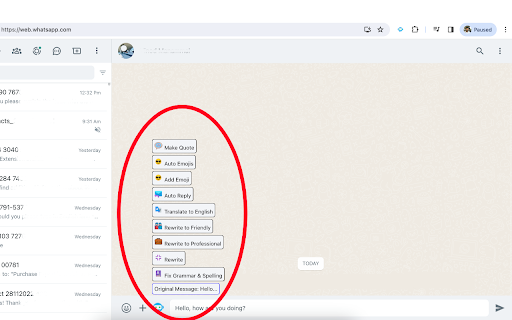
ChatGpt for WhatsApp waGpt - AI for WhatsApp Chat Elevate your WhatsApp conversations with waGpt, the innovative Google Chrome extension that seamlessly integrates advanced AI (Artificial Intelligence) features, inspired by ChatGPT, the renowned WhatsApp bot. Designed to enhance communication for both personal and business use, waGpt utilizes cutting-edge technology to bring a new dimension to your messaging experience on WhatsApp, the popular AI WhatsApp tool. 1. Make Quote: Let AI generate inspiring random quotes for your messages, adding a touch of creativity to your daily conversations on WhatsApp, powered by ChatGPT. 2. Auto Emojis: Automatically create emojis based on learned patterns from previous messages using the intelligent WhatsApp bot, waGpt, inspired by ChatGPT on WhatsApp. 3. Add Emoji: Enhance your messages by letting AI intelligently suggest and add suitable emojis, ensuring your chats are lively and engaging on WhatsApp, the preferred platform for ChatGPT. 4. Auto Reply: Say goodbye to writer's block. waGpt auto-generates replies inspired by ChatGPT by learning from your chat history on WhatsApp, the ultimate ChatGPT on WhatsApp experience. 5. Translate: Break language barriers with AI-powered translation on WhatsApp, supporting 133 languages. Communicate seamlessly with friends and customers, making waGpt a versatile WhatsApp business web tool. 6. Rewrite to Friendly: Infuse a friendly tone into your messages with AI-driven rewriting on WhatsApp, creating warm and approachable chats using ChatGPT technology. 7. Rewrite to Professional: Impress your customers with professionally toned messages on WhatsApp. waGpt ensures your business communication is polished and effective, utilizing the power of ChatGPT. 8. Rewrite: Address grammar and spelling errors with AI on WhatsApp, presented in a different manner. waGpt simply rewrites whatever you write with the finesse of ChatGPT on WhatsApp. 9. Fix Grammar & Spelling: Correct grammar and spelling mistakes effortlessly on WhatsApp with waGpt. Let AI ensure your messages are clear and professional, like ChatGPT for WhatsApp. 1. Install waGpt: Add the extension to your Google Chrome browser for an enhanced ChatGPT WhatsApp experience. 2. Get API Key: Obtain your API Key from the OpenAI portal. Save the key in the waGpt screen using the provided step-by-step guidance for optimal ChatGPT integration. 3. Open WhatsApp Web: Visit https://web.whatsapp.com on your browser, and experience the power of ChatGPT on WhatsApp. 4. Enable on WhatsApp: Click the "Enable on WhatsApp" button at the top of the waGpt screen. The ChatGPT icon will be visible on the left side of your WhatsApp message typing area. waGpt is an independent project and is not officially affiliated with OpenAI or WhatsApp. It acts as a bridge between ChatGPT technology by OpenAI and WhatsApp, providing users with a unique AI-enhanced chat experience. WhatsApp is a registered trademark of WhatsApp Inc. in the United States and other countries.

ChatGPT Bulk Delete
A Chrome extension to bulk delete ChatGPT conversations This Chrome extension is designed to help users quickly and efficiently delete conversations in the ChatGPT’s left sidebar. With the extension installed, users can add checkboxes to each conversation in the sidebar, select multiple conversations to delete or archive, and accomplish this with just a few clicks. Hold Shift and click to select multiple conversations for efficient bulk actions. This extension is particularly useful for users who frequently use ChatGPT and need to manage their conversations efficiently. Instead of deleting conversations one by one, users can remove multiple conversations at once, saving both time and effort. Additionally, this extension now offers a “bulk archive” feature for a one-time fee of $0.99 USD. This paid feature allows users to archive multiple conversations simultaneously, further enhancing the tool’s utility and convenience. The extension popup includes a small advertisement labeled “Ad” in the footer, linking to TubeVocab (https://www.tubevocab.com/), a third-party language-learning product. This ad helps support the continued development and free distribution of ChatGPT Bulk Delete. Clicking it is entirely optional and does not affect any of the extension’s core functionality.

WA Chat Backup
WA Chat Backup is the fastest and easiest way to back up WhatsApp messages securely to your laptop or desktop. Whether you want to save your WhatsApp chat history, export WhatsApp messages, or store important conversations in PDF or Excel format, WA Chat Backup has you covered. 🔐 Protect Your Data & Keep a Permanent Record of All Important Conversations. 💡 Core Features of WA Chat Backup: ✅ Backup Chats by Message Count & Date Range • Choose how many messages you want to back up- 5, 20, 50, or more. • Export chats based on specific date ranges directly from WhatsApp Web. • Get flexibility and control with custom chat export options. ✅ Export as PDF, TXT, CSV (Multiple Format Support) • Choose your preferred format to download chats • Great for reporting, documentation, or legal use ✅ Back Up Individual or Group Chats • Export one-on-one conversations or entire WhatsApp groups • Perfect for professionals, teams, or customer communication tracking ✅ Download Media with Chat (Optional) • Optionally include images, videos, and documents with the chat backup • Organize everything neatly in folders ✅ Works Smoothly on WhatsApp Web • No need for mobile access to export chats. • Fully functional via WhatsApp Web in your browser. • Ideal for professionals, researchers, legal teams, and more. ✅ In-Built Support & Tutorial • Stuck somewhere? Access step-by-step video tutorials directly inside the extension. • Chat with the support team from the extension interface. ✅ User-Friendly Interface • Simple and intuitive design- no technical skills required. • Export WhatsApp chats in just 3 clicks. ✅ Secure & Private • Your chat data is processed on your device- nothing is stored on external servers. • 100% privacy guaranteed. 🚀 Why Choose WA Chat Backup? ✔️ Best tool to download WhatsApp chat history ✔️ Multiple format options (PDF, CSV, TXT) ✔️ Easy-to-use Chrome extension – no software required ✔️ Ideal for professionals, freelancers, and legal advisors ✔️ Secure – data saved only on your device ✔️ Perfect for users who need permanent WhatsApp chat records ✔️ Lightweight – doesn’t slow down your browser ✔️ No sign-up required 🎯 Use Cases ✅ Lawyers & Legal Teams – Export chats for evidence or case filing ✅ Freelancers & Coaches – Save client communications for invoicing or future reference ✅ HR & Recruiters – Back up candidate conversations ✅ Customer Support Teams – Archive WhatsApp interactions with customers ✅ Event Planners – Document group discussions and RSVPs 🔧 How to Install the Extension Step 1: Visit https://wa-chat-backup.com Step 2: Click "Add to Chrome" and pin the extension Step 3: Open web.whatsapp.com and log in Step 4: Open any individual or group chat Step 5: Click the WA Chat Backup extension → Select format → Export & download ⚠️ Disclaimer This extension is not endorsed by WhatsApp™ or Meta™. It is an independent tool developed to help users export their chat history from WhatsApp Web. Users must comply with WhatsApp’s terms of service. LEGAL WhatsApp™ is a trademark of WhatsApp Inc., registered in the U.S. and other countries. WA Chat Backup is not affiliated with WhatsApp™ or Meta™.

ChatGenie for Chatgpt
The ultimate browser extension for accessing Chatgpt Chatgenie brings the power of OpenAI's ChatGPT to your browsing experience, Chatgenie is focused on reliability and keeping up with recent changes. Features: • Easily access ChatGPT by clicking on the icon in the toolbar. The popup will appear and you can start a conversation with ChatGPT. • Quickly access ChatGPT from the navigation bar (aka Omnibox) by typing `gpt` and pressing space. • Run ChatGPT from the context menu. • Maintains a longer ChatGPT session by periodically pinging it. • (Beta) Prevents leaks of personal data to the LLM We strive to keep up with the fast-paced development of ChatGPT to bring you the best possible experience. How to use: • Log in to https://chat.openai.com • If you encounter an error, try opening chat.openai.com again. The service may be under high demand. • If you continue to experience issues, please report a bug in the review section of our extension's page.

WACAO!
AI-powered WhatsApp chat summarization and translation Transform your WhatsApp Web experience with AI-powered chat summarization and real-time translation. WACAO! helps you quickly understand long conversations and communicate across language barriers - all while keeping your data completely private. Key Features: ✅ Smart Summaries: Get key points from your last 20-50 messages instantly using Chrome's built-in AI ✅ Real-Time Translation: Auto-detect and translate messages to your preferred language ✅ Complete Privacy: All processing happens locally in your browser - no data ever leaves your device ✅ Easy to Use: Simple side panel interface that works seamlessly with WhatsApp Web ✅ No Setup Required: Uses Chrome's native AI APIs - no external accounts needed Perfect for busy professionals, multilingual families, and anyone who wants to stay on top of their WhatsApp conversations without spending hours reading through chat history.
