
dpfkichfneimfhlodeijbmoijoieiodi
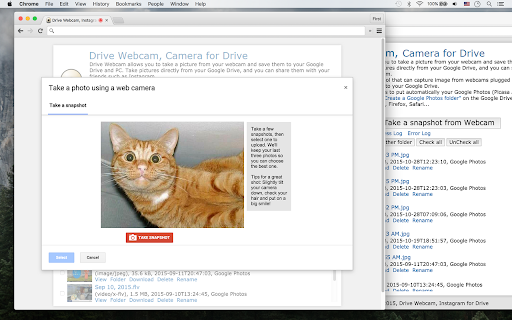

Record videos from webcam and save them to computer/Drive. Share them with your friends. This Webcam Recorder allows you to record videos from your webcam and save them to your computer and Google Drive™. This app is a webcam recording tool that can capture images and videos from webcams plugged into the computer and save video, jpg, and png files. This extension works with minimal permissions. This extension is easily accessible via the Chrome context menu on the top-right toolbar, and you will find features and menus there.

Online Webcam Snapshot for Google Drive
Take Picture and Video and optionally save it to Google Drive Install our software and take a screenshot using your webcam quickly! Its easy to use, we have an instruction manual once you have installed this software. Free WebCam Snapshot for Google Drive™ - take a quick screenshot with your web camera and save the image to Drive/save it to your computer. Online Webcam Snapshot for Drive™ is a popular and useful application to create selfie photos with your webcam at home. You can also create GIF images using our software extension for free. - 100% Free Software - Create Selfie Screenshots/Create GIFs using your web camera You can also rate our application. Disclaimer: Please note this extension is NOT made by Google and is made by an independent development team. All copyrights belong to their respective owners. This software is not owned by, is not licensed by and is not a subsidiary of Google Inc.

BombBomb Video - Webcam & Screen Recorder
Create, share, and track webcam and screen capture videos with the BombBomb Browser Extension. Get better results with video. Quickly and easily create, share, and track webcam and screen capture videos from any page in Chrome with the BombBomb Chrome Extension. 🎥 RECORD OR UPLOAD VIDEOS ‣ Record your webcam, your screen, or both ‣ Create and add in-video Calls-to-Action ✉️ SHARE YOUR VIDEOS ‣ Embed video on a page or in an email, or share video URL ‣ 3-second Animated Preview in emails ‣ Add logo to your video player pages ‣ Recipients can like and comment on videos ‣ Recipients can reply with their own video 📊 TRACK ENGAGEMENT WITH YOUR VIDEOS ‣ Track emails opened, videos played, links clicked ‣ Real-time activity feed ‣ Know how much of your videos were watched ‣ Browser and smartphone push notifications ★★ Using Gmail? Enjoy all of the above features added directly to your Gmail inbox, PLUS: 🗒 SNIPPETS (GMAIL ONLY) ‣ Create and save canned responses to be reused ‣ Include text, images, links, and videos We believe that every message you send can (and should!) be as effective as an in-person meeting. Join 40,000+ Sales and Customer Success professionals by humanizing your digital messages with BombBomb Video. WHY BOMBBOMB? BombBomb has been pioneering video communication since 2006. With over a decade of experience, an engaged community, and the definitive guide (we literally wrote the book on it!), you'll have the education, training, and support you need to be successful with video. Try free for 14 days (no credit card required).

Screen & Webcam recorder - Flonnect
Allows Screen Recording from your Webcam and Desktop Record your screen or camera along with your audio. This extension supports all types of screen recordings for free with unlimited usage. ✅Free to Use ✅No Watermark ✅No Lag screen recording ✅Unlimited Usage ✅Includes audio recording with Webcam ✅Easy to share the video link with teammate ✅Annotate video while recording Note: Please update your browser to the latest version and grant the permissions to record your screen and audio. Install the Screen recorder chrome extension to capture screen video. It offers multi features such as >>Simple Screen Recorder >>Reaction camera or webcam recorder >>Screen & Webcam recorder (With Picture in Picture Display) Here is how to use Screen Recorder Extension: >> Click on the Extension icon >> Then select one of the 3 options of screen recording >> You can choose to record audio or disable it >> Grant the permission to record your screen and mic options >> Tap on the record button and it will start the recording >> Later download the file or view the recording it in the active tab Supported Screen Recorder types: ✅Entire Full Screen of Desktop ✅ Single Tab ✅ Active browser Special gratitude to roOt_d3viL for continuous testing the product. The Screen Recorder Extension is ideal for professionals, educators, and anyone needing a reliable tool for capturing screen content. With added benefits like quality control settings, multi-part uploads for faster video handling, and features like trimming and transcription, your screen recording experience is elevated to new heights. Perfect for tutorials, presentations, or just sharing ideas, the Screen Recorder Extension is your go-to tool for all screen capture needs. Install now to revolutionize the way you record and share content! What’s New in the Latest Versions: • Version 7.5.1-7.6.0: Added backup option for offline users. • Version 7.4.0-7.5.1: Added a dev mode for easy bug reporting and integration with tools like jira. • Version 7.3.11-7.4.0: Black friday integration • Version 7.3.11-7.3.12: Camera integration with presentation mode. • Version 7.3.8-7.3.11: Seo optimized sharing link • Version 7.3.7-7.3.8: Added one click integration with github pull request page. • Version 7.3.5-7.3.7: Added one click integration with gmail and gmeet. • Version 7.3.0-7.3.5: Increase performance of video uploading api. • Version 7.2.2: UI/UX enhancements for a more intuitive experience. • Version 7.2.1: Resolved bugs for a smoother operation. • Version 7.2.0: Introduction of the VP9 codec, ensuring high-quality 1080p video recordings. • Version 7.1.3 - 7.1.1: Fixes for downloading and uploading issues, along with video compression for smaller file sizes and Mac-specific bug resolutions. • Version 7.1.0: Major UI/UX overhaul, workspace features, and collaborative functions. • Version 7.0.0 - 7.0.4: From movable camera features to annotation tools and bug fixes – a series of updates to refine your recording experience. • Version 6.0.0: Auto-upload and video redirection enhancements for a more efficient workflow. • Version 5.2.0 - 5.1.1: Offline storage for recent videos, multi-part uploads for increased speed, and auto-generated thumbnails for a better library overview. • Version 4.1.0 - 4.1.3: Crucial bug fixes in screen recorder functionality and multiple video uploads. • Version 3.1.1 - 3.0.0: Quality control options and link generation for easy video sharing. • Version 2.0.1 - 2.0.3: UI/UX improvements and chrome tab audio capture options. • Version 1.0.2 - 0.0.1: Foundational features including webcam recording, improved UX, multi-language support, and initial bug fixes. Make your virtual communication as efficient and effective as possible. Get the Screen Recorder Extension today and transform your screen captures into powerful tools of engagement.

Video Recorder
Easily record video & audio from your computer's camera! Video Recorder is an extension that helps you record video (including audio) via your computer's camera. To work with this addon, please click on the toolbar button to open the interface. To start recording, please click on the - Start Recording - button. The app will ask you to permit the camera access. You can also mark the - Access microphone - option to include audio in the recording. Please note that the final video will be downloaded to the default download location in your system. Note: Downloaded video is in "webm" format. To get more information about this video format, please visit the (https://en.wikipedia.org/wiki/WebM) page. You can use third-party software to change the " .webm" format to a desired one. To report bugs, please fill the bug report form on the addon's homepage (https://mybrowseraddon.com/video-recorder.html).
