
dpehgggbpmclbfgaapnllihhhbcllknb
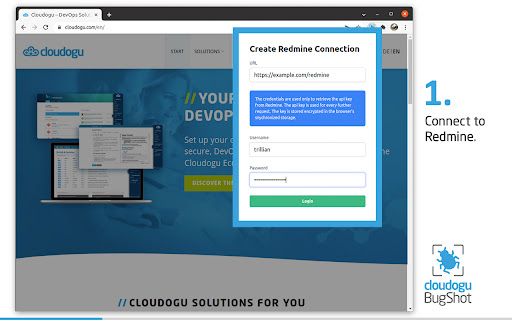


Capture visual bugs and report it to redmine. Website testing made easier: BugShot for Redmine makes reporting bugs straightforward and convenient. Thanks to a minimal workflow, BugShot for Redmine helps save valuable time when testing websites. PREPARATION: Just add BugShot for Redmine to your Chrome Extensions, and check "Enable REST web service" once in the Redmine settings under API. THIS IS HOW IT WORKS: Enter the url of your Redmine and log in with your account. Username and password have to be entered only once, because BugShot reads the Api Key of the user from Redmine with this data and stores it encrypted. BugShot then uses the Api Key for further communication with Redmine. Create a reference ticket with the parameters of the website to be tested and the default template is already created in Redmine for each error found. Of course, additional tickets can be created or existing tickets can be used as reference. Detected bugs can now be captured using the BugShot button or shortcut (Windows/Linux Shift+Ctrl+S and Mac Shift+Command+S) and the generated screenshot can be commented directly using the paint and label function. Now just fill in the subject and description of the error and submit it. The created ticket can then be viewed in Redmine. Benefit: URL and browser resolution will no longer be forgotten in the future, because Bugshot automatically attaches this information to the ticket. At Cloudogu we believe in good software development through innovation, open source, agility, DevOps and community. Our team of approximately 50 members enjoy sharing their knowledge and new insights in our community, blog, training and consulting - Whether on-site in the heart of Brunswick, Germany or remotely. Our topics are DevOps, GitOps, Agile, Security and technologies like Kubernetes and Docker. It all comes together in our open source projects, the Cloudogu EcoSystem and SCM-Manager.

Redmine Time Spender
Spend less time in Redmine with time tracking. * no need to login again because your session has expired * check your time entries with a simple click/hotkey * change or create a copy of a time entry with the speed of light

Morning Reader
Open assigned web pages for reading each morning. Easy way to load up your morning reading websites. Synchronizes with your browser account. - Create and edit a list of website links for reading. - Reorder links in the list with drag and drop. - Choose days of the week to open each website. - One button click to load the list of websites. - Right click on a website to add to the list. - Open websites in existing window or a new window. - Open websites in the list order or random order. - Option to open websites on browser startup. - Import websites from existing browser bookmarks. - Export list to a file. - Import list from a file. - 2022-11-16 v1.0.1 Bug fix for button to open links. - 2022-11-17 v1.0.2 Fixed missing CSS file in release. Added batch file to source code for release builds. - 2026-02-04 v1.1.0 Replaced up/down arrows with drag-and-drop link re-ordering. Format long links to hide extra text in display. If "Load links in existing window" is set, stay in the current tab when opening links.

ScoreGap — LSAT Wrong Answer Journal
Captures your LSAT® results from LawHub, 7Sage, and PowerScore. Builds your wrong answer journal and predicts your score. Every LSAT® tutor recommends a wrong answer journal. But nobody keeps one. Building it by hand takes longer than the test itself. ScoreGap automates the entire process. Take a practice test on LawHub, 7Sage, or PowerScore, and the extension captures your answers, timing, and score automatically. No copy-pasting. No spreadsheets. WHAT'S NEW Major journal updates since v1.0.5: • Priority tiers replace the flag button: mark wrong answers as Revisit, Important, or Critical • Edit notes after marking reviewed: refine your reflections anytime as you revisit errors • Notes auto-save as you type: closing the panel or hitting a session timeout won't lose your work • Inline reconnect: session-expired banner lets you sign back in without leaving the journal • Clearer duplicate handling: "already in your journal" message when re-opening a synced test • Status reliability: connection indicator stays accurate even without a recent sync via LawHub HOW IT WORKS 1. Take a test on LawHub, 7Sage, or PowerScore 2. Open your score report: the extension captures it instantly 3. Your wrong-answer journal populates on scoregap.com 4. Review Panel: use your journal in a side panel while you study WHAT GETS CAPTURED • Scaled score and raw score • Per-section breakdown (LR and RC) • Questions: your answer, correct answer, question type, difficulty, timing WHAT'S INCLUDED • Auto-capture from LawHub, 7Sage, and PowerScore • Wrong-answer journal with guided reflection • Review Panel side panel for journaling while you study • Dashboard: score prediction, study priorities, pattern alerts • Full analytics suite (5 taxonomy frameworks, time strategy, error heat-map, section trajectory) • Prescriptive study recommendations • Points-available analysis showing exactly where your gains are • Admissions probability estimates for 122 ABA law schools • Shareable score reports (PNG and PDF) • Imports: CSV, XLSX, PDF, manual • Export to CSV anytime Core capture and journaling included with any account. Advanced analytics and admissions tools are part of an optional Pro plan. See scoregap.com for details. PRIVACY • Extension only reads your score report. Never your password or test questions. • No tracking, no ads, no data sharing • All data transmitted over HTTPS • You own your data. Export or delete anytime. • Full privacy policy: https://scoregap.com/privacy LSAT® is a registered trademark of the Law School Admission Council (LSAC®). ScoreGap is not affiliated with or endorsed by LSAC.

SEO Sidebar - Your On Page SEO Companion
Real time on page SEO analysis in a persistent sidebar while you browse websites. SEO Sidebar Extension shows comprehensive on page SEO insights as you browse the web. Once activated, the sidebar remains visible and continuously updates with key SEO information for each page you visit, allowing you to analyze websites in real time as the sidebar automatically updates while you browse. The extension provides in depth details on: • Meta Tags • Header Tags • Canonical URLs • Internal and External Links • Image Alt Attributes • Schema Markup • Open Graph (OG) Tags for Facebook, Twitter, and Articles Beyond the standard SEO data, SEO Sidebar also points out things that may affect SEO health. Instead of flooding you with dozens of low value warnings, it focuses on important issues that can seriously affect SEO, like noindex pages, broken or incorrect canonicals, cross domain canonicals, and other critical indexing signals. SEO Sidebar also includes optional integration with the SEOToolbox Platform. If you choose to connect your account, you can access website audits directly inside the extension and view actionable SEO tasks designed to help improve your site health over time. Most tasks can typically be completed in just a few minutes each day. The on page SEO analysis features work completely independently and do not require a SEOToolbox account or platform connection. You can also export collected SEO data as a text report for documentation, sharing, or further analysis.
