
ajgdpnedcfflmknmalhcaenanifgfiop


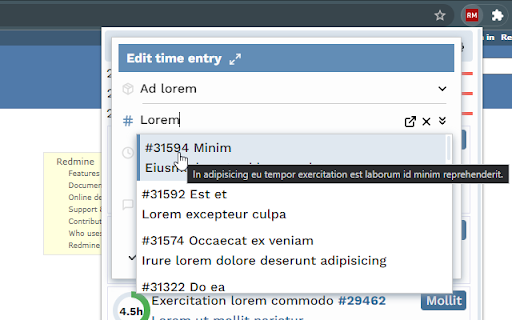

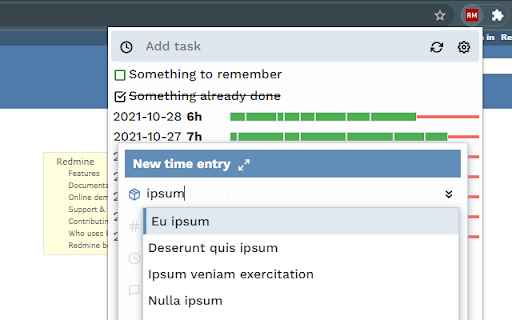
Spend less time in Redmine with time tracking. * no need to login again because your session has expired * check your time entries with a simple click/hotkey * change or create a copy of a time entry with the speed of light

TaskMingle: To-Do, Time & Notes
Stay productive and organized with TaskMingle—manage tasks, track time, and take notes effortlessly, all in one place! Organize Work and Life with TaskMingle for Chrome TaskMingle is the ultimate productivity tool, helping you streamline tasks, manage your time efficiently, and stay organized—all from your browser. Designed to fit seamlessly into your daily routine, TaskMingle empowers you to tackle work, personal projects, and daily to-dos with ease. Effortless Task Management: Organize to-do lists, prioritize tasks, and meet your goals. Pomodoro Timer: Stay focused with structured work sessions and regular breaks. Time Tracking: Optimize your workflow by monitoring task duration. Quick Notes: Keep ideas, reminders, and plans handy for better organization. Make productivity easy, fun, and rewarding. Simplify your day and achieve your goals with TaskMingle for Chrome.

Auto Bookmark
Keeps a pinned bookmarks page open to prevent the browser window from closing when the last tab is closed. [Overview] A simple extension designed to prevent browser windows from accidentally closing when you close your tabs. ・Automatic Pinning: Automatically opens and pins the bookmarks page (or favorites page) at the far left of every normal window. ・Prevent Window Closure: Even if you close the last active tab, the pinned bookmarks page remains open, preventing the entire window from closing. ・Duplicate Cleanup: If multiple bookmarks pages accidentally open, it automatically cleans them up and keeps just one. The extension monitors tab states in the background to ensure that at least one pinned bookmarks page is always safely maintained.

Word Counter
Sometime you may want to quickly count the words of free text on a webpage, Word Counter is a right tool for you to get word statistics. Simply select the text of interest and then right click to open its context menu. After clicking on menu item "Easy Word Counter", you will immediately see statistical results including the number of words and characters as well as average word length and the longest word etc.

InfoSE
Quickly access relevant information for selected word Introducing "InfoSE," the ultimate extension for lightning-fast access to relevant information right at your fingertips. With InfoSE, effortlessly explore top relevant results for selected word, neatly organized within accordion-style panels, each offering a concise summary for quick insights. Key Features: Effortless Access: Simply highlight any word or phrase on your browser, and InfoSE springs into action, fetching relevant information instantaneously. Accordion Interface: InfoSE presents search results in a sleek accordion format, allowing you to expand and collapse each panel effortlessly. This intuitive design enables efficient browsing without cluttering your screen. Comprehensive Summaries: Dive into succinct summaries within each accordion panel, providing essential details without overwhelming you with excessive information. Whether it's definitions, explanations, or background context, InfoSE delivers the highlights at a glance. Wikipedia Integration: Seamlessly explore Wikipedia entries directly within InfoSE. With a single click, delve into comprehensive articles, gaining in-depth understanding on your chosen topic without leaving your browsing session.
