
dpeebajhbigfamnhmnlabecogegimodb
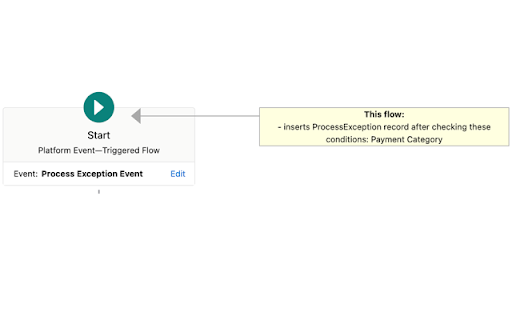


Shows tooltips on flow elements and exposes flow information with GPT queries A simple browser extension that adds tooltips to Salesforce flows and displays a table of elements in the flow, allowing requests to OpenAI GPT to explain/summarize the flow. The extension runs on the browser and first checks whether a Salesforce page is open. If so, then calls the Salesforce tooling API and gets the flow metadata/definition. Then it adds a tooltip with relevant information on each of the flow elements. The button "View Definition" opens a frame containing the flow definition in a table with a short explanation and buttons to submit questions about the flow to OpenAI GPT. The privacy policy is at https://sites.google.com/view/mybrowserextensions/home This extension does not handle personal or sensitive user data. It only communicates with Salesforce and OpenAI to request data to display on the screen and nothing else is sent to any other server. The source code can be found at: https://github.com/Fernando-Fernandez/SalesforceFlowExtension

Salesforce Show Api Name
Salesforce Show API Name The easiest way to view and copy API names in Salesforce 1. Shows API names for all fields and objects 2. Works in both Classic and Lightning 3. Copy single or multiple fields with one click On any Salesforce record page: 1. Click the extension icon to show/hide API names INSTALLATION Get it from the Chrome Web Store or install manually from: https://github.com/ChenZaichuang/salesforce_show_api_name

Salesforce Flow List Search
Adds a name search on the salesforce flows screen in lightning and auto scroll to reveal all flows in the list Adds a Flow Name search on the Salesforce flows screen (lightning only) and auto scroll to reveal all flows in the list. No more having to scroll through pages to get the flow you want and easy search.

Automation Hunter For Salesforce
Automation Hunter is a powerful Chrome extension designed to revolutionize your Salesforce experience by providing a comprehensive solution for discovering automations on any Salesforce object. Whether you're an administrator, developer, or power user, this extension empowers you to quickly and efficiently uncover all the automations in your Salesforce environment. With Automation Hunter, the days of manually sifting through countless configurations and settings are over. This user-friendly tool employs cutting-edge technology to scan and analyze your Salesforce org, effortlessly identifying and displaying all relevant automations associated with a specific Salesforce object. Available for all Admin /Developer /Consultants Don't Find The Automation, Hunt The Automation In Salesforce. *************** Features *************** * Available in both Classic ☁️ and Lightning ⚡️ * Just select the object and find all automations in just 2 clicks 🪄 * Download Object Automation Report 🖨 * Privacy : This Extension process your data within your browser and do not send it outside your browser. ****** Automation Report Includes ****** 1. Flows Automation 2. Apex Triggers Automation 3. Workflow Automation 4. Validation Rules 5. Apex Classes With Selected Object Reference 6. Other Apex Triggers With Selected Object Reference 7. Email Template With Selected Object Reference It will give you all the above automations written on selected object. ****** How To Use It ****** Once extension is installed in your chrome browser * In Lightning Login To Salesforce -> Setup -> SetupHome (Extension will be loaded on right side) *In Classic Login To Salesforce -> Setup -> HomePage (Extension will be available above recent items) * Now select Object on which you would like to find all automations and click on 'Load Automation' *Within few seconds all your automation written on that selected object will be organised at one place for you. * You can download this automation pdf report and share it with your team if you want. ****** Feedback ****** * If this tool helps you to save your time while working on projects in any way. Please help to share your valuable feedback. And at the end purpose of creating this extension is to save your time. Smile Please 😊 The information provided by Automation Hunter ('we', 'us', or 'our') on extension is as a utility purposes only. We do not store any of your personal information. All information on the extension is provided in good faith, however we make no representation or warranty of any kind, express or implied, regarding the accuracy, adequacy, validity, reliability, availability, or completeness of any information on the Site. UNDER NO CIRCUMSTANCE SHALL WE HAVE ANY LIABILITY TO YOU FOR ANY LOSS OR DAMAGE OF ANY KIND INCURRED AS A RESULT OF THE USE OF THIS EXTENSION OR RELIANCE ON ANY INFORMATION PROVIDED REGARDING THE EXTENSION. YOUR USE OF THE EXTENSION AND YOUR RELIANCE ON ANY INFORMATION ON THE EXTENSION IS SOLELY AT YOUR OWN RISK.

EasyCrud(Salesforce)
Assign your CRUD and FLS for Salesforce in Bulk from Single Screen This Extension allows Salesforce Admins/Developers to assign CRUD and FLS Permissions from Single Screen. There are also features that provides ability to export permissions in CSV and also generate dashboard for the permissions.
