
dopdchianoijndklgjkckfcpdoaabcab
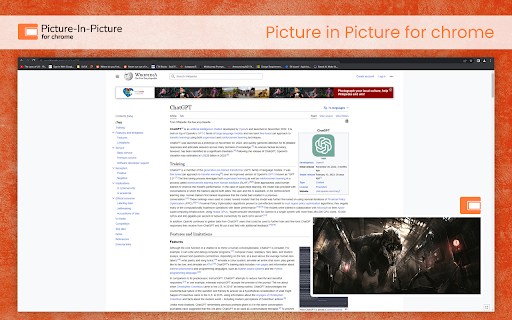
Enable picture in picture for YouTube and Chrome. Best Floating PiP player for YouTube. In 2025, juggling your favorite videos with work, browsing, or chatting is effortless with the Picture-in-Picture (PiP) for Chrome extension. The Picture-in-Picture (PiP) for Chrome extension allows you to watch videos in a floating window that stays on top of other windows, making multitasking easier than ever. Whether you're watching YouTube PiP mode, streaming on PiP for Netflix, or viewing content on other platforms, this extension ensures your favorite videos remain visible while you browse, work, or chat with friends. Floating Video Window: Enjoy videos in a small window that floats on top of other applications, perfect for multitasking with a floating video player Chrome. Movable and Resizable: Adjust the size and position of the video window to fit your workspace, giving you flexibility in how you multitask. Supports Popular Video Platforms: Works seamlessly with YouTube PiP mode, PiP for Netflix, Vimeo, and other video sites, allowing you to use it across your favorite platforms. Simple to Use: Easily activate PiP for Chrome mode with one click for an uninterrupted viewing experience. Free Extension: Completely free to use, with no hidden fees, making it accessible to everyone. Install the Extension: Press “Add to Chrome” to install Picture-in-Picture for Chrome Extension. Start Playing a Video: Play any video on the site you are on. Activate PiP Mode: Click the PiP button on the video player to watch in a floating window. Enhanced Multitasking: Easily work, browse, or chat while keeping the video visible in a floating video player Chrome window. Convenience: Keep videos playing even when you switch to another tab or application, allowing for continuous viewing. Flexible Viewing: Compatible with major video sites, enabling you to watch a variety of content with ease. Improved Focus: Minimize distractions by reducing the video to a corner of your screen while keeping the audio active. Why Choose PiP for Video Multitasking? With the Video multitasking Chrome extension, you can seamlessly switch between tasks while keeping videos on-screen in a floating video player Chrome. Whether it's YouTube PiP mode, PiP for Netflix, or other platforms, this extension allows you to enjoy your content without interrupting your workflow. Install Picture-in-Picture for Chrome today and revolutionize the way you multitask in 2025!! 1. Which websites does the PiP extension support? The PiP extension works with most video platforms, including YouTube, Netflix, Vimeo, and many others. 2. Can I resize the PiP window? Yes, you can adjust the window size and move it around to suit your preference. 3. Will the PiP extension affect my browsing speed? No, the extension is designed to be lightweight and has minimal impact on browsing speed. 4. Is the PiP mode free to use? Yes, PiP for Chrome is entirely free and accessible to all users.

Picture in Picture for Videos
Picture in Picture for floating video from any site Picture in Picture for Videos – Floating Video Player for Chrome Watch videos while you work with Picture in Picture for Videos, a powerful floating video (PiP) Chrome extension that lets you play any video in a movable, resizable always-on-top window. Whether you’re watching YouTube, Netflix, Vimeo, Prime Video, or any other video website, this extension keeps your video visible while you browse other tabs, chat, code, or work — without interruptions. 🎥 Picture in Picture Mode Play videos in a floating PiP window that stays on top of all other tabs and apps. 🖥️ Movable & Resizable Player Drag and resize the video window to perfectly fit your screen and workflow. 🌐 Works on Any Video Website Supports YouTube, Netflix, Vimeo, Prime Video, and most HTML5 video players. 🖱️ One-Click Activation Enable Picture in Picture instantly using the Chrome toolbar icon. 🎯 Perfect For ✔ Multitaskers who want to work and watch videos together ✔ Students attending online classes or tutorials ✔ Developers & designers following video guides ✔ Remote workers, traders, and content creators ✔ Anyone who wants distraction-free video viewing 🚀 Why Choose Picture in Picture for Videos? 📺 Always on Top – Your video stays visible while you work ⚡ Fast & Lightweight – Smooth playback with minimal system usage 🔌 Seamless Chrome Integration – Simple and intuitive to use 🛠️ Built for Productivity – Designed to enhance multitasking 1. How does Picture in Picture for Videos work? Just open a video on any website and click the extension icon to launch the video in a floating PiP window. 2. Does it work on all websites? Yes, it works on most websites that use HTML5 video players, including YouTube, Netflix, Vimeo, and more. 3. Can I resize or move the PiP window? Absolutely! You can resize and move the floating video window anywhere on your screen. 4. Is this extension free to use? Yes, Picture in Picture for Videos is completely free to download and use. 5. Will the video keep playing when I switch tabs? Yes, the video continues playing while you switch tabs or applications. We collect only the minimum data necessary to ensure smooth performance and improve functionality. This information is used solely to enhance the user experience and is never shared with third parties. Note: We do not collect any personally identifiable information. Install Picture in Picture for Videos today and enjoy the freedom to watch videos while staying productive — simple, powerful, and distraction-free.

Picture in Picture - PiP View
This extension brings a PiP view to all websites with an HTML video element. The extension adds a page action button to your browser. When a page has a video element, the color of this button changes. Press the button to open the active player in the Picture-in-Picture mode (PiP Mode). This extension automatically tries to use the active player. For YouTube, the extension also offers an in-player button next to the settings button to open the YouTube video in the picture-in-picture mode. You can use this extension to watch YouTube videos in a floating window that is on top of all other windows so tabs can be switched and still the player is visible. The floating window has play and pause buttons, and you can exit from the picture-in-picture mode anytime. What is the Picture-in-Picture (PiP) mode: This mode lets you play any video in Picture-in-Picture (PiP) mode, and it works on all platforms. PiP is a popped-out, always-on-top video player that floats on top of other windows. You can also reposition it along the screen border while you continue to surf the internet. Notes: 1. You need Chrome version >= 70 for this extension to work 2. This extension works for players in iframes 3. This extension is based on manifest v3 4. The extension includes a script that prevents the page from leaving the Picture-in-Picture view for 2 seconds from version 0.3.2. This script helps to address issues with pages that disable the Picture-in-Picture feature or cancel the Picture-in-Picture requests. 5. It works even if the player has "disablepictureinpicture" attribute

Picture-in-Picture Shortcut
Switch videos to Picture-in-Picture mode with a keyboard shortcut or toolbar button. Picture-in-Picture Shortcut adds a keyboard shortcut and toolbar button for switching video players to the Picture-in-Picture mode in web browsers. The default keyboard shortcut is Ctrl+Period (Command+Period on Mac), but it can be changed from the browser settings. The Picture-in-Picture Shortcut extension button in the browser's toolbar can be used to toggle PiP mode. Google Chrome and other Chromium browsers have a built-in Picture-in-Picture button in the default media controls, but it isn't always available and requires multiple mouse clicks. Picture-in-Picture Shortcut also overrides sites that don't normally allow Picture-in-Picture mode, and attempts to add a play/pause button to the PiP popup. However, this may not always work for sites and players not originally built for PiP mode. This extension is open-source under the GPLv3 license, the code is available on GitHub: https://github.com/corbindavenport/pip-shortcut

SuperPiP - Picture-in-Picture with playback controls and subtitles
Watch YouTube, Netflix, Disney+ & Prime Video in Picture-in-Picture — full controls, subtitles, and keyboard shortcuts. Playback controls will be displayed so you can: * Play/Pause the video * Adjust/Mute the volume * Forward/Rewind the video * Change the playback speed * Play the next video Subtitles will be displayed if it's turned on. Currently subtitles work on Youtube, Netflix, Disney+ and PrimeVideo (more to come). The size of the PiP window will be remembered. Next time you open it you will get the same size. Use hotkey E and S to expand/shrink the PiP window. Otherwise the PiP window will not keep the aspect ratio when you resize and you need to use hotkey C to remove white borders (or the crop button at the bottom right). Use hotkey Alt+P to toggle the PiP window and below hotkeys when the PiP window is hovered or focused: * Forward (→) * Rewind (←) * Increase volume (↑) * Decrease volume (↓) * Pause/Play (␣)
