
dofniecopchojcnidpeiodcfnodlenph
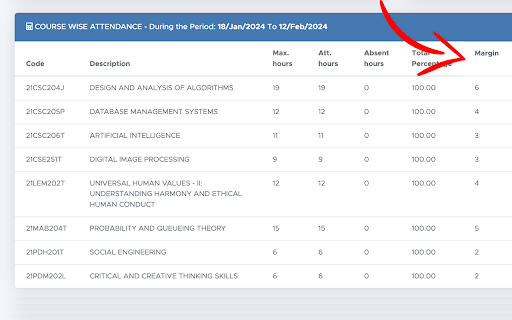
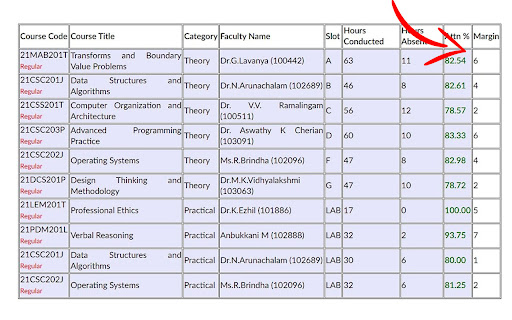
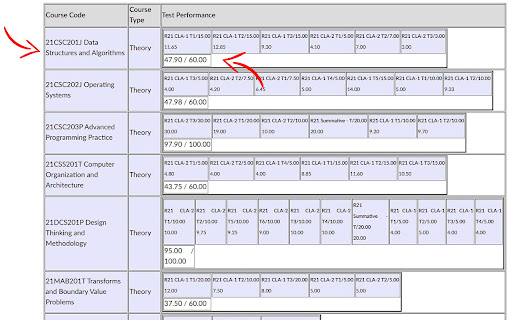
Makes academia and student portal more user-friendly. See attendance margin right on the official website. SRM Margin Check is used to check your attendance margins right on the official websites at SRM Institute of Science and Technology. Tailored for use with the Academia and Student Portal websites of SRM, this extension offers indispensable features to help you maintain attendance and track your academic progress effectively. Attendance Margin Tracking: Easily monitor your attendance margin to ensure compliance with the 75% attendance requirement. Know precisely how many classes you can miss while staying within attendance guidelines. Easy Marks Checking: Checking your marks on academia is so unconvenient with only the subject codes being mentioned besides your marks. With this extension it adds the subject names and also adds up all your marks for the subject for better clarity and convenience

Buyhatke: Price History & Tracker, Spend Lens
Buyhatke—Track price history, compare prices, find auto coupons, get alerts & save big with Spend Lens while shopping online. Buyhatke makes online shopping smarter and ensures the best price for a product via price history, price drop alerts, and price comparison. Use Lookalike to find exact products across stores and never miss a deal. Track your spending across Amazon, Flipkart, Zomato, and more with Spend Lens. Get detailed insights and take control of your budget ✓ See Price Graph: For every product on any e-commerce website, you can see the item’s price history for 3 months. Also, see when it’s the best time to buy. ✓ Compare prices: Get the best prices easily. There is no need to manually check every website for the lowest price. ✓ Watch Price: Price too high? Watch Prices for your favorite items and get an alert when the price drops via mail or push notifications on the website and mobile(via app) ✓ Automatic coupons: Just click on the Auto Coupon button on the checkout page of e-commerce websites like Myntra, Ajio, Walmart, eBay, Target etc. and we’ll automatically apply the best available coupon ✓ Lookalike: Find similar products at a lower cost, ensuring you get the best deals effortlessly. ✓ Spend Lens: It Provides a detailed overview of your spending across various stores, helping you manage your expenses efficiently. This extension may use affiliate links for certain stores. When you click on a link and make a purchase, we may earn a small commission at no extra cost to you. By installing the extension you agree to the Terms & Conditions: https://buyhatke.com/extension-terms

Spending Calculator for Swiggy™ and Zomato™
Zomato™ and Swiggy™ spending calculator to keep track of food expenses. In 2025, tracking your food expenses has never been easier! Track Food Expenses on Swiggy™ & Zomato™ Instantly! The Spending Calculator for Swiggy™ and Zomato™ is a handy Chrome extension for Swiggy expenses and food order tracker extension designed to help you monitor your food spending on India’s top food delivery platforms. Whether you’re looking to track food spending online, calculate your Swiggy™ expenses, or get insights into your total spending on Zomato™, this tool has got you covered. With just one click, you can calculate your expenditure, view year-wise data, and even uncover your top food orders. Perfect for those who want to budget food expenses and better understand their spending habits, this extension makes managing food expenses easy and transparent. Calculate Total Spending: Instantly get a summary of all your orders and calculate Swiggy expenses or your total spending on Zomato. Top Orders Insight: Displays the top 5 orders you’ve spent the most on using the Swiggy and Zomato expense calculator. Year-wise Analysis: View spending trends by year to understand how your food habits evolve with this food expense tracker. Real-Time Recalculation: Recalculate your spending total anytime for up-to-date information. How to Use for Swiggy™: Install & Pin: Add the Swiggy spending tracker extension and pin it to your Chrome browser. Visit Swiggy™: Log in and navigate to the “My Orders” section. Scroll: Scroll to load all orders or as many as you want. Calculate: Click the extension icon and select “Find Total Spending” to use the Swiggy and Zomato expense calculator. How to Use for Zomato™: Install & Pin: Add the extension and pin it to Chrome. Visit Zomato™: Log in and click “Find Total Spending” in the extension to use the Zomato spending calculator. Wait a Moment: The calculation time depends on your order history volume. This extension is a must-have for anyone looking to track food spending online, budget food expenses, or stay informed about their Swiggy™ and Zomato™ orders. Install now to take control of your spending habits. 1. What does the Spending Calculator for Swiggy™ & Zomato™ do? This tool calculates your total spending on food orders made through Swiggy™ and Zomato™, offering insights into your expenses over time. 2. Does this extension work with other food delivery platforms? Currently, it is designed specifically for Swiggy™ and Zomato™. No, all calculations are performed locally on your browser and are not stored or shared. 4. Does it work with the mobile versions of Swiggy™ and Zomato™? No, this extension is compatible only with the desktop browser version.

HirePro Assessment
Disables distracting extensions on hirepro assessments for fair testing HirePro Assessment is an extension designed to safeguard the integrity and fairness of online assessments, fostering a trustworthy and secure environment for both test-takers and educators. 1. Automatic Extension Disabling: HirePro automatically detects and disables all other Chrome extensions during assessments, eliminating potential cheating avenues and ensuring a level playing field. 2. Secure Communication: Communication between HirePro Assessment extension and assessment platforms is secured, preventing unauthorized access and protecting user data. 3. Privacy-Focused: HirePro Assessment extension does not collect user information. Benefits for Test-Takers: 1.Focus on Your Performance: With distractions minimized, you can fully concentrate on demonstrating your knowledge and skills without worry about unfair advantages. 2. Fair and Equitable Testing: HirePro ensures everyone has an equal opportunity to succeed, promoting trust in the assessment process and its outcomes. 3. Peace of Mind: Knowing your efforts are accurately evaluated strengthens your confidence and fosters academic integrity.

Permanent Inspect Element
Save the changes you make to a page with Inspect Element so they wouldn't go away after refreshing This extension lets you save the changes you make to a static web page using Inspect Element to remain there even after you refresh the page. So if you want to modify a web page to make it easier for you to read, or to remove an intrusive banner, you can do that, and you wouldn't have to re-do it every time you visit the page again. Of course, this only changes the content of the page on *your* computer and not the website itself.
