
dngepaimfmeobhmakaihhdafcjmlbgjh

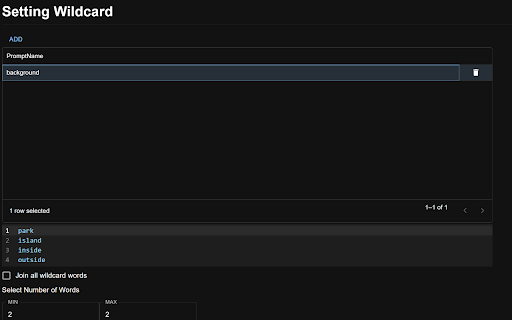
A NovelAI Wildcard Extension A prompt input UI is added to the NovelAI image generation page. The following functions and more have been added - New syntax for emphasis and weakening: {example::3} -> {{{example}}} - Dynamic Prompt: {ABAB|CCB|CBADB} -> ABAB or CCB or CBADB - Wildcard setting : W__Girl__W -> Random selection of a word from the words previously set in Girl's wildcard Press `ctrl + G` in the browser to generate a prompt and copy it to the clipboard - 0.0.3: Adjusted part of the UI, fixed wildcard bug, added English support. - 0.0.2: Added stay open to UI

novelai-support
Support to input prompts to NovelAI NovelAIのprompt並び替え・強調をサポートします。

Pixiv Fanbox Downloader
Batch download files on Pixiv Fanbox. Supports filtering file types, custom file names, and supports multiple languages. Open fanbox.cc and click the blue download button on the right side of the page to get started. Note: This extension cannot bypass paid restrictions.

SpellStack for NovelAI
Assists in entering prompts in NovelAI. You can organize your prompts by grouping and sorting them by style, effect, face, body, background, etc. You can also save and manage the prompts you create. What you are editing on the extension is input to NovelAI prompts in real time. Group words according to style, effect, face, body, background, etc. Word groups can also be reordered. The content of the generated prompts will be color-coded according to the word groups. Words can be sorted one by one, so you will never lose track of the words you have already entered. There is no need to add parentheses to indicate the strength of a word. You can increase or decrease them with extensions, and parentheses are automatically assigned so you will never get a pair of parentheses wrong. # Save and restore prompts You can save your favorite settings. You can also restore the contents of a previously created prompt and resume working on it.

Powerful Pixiv Downloader
Note: After installation, open pixiv.net to use it. If you want to download all of a user's works, you can click the "Start crawl" button on that user's homepage. 注意:安装之后,打开 pixiv.net 方可使用。如果你想下载一个用户的所有作品,可以在该用户的主页点击”开始抓取”按钮。 【English】Use this tool, you can: - Batch download all the artist's works, your bookmarks, your following, rankings, search results, etc.; - One-click download of any work you see; - Manually select the work you want to download on the page; - Set filter conditions to filter the works you want to download; - Download illustrations, manga, ugoira(animations), novels; - Save ugoira in GIF, WebM, WebP, APNG, ZIP formats; - Save novels in TXT, EPUB format; - Create folders with various data such as artist name, date, title, etc.; - Customize file names and sort them; - Add 0 in front of the serial number, so that the sorting will not be confused; - Save user avatar and cover image; - display larger thumbnails for easier viewing; - Preview the image on the thumbnail, and view the original image; - Save download records to avoid repeated downloads; - Save download progress, resume unfinished downloads; - export work data; - Collect works in batches; - Help you manage your bookmarks; - Timed crawl; - Highlight following users;
