
dmcnmfllnjedaghbpeijdblnnbjdnajb
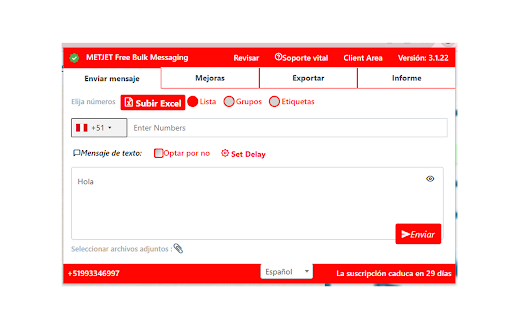
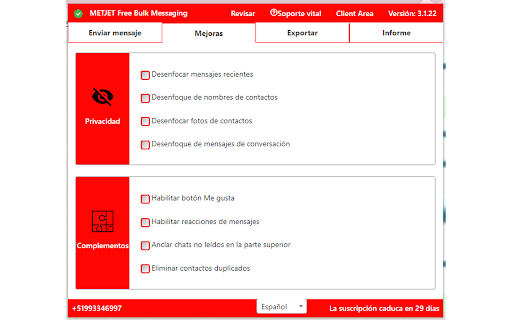


METJET Free Bulk Messaging - Send Messages, Attachments, Personalized Message, Smart auto replies and more. Best Message Sending Extension. Send customized messages and greetings Messages to your customers and Family Members. Important Note: Our extension features are not intended to mass message or spam the people. It is intended to send greetings, invitation and offer messages to family, friends and people you know, please use responsibly.

ChatGPT Automation - Auto ChatGPT on chatgpt.com
Auto ChatGPT for your prompts at scale. Batch generate and auto-download responses and images on ChatGPT.com. ChatGPT Automation is an Auto ChatGPT tool built to fully automate your workflow on OpenAI's chatgpt.com. No more manually typing prompts one by one — let ChatGPT run automatically. This extension turns ChatGPT into a batch-processing engine, allowing you to auto-submit prompts, auto-generate content, and auto-download results at scale. 🔥 What ChatGPT Automation does Auto ChatGPT prompts continuously without manual interaction Batch generate AI text, images, and visual content Automatically download results with smart file naming Handle long prompt queues safely with smart random delays 🤖 Auto ChatGPT Batch Processing Queue dozens or hundreds of prompts and let ChatGPT Automation automatically: - Submit prompts to ChatGPT - Wait for generation to complete - Move to the next prompt No clicks. No babysitting. 🎨 Image to Image Transformation Batch transform and enhance images using AI with text prompts Chain mode: automatically use the previous generated image as input for the next prompt 🧩 Ingredients to Text Mode Upload reference images and batch-process them with prompts Auto-add character images based on filename matching ⚙️ Professional Automation Controls - Smart Random Delay System to avoid rate limits - Configurable min/max delay between prompts - Auto Download once generation completes with custom folder organization - Auto-rename files based on prompt content - Max Retries on failure — automatically retry failed prompts - Multiple outputs per prompt (1–4) 📊 Real-time Queue Monitoring - Live prompt queue with per-prompt status (Queued → Running → Completed) - Visual progress tracking inside the Side Panel - Retry counter per prompt ✅ Perfect for - Content creators and copywriters - AI image and visual producers - Automation & productivity users - Anyone who wants to Auto ChatGPT at scale

AI Chat Exporter: Gemini to PDF, MD and more
Export Gemini chats to PDF, Markdown, Text, CSV... Free and fully customizable. AI Chat Exporter: Gemini to PDF, MD and more lets you save your conversations with Gemini AI to your computer. Export Gemini to PDF, Markdown, Text, CSV, or JSON files with just a couple of clicks. Looking for an easy way to save Gemini conversations as PDF? With AI Chat Exporter, you can export Gemini chats and refer back to them whenever you need! ## Main Features 💼 ### Multiple File Formats 📋 Choose the format that works best for you: - PDF - Convert Gemini to PDF, perfect for printing or sharing with others - Markdown - Great for editing in note-taking apps - Text - Simple and works everywhere - CSV - Useful for data analysis - JSON - Ideal for developers or data processing ### Customization Options ⚙️ Make your exports look exactly how you want: - Choose which messages to export - Include or exclude timestamps(created, updated, exported) - Adjust Date & Time format - More settings for PDF: - File name & Content title - Light or dark theme - Page format (A4, Letter, etc. Portrait or Landscape) - Page margin - Font size - Table of content - User info (name & email) - Include page numbers - Customize footer (page number) - Include Thinking process - Page break for each conversation turn ### Complete Content Support 🧩 AI Chat Exporter captures everything in your conversations: - Regular text messages - Code blocks with proper formatting - Math formulas - Tables and charts - Thinking Process displays ### Easy to Use 👍 Save Gemini to PDF in just 2 clicks! No complicated settings or steps required unless you want to customize. ## How to Export Gemini to PDF & More 🔍 1. Install the extension from the Chrome Web Store 2. Visit Gemini's website and have a conversation 3. The export button displays next to your input field 3. Click "Select" and choose which parts of the conversation you want to export 4. Choose your export format (PDF, Markdown, Text, CSV, or JSON) 5. Click "Export" and your file will download automatically That's it! Your Gemini conversation is now saved as a PDF or any format you chose. ## Privacy First Approach 🔒 We take your privacy seriously. AI Chat Exporter: - Doesn't access your data for any purpose other than exporting - Never save, share or analyze your conversation data Your conversations stay between you and your computer - exactly how it should be! ## Pricing and Free Usage 💰 AI Chat Exporter offers generous free usage: - **PDF Exports**: 3 free exports per day - **All Other Formats** (Markdown, Text, CSV, JSON): Unlimited and permanently free! We offer PRO plans for users who need more PDF exports. All other export formats remain free forever, no subscription required. ## Frequently Asked Questions ❓ ### Is AI Chat Exporter free? Yes! AI Chat Exporter offers free usage for all export formats. PDF exports are free 3 times per day, while Markdown, Text, CSV, and JSON exports are completely free with no limits. We offer PRO plans for users who need more PDF exports. ### Do I need an account to start using AI Chat Exporter? No account needed! Just install the extension and start exporting. ### Will AI Chat Exporter work with other AI chat tools? Currently, AI Chat Exporter works specifically with Gemini AI. Support for other platforms may be added in the future. ### Will my formatting be preserved when I export Gemini to PDF? Yes! We work hard to maintain formatting, including code blocks, tables, and special outputs. ### Is there a limit to how long a conversation I can export? There's no set limit, but very long conversations may take longer to process, especially for PDF exports. ### Can I customize how my exports look? Absolutely! Check out the Customization Options section for details. ### Does AI Chat Exporter work with the latest version of Gemini? Yes! We regularly update the extension to ensure compatibility with the latest Gemini features. ## Support and Contact 📞 Have questions, suggestions, or found a bug? We'd love to hear from you! - Email: support@ai-chat-exporter.com

Gmail AI Email Assistant - Mailmeteor
Meet an inbox that organizes itself, drafts replies for you, and writes alongside you. All without leaving Gmail. Mailmeteor for Gmail helps you save hours every day in your inbox. It brings powerful features to your Gmail workflow, such as: 🏷️ Auto-labels emails to help you focus 📝 Auto-drafts replies in your tone 💌 Mail merge directly from Gmail ✔ Email tracker to know when your emails are opened ⏰ Inbox time to monitor your time spent on emails 🗂️ Search and export emails in one click Most features are free to use. Upgrade to send more emails, get additional AI credits, and access advanced features, like email tracking, attachments, Autopilot, and more. - Best-rated add-on for Gmail - 7 million users on Google Sheets, rated 4.9/5 - Trusted by teams at Spotify, Uber, Pinterest, Shopify, and Change.org - Recommended by Google This extension works exclusively in Gmail, where your work happens. No need to add extra tools or switch to a different dashboard or SaaS. ➤ AI Email Assistant, including email categorization, drafts replies, email writer, and more. ➤ Email Tracker to know when your emails are opened or clicked ➤ Mail merge inside Gmail ™. We maximize your email deliverability and send emails directly from Gmail ™. ➤ Follow up with ease in Gmail ™. Send automated follow-ups in one click, without your recipients knowing. ➤ Designed to respect your privacy. ✓ AI Email Assistant built into Gmail ✓ Mail merge, with analytics ✓ Email Tracker (opens and clicks) ✓ Auto follow-up: send a reminder when not opened, not replied… ✓ Bounces detection: make sure you don’t follow up to dead email addresses ✓ Hubspot / CRM integration ✓ CSV emails export ✓ Available in English Once you've installed this extension, you'll be invited to enable AI Email Assistant features immediately. Alternatively, you can enable it by following these steps: 1. Access the Settings > Add-ons > Mailmeteor settings 2. Turn on the AI Email Assistant feature 3. Fine-tune the email categorization, pre-drafts, and other settings. Once enabled, your AI Email Assistant will: - organize your inbox, with smart labels - draft replies to important emails (to respond) - help you write emails faster Once you've installed this extension, here's how to send mass emails in your Gmail inbox: 1. Select the "Campaigns" tab, underneath Inbox / Starred / Sent 2. Click on "New campaign" 3. Write your email and select recipients 4. Once you're ready, send yourself a test email or preview 5. Click "Send emails" Your recipients will receive the emails just as you would have sent them, and your emails remain accessible in the "Sent" tab of your Gmail account. Once you’ve installed this extension for Gmail, here’s how to follow up in Gmail: 1. Compose a new message as usual 2. Instead of clicking on “Send”, click on the caret and select “Send with a follow-up” 3. Select a follow-up template or write a new message 4. Define when the follow-up should be sent (e.g. 3 days later, if no reply) 5. Click send SUPPORT AND DOCUMENTATION You will learn: ⚑ The best time to follow up with a prospect ⚑ A wide selection of email templates ⚑ Gmail best practices to improve your deliverability And also, everything you need to know before doing a mass mailing in Gmail ™, such as: ⚑ How to send mass emails in Gmail ™ ⚑ How to send mass customized emails with Gmail ™ ⚑ How to send a mass email without showing addresses in Gmail ™ ⚑ How to use your Gmail ™ contact list to send emails ⚑ Why Mailmeteor is better than Gmass, Lemlist, Yamm, Streak and Mailsuite FREE FOR EDUCATION Have a .EDU email address? Mailmeteor provides free licenses for students and staff, as part of its Education Program. Learn more: https://mailmeteor.com/education-program Mailmeteor turns your Gmail inbox into a complete email marketing solution: ✪ Follow up with ease to make sure your recipients reply ✪ Templates to reuse your best follow-up messages ✪ Skip following up when the recipient replies ✪ Bounce detection: remove invalid email addresses ✪ Mailmeteor Dashboard to do even more with your emails You can use Mailmeteor in many different ways. Here are some examples: ➤ Sales & Marketing: to boost your conversion and re-engage your leads at scale ➤ Customer care: to make sure a ticket is closed ➤ Finance: to put an end to unpaid invoices ➤ Marketing: personalized thank-you emails to HR recruiters, crowdfunding supporters, Product Hunt, business angels, friends & family. ➤ Job hunt: follow-up after an interview and make sure the recruiter doesn’t forget about you ➤ PR: Bump your email to the top of journalists' or influencers' inboxes. ➤ Email No Code: follow up with prospects without a line of code ➤ Events: Inviting people to an event (webinar, wedding, job-dating, fair, conference, meetup...) and reducing no-shows by sending a reminder shortly before the event. Here are the features we have built thanks to your feedback: ✓ Send newsletters in Gmail ✓ Multi follow-ups & email sequence ✓ Follow-up with images & attachments ✓ Templates management to write emails faster ✓ Open & Click Tracking ✓ More follow-up triggers, such as open/no-open ✓ Cold emailing & Mail merge in Gmail Mailmeteor complies with privacy laws (especially GDPR) to protect your data. Learn more about how we respect your privacy in our Privacy Policy in our Security center: https://mailmeteor.com/security Mailmeteor is audited by Google every year for optimal security. We're CASA Tier 3 compliant, with SOC 2 certification in progress. Gmail and Google are trademarks of Google Inc. Use of these trademarks is subject to Google permissions.

Jetwriter AI: Reply Emails, Ask Page, Summarize, Fix Grammar, and More
Write emails & messages, chat with page, improve writing, translate, and do much more. Powered by the most intelligent AI models Get personalized, context-aware AI help on any website with Jetwriter AI. Write emails and messages, chat with page, fix grammar, improve your writing, translate text, and much more - all in seconds. Powered by the world's most intelligent AI models. Free to try. 📧 ADVANCED GMAIL INTEGRATION: REFERENCES PAST EMAILS, WEB SEARCH, and HELP DOCS Generate personalized, context-aware replies in your exact tone directly from the Gmail compose window. Jetwriter AI learns your unique style from your sent emails, while seamlessly pulling accurate, real-time answers from your linked website, help docs, or live web searches. ✍️ GENERATE CONTEXT AWARE REPLIES IN YOUR VOICE Get AI assistance on email and messaging platforms such as Gmail, WhatsApp, LinkedIn, Outlook, Zendesk, and more. 🚀 HIGHEST QUALITY RESPONSES Go beyond generic AI. Our system is fully personalized to you, generating intelligent, context-aware responses. Powered by the world's most advanced AI models, including GPT-5.2 Thinking, Claude Sonnet 4.6, Gemini 3.1 Pro and more. 🌐 WEB SEARCH & READ LINKS Accesses the web to get the latest info for your replies. 📄 CHAT WITH ANY PAGE - Summarize articles - Find key information - Proofread your work - Explain complex terms ✨ SELECT ANY TEXT TO TRANSFORM - Correct grammar and spelling - Improve writing clarity and style - Rephrase and change the tone - Translate to any language - Create your own custom actions 👤 PERSONALIZED TO YOU - Teach the AI about you and your role for truly personalized responses. - Create different writing styles for various purposes. - Save your favorite prompts for one-click access. - Customize the length of AI responses. - Supports all languages. 🎙️ VOICE INPUT Save time with instant, accurate voice-to-prompt in any language. 🎨 MINIMAL, NON-INTRUSIVE DESIGN - No Layout Shifts: Unlike sidebar extensions, Jetwriter opens as a clean modal on top of the page. - Flexible: Resize and drag the modal anywhere on your screen. - Easy Access: Open via keyboard shortcut, highlighting text, right-click context menu, or the extension icon. - Integrated Buttons: Find AI reply buttons directly within popular sites such as Gmail, LinkedIn, WhatsApp Zoho, and more. - Rich Chat Experience: Supports multi-turn conversations, Markdown, code highlighting, and LaTeX. ⚡ SUPERIOR PERFORMANCE - Lightweight extension (
