
dkenplobjcbiljmfbgpbpaboipfgpcbm
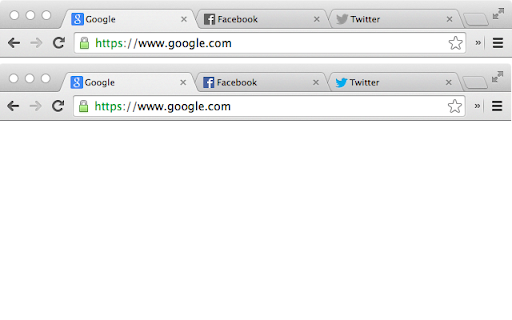
Desaturate the favicons of all inactive tabs. Favicons—originally “favorites icons”—are the small icons that appear next to the page title inside a tab in Google Chrome. Many companies choose to utilize this icon as a way to show off their logo or brand. As such, they’re often colorful and bold. In an effort to provide a more minimalist, distraction-free, browsing experience, this extension desaturates the tab icons for all but the active tab. In other words, all of the background tabs will appear in grayscale (“black and white”). When you switch which tab you’re viewing, the tab you were just viewing will see its icon switch to grayscale, and the new one you’re viewing will go back to full color. The extension has no settings. There’s nothing to do. Just install it and it’ll start working right away. If you ever want the full color of icons to return, simply uninstall the extension.

Close All Tabs
Close all open tabs. Optionally close pinned tabs and incognito mode tabs. Use the toolbar button, keyboard command (alt + w) or the context menu options to quickly close open tabs. Several other options available. Change the default setting for the toolbar button, and open a particular URL after closing all the tabs. Optionally close pinned tabs and incognito mode tabs. Visit our homepage for detailed user guide: https://browsernative.com/close-all-tabs-extension/

Bookmark All Tabs
𝗪𝗵𝗮𝘁 𝗶𝘀 𝗕𝗼𝗼𝗸𝗺𝗮𝗿𝗸 𝗔𝗹𝗹 𝗧𝗮𝗯𝘀? Save all tabs to any bookmarks folder anywhere at the press of a button. No annoying menus, popups or questions asking you to name things when bookmarking. Save bookmarks to an auto generated folder using values like the active page title you were on when saving, the current date, day, time etc. nested under any folder you want. Auto generate a “Recent” folder to quickly access your most frequently used bookmarks. Plus tons more features to tweak for whatever your workflow… • Save using date, day, time, current tab and more as nested sub folders. • Option to bookmark the active tab only.

Shut the tab up!
This extension will mute tabs that are inactive. So you will only hear sounds of the current active tab. You can also choose if you want to mute pinned tabs or not. v.1.3.1 - Migration for Chrome Manifest V3 support v.1.1.0 - Changed extension name - Added german translation

Pause All Videos
This tool is intended to help people who have lots (maybe even hundreds!) of tabs open. When they restore all those tabs at once, their open videos might start playing! Instead of having to search through all the open windows and pause the videos one by one, this extension gives a simple button that pauses every video at once.
