
dkagkciaaaligkmbgeeahgenhoojmncl
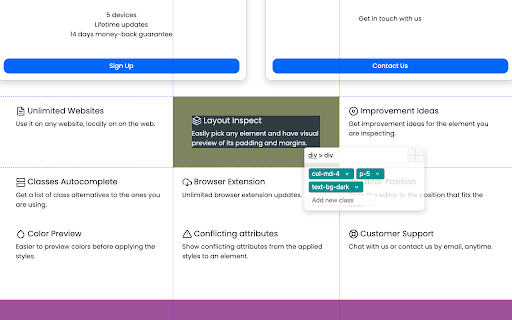
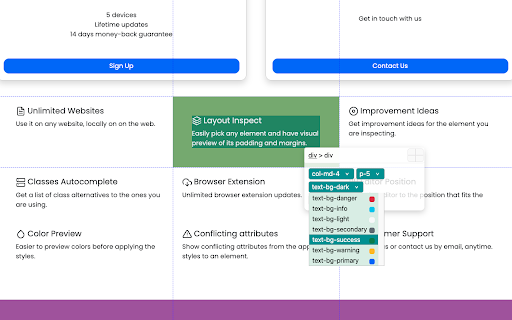
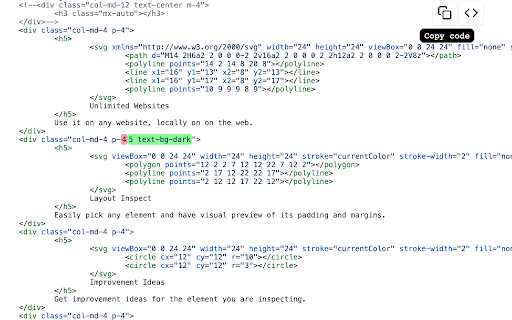
A chrome extension that lets you change the design within your browser. Build your web easier in the browser - A chrome extension that lets you change the design within your browser Design fast Effortlessly change classes and preview the design in realtime. Nuweb gives you a list of alternative classes that you can use, and a preview of the colors. Preview margins and padding and easily navigate through parent elements. Convert to Tailwind CSS Fast convert all your website CSS into Tailwind CSS and don't waste hours doing it manually. Preview it in CodePen afterwards. Suggestions Make sure your elements are complete and work as they are supposed. Nuweb will suggest ideas that will make your design complete. Track all changes Track all the changes in the code, and sync it with your code base. Nuweb will remind you if there are changes that are left unnoticed so you never lose your progress. Discover an enjoyable way to build your website with Tailwind or Bootstrap Convert to Tailwind CSS - Convert any element fast Open in CodePen - Preview any element isolated in a CodePen environment Unlimited Websites - Use it on any website, locally or on the web. Layout Inspect - Easily pick any element and have visual preview of its padding and margins. Improvement Ideas - Get improvement ideas for the element you are inspecting. Classes Autocomplete - Get a list of class alternatives to the ones you are using. Browser Extension - Unlimited browser extension updates. Editor Position - Snap the editor to the position that fits the best. Color Preview - Easier to preview colors before applying the styles. Conflicting attributes - Show conflicting attributes from the applied styles to an element. Customer Support - Chat with us or contact us by email, anytime. - Version 1.0.6 includes fixes and support for latest versions of Tailwind and Bootstrap

Next Pointer - Custom Cursor for Chrome™
Your browser, your cursor. A lightweight extension for simple cursor customization. A simple extension to change your mouse cursor across websites. Personalize every webpage with a custom mouse cursor. Easy to use, works on most websites, and lets you switch cursors in one click. !Please note that this extension cannot work on Chrome Web Store pages or built-in Chrome pages like the New Tab page. It works normally on regular websites such as google.com and others.

Custom Scrollbar
Custom Scrollbar is a Chrome extension that allows users to customize the appearance of scrollbars in their browser Discover a new level of personalization for your web experience with Custom Scrollbar for Google Chrome! Tired of standard scrollbars that feel as bland as a diet without color? 🍞🙄 Install Custom Scrollbar and make your browser stylish and expressive as you've always dreamed! Choose from over 20 different designs - from classic minimalism to vibrant neon fireworks. The choice is yours! Here are just a few of the options we have: 1. Classic white ⚪ 2. Black with sleek lines ⚫ 3. Minimalistic gray 🌑 4. Subtle night mode 🌙 5. Fun pastel shades 🌈 6. Bright neon colors 💡 7. Geometric shapes 🔷 8. Marble effect 🏛️ 9. Silky gloss ✨ 10. Forest shades of green 🌲 You can customize the design to your liking to find your perfect style. 💡 Simply download the extension from the Chrome Web Store, choose your favorite style, and enjoy a fresh look for your web browsing! Convenience and beauty - what could be better? 😉 Don't wait any longer, add a splash of color to your online life with Custom Scrollbar! Your browser deserves an upgrade that will lift your spirits and make online surfing more enjoyable!

Fluentez-extension
Chrome extension that allows users to quickly build their vocabulary on the Fluentez website by selecting text anywhere This Chrome extension allows users to quickly build their vocabulary on the Fluentez website by selecting text anywhere on the web. When a user highlights a word or phrase, the extension automatically saves it to their personal vocabulary list on Fluentez, making the process of learning new words both convenient and efficient. There's no need to switch between tabs or apps everything is recorded and synced instantly while browsing the web.

Shortcut Organizer
Chrome extension offering a sleek and customizable dashboard to organize your web shortcuts. Shortcut Organizer is a Chrome extension designed to enhance your browsing experience. It replaces the default start page with a sleek and customizable dashboard, allowing you to manage your shortcuts in an organized and efficient way. With Shortcut Organizer, you can create, rename, and reorganize your folders using an intuitive drag-and-drop feature. You can also add or edit shortcuts with custom labels and URLs, move shortcuts between folders, or even add a shortcut directly by clicking on an icon in the navigation bar. Additionally, you can customize your start page with a background image of your choice. The extension automatically fetches website icons, providing a clean and visually appealing display. Available in both English and French, Shortcut Organizer adapts to your needs with a seamless multilingual experience. Key Features: - Create, rename, and reorganize your folders easily with drag and drop. - Add or edit shortcuts with custom labels and URLs. - Move shortcuts between folders with an intuitive drag-and-drop feature. - Add a shortcut directly by clicking on an icon in the navigation bar. - Customize your start page with a background image. - Shortcuts automatically fetch website icons for a clean and aesthetic look. - Available in English and French to suit your preferred language. Why Choose Shortcut Organizer? - Ease of use: An intuitive interface, perfect for all users. - Efficient and organized: Save time and quickly access your favorite links. - Advanced customization: Personalize your start page to match your style and needs. - Open source: Contribute to the project's evolution and share your ideas on GitHub.
