
djomnlnkjcapcnngcalcgnamippdldhb
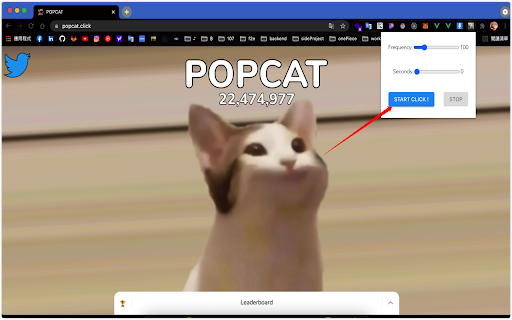
🤖 Auto click bot 🚀 auto click bot 一個可以快速點擊鍵盤上的按鍵的插件! 衝吧讓你的國家衝到第一吧! 只需要單擊按鈕,可客製化速度 次數,達到連點效果。

GG Auto Clicker 1.2
GG Auto clicker helps you automate mouse clicks on your chrome browser and has multiple options for automation. Note- ALL THE BUGS IN EXTENSION HAVE BEEN RESOLVED. IT WORKS PERFECT NOW. Hello people of the internet, we made an auto clicker for y’all that works, cherry on the top, in your chrome! ☆ GG Auto clicker chrome extension ☆ The first chrome extension with multiple clicking features to automate mouse clicks on chrome browser. NOTE - Press Ctrl and comma together to start. (Ctrl + ,). Don’t get confused! The plus symbol only means that ctrl and , should be pressed together (don’t press +) Support email - hello@autoclicker.gg (feel free to reach out for support) Allow us a moment to explain all the features to you- ✓ Click Interval: You can select the click interval between two clicks and set the unit. Example: 1 millisecond, 10 seconds or 20 minutes. ✓ Click options: You can select right or left, single or double mouse options. ✓ Click repeat: You can set the number of times it should click. Press “NEVER STOP” if you want it to run until stopped. ✓ Cursor position: You can click on current cursor location, or pick X-Y coordinates using Ctrl + / from anywhere on the screen and manually input them. ✓ Fill in your required settings. ✓ Leave the boxes that you don’t want to change, as it is. ✓ Save settings. ✓ Go back to your desired chrome window where you want to run the auto clicker online. Click on the screen once. ✓ Press Ctrl and comma buttons together to start (ctrl + ,) - please do not use the +, you only have to use two buttons simultaneously- the + is only for showing you which buttons to use together. Here are the shortcuts / commands you can use. ★ To start the auto clicker, press Ctrl + , ★ To stop, press Ctrl + . ★ To pick X-Y coordinates, press Ctrl + / THAT IS IT, SEE THE MAGIC HAPPEN. You will find two other options at the bottom in colour- ★ Reset settings: It will reset the settings to default. ★ Save settings: It will save your current settings. (It will stay like this, unless you press reset). The chrome extension is free of cost and all the features have been thoroughly tested by our developers. But if you still find any bugs or face any issue operating, feel free to email us. ★★★ EMAIL US at hello@autoclicker.gg for any kind of support. ★★★ Please don’t drop a negative review, before reaching out to us. We will make it work for you, in most cases.

Auto Clicker - AutoFill
AutoFill input field or auto click button or link anything anywhere.You can configure and check click speed test Need help? Chat with us on https://discord.gg/ubMBeX3 Easily fill input fields, click buttons, or interact with any link anywhere. Configure it in just a few steps and operate like a PRO. Features: ⚡Auto click / Auto fill functionality ⚡Delay before click/fill ⚡Retry in case the element takes time to load ⚡Repeat single action/group of actions ⚡URL support with regular expression matching ⚡Start time configuration ⚡Manual / auto start options ⚡Fill form values from Google Sheets ⚡Fill random values ⚡Perform operations like append, prepend, replace, and clear ⚡Copy and paste from clipboard ⚡Fetch values from query parameters ⚡Scroll page to specific element or location ⚡Trigger mouse and keyboard events ⚡Close window after job completion ⚡Run browser default functions ⚡Check within iframes ⚡Google Drive backup ⚡Notification on Discord server ⚡Check conditions before performing actions Developed with HTML, CSS, and JavaScript, you can quickly configure your tasks using XPath and operate like a PRO. Instead of leaving a bad rating, please report bugs https://github.com/Dhruv-Techapps/acf-docs/issues. Your feedback helps us improve Auto Clicker - AutoFill. Give early feedback: Let us know what you think and help make Auto Clicker - AutoFill a better extension.

Blooket Hacker
Studyoutlaws Blooket Assistant: answer visibility for homework and live games, timing + accuracy control, and user-driven behavior. Blooket Hacker is a powerful Chrome extension built to enhance your Blooket experience with smart automation, real-time answer solving, and advanced farming tools. Whether you're playing live games or grinding Study mode, StudyOutlaws helps you progress faster, smarter, and more efficiently. ⚡ Designed with performance and simplicity in mind, the extension features a clean control panel, real-time syncing, and customizable automation settings — plus weekly giveaways and referral rewards to unlock Pro and Ultimate access. 🔐🎉 - 🚜 Blooket XP + Coin AutoFarmer (Beta) — Instantly get the daily Max Coins/XP using our website - 🔗 One Time Account Linking — Set it once and let it run - 📅 Smart Scheduling (Daily / Weekly) — Consistent scheduling custom to your preference - 📊 Run Tracking System — See active and completed sessions -⚡ Improved Solver Speed & Accuracy — Faster, more reliable answers using ai for all game modes - 🤖 AI Fallback System — Solves unknown questions automatically for all game modes -⚡ Sync & Solve System — Refresh and solve instantly with one click - 🧩 Autosolve Mode — Automatically answers questions with adjustable delay & accuracy Everything in Starter plus: Advanced automation for users who want more control and higher limits. -⚡ Autosolve Controls — Customize delay and accuracy - 🎛️ Panel Customization — Toggle dark mode, highlights, and more - 🧪 Debug Logs Access — Advanced diagnostics and troubleshooting Perfect for getting started instantly: - 🎯 Tier-based referral rewards (up to 90 days Ultimate) - 🎟️ Referral entries boost your chances - 🎁 Bonus giveaway entries from free referrals - 🔒 Google login support - ⚡ Fast, simple entry for all users - ✨ Full UI redesign — cleaner, faster, smoother Upgrade your Blooket experience with a fast, automated, and feature-rich Chrome extension designed for performance and simplicity. 🚀

Laser Cat
Shoot laser at things you want to remove from the internet This extension adds a laser cat to your internet. Use the laser to zap things you want to remove! If you like cats and lasers you are going to LOVE this extension. == Here's how to use the extension == 🌍 Step 1: Go to a website 😺 Step 2: Click on the activate button 🌈 Step 3: Click on the page to shoot laser! This permission is needed for adding a laser cat to the website. Laser Cat **DOES NOT** collect any of your data or your browsing activity on any websites. As a privacy advocate myself, I prioritise your privacy above all. If you want to read the privacy policy and terms of service you can find it at my website https://lasercat.app#privacy == Feedback and bug reports == If you find a bug or are having issues please don't post your bug report here - contact me directly at hello@lasercat.app so I can fix it asap. If you like Laser Cat, please help spread the word by giving it a 5 star rating here or share it with your friends 😄 If you are not fully satisfied, please contact me at hello@lasercat.app and I'll make sure to help. I'm currently in the process of creating brand new characters. The long term idea is to create a lot of cute/funny characters with unique looks and feels. You can unlock all characters with a one-tome support or alternatively unlock them with points based on how long time you have used the extension. If you have some good ideas for new characters, feel free to throw me a message! If you want to learn more about my extension you can go to my website https://lasercat.app. Here you can read the privacy policy, terms of service and FAQ. I will keep improving Laser Cat! Stay tuned for updates in the future 👍
