
iapifmceeokikomajpccajhjpacjmibe


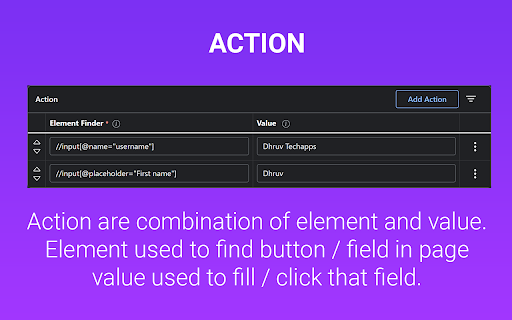

AutoFill input field or auto click button or link anything anywhere.You can configure and check click speed test Need help? Chat with us on https://discord.gg/ubMBeX3 Easily fill input fields, click buttons, or interact with any link anywhere. Configure it in just a few steps and operate like a PRO. Features: ⚡Auto click / Auto fill functionality ⚡Delay before click/fill ⚡Retry in case the element takes time to load ⚡Repeat single action/group of actions ⚡URL support with regular expression matching ⚡Start time configuration ⚡Manual / auto start options ⚡Fill form values from Google Sheets ⚡Fill random values ⚡Perform operations like append, prepend, replace, and clear ⚡Copy and paste from clipboard ⚡Fetch values from query parameters ⚡Scroll page to specific element or location ⚡Trigger mouse and keyboard events ⚡Close window after job completion ⚡Run browser default functions ⚡Check within iframes ⚡Google Drive backup ⚡Notification on Discord server ⚡Check conditions before performing actions Developed with HTML, CSS, and JavaScript, you can quickly configure your tasks using XPath and operate like a PRO. Instead of leaving a bad rating, please report bugs https://github.com/Dhruv-Techapps/acf-docs/issues. Your feedback helps us improve Auto Clicker - AutoFill. Give early feedback: Let us know what you think and help make Auto Clicker - AutoFill a better extension.

Auto Clicker - AutoFill [BETA]
AutoFill input field or auto click button or link anything anywhere.You can configure and check click speed test Welcome to Auto Clicker - AutoFill Beta for Chrome! The stable version can be found here: https://chrome.google.com/extensions/detail/iapifmceeokikomajpccajhjpacjmibe Fill input field or click button or link anything anywhere. easy configure in few steps and work like PRO Auto click / Auto fill Beta is chrome extension developed with HTML, CSS, JavaScript. Quickly configure your job using XPath and work like PRO. Please note: Beta version might and sometimes most probably will contain bugs ;) Live on the bleeding edge: Try out our latest features. (They'll be rough around the edges!) You can install Auto Clicker - AutoFill Beta alongside other channels of Auto Clicker - AutoFill for Chrome. Give early feedback: Let us know what you think and help make Auto Clicker - AutoFill for Chrome a better extension.

Auto Refresh & Clicker
Auto Refresh & Click the button with keywords. Any questions, please contact cameoshell09@gmail.com "Auto Refresh & Clicker" is a lightweight and easy-to-use browser extension that helps you manage web pages automatically. Not only can it automatically refresh the web page according to the time interval you set, ensuring that you get the latest content in a timely manner, it can also monitor whether the button or link you specify appears: when the button or link appears, "Auto Refresh & Clicker" can automatically click it for you. Ideal for users who need to frequently refresh web pages and click on specific elements. Highlights: • Auto refresh: Set the refresh interval to keep web pages updated without manual operation. • Intelligent monitoring: Specify a button or link and the program will automatically detect its occurrence and trigger a click. • Lightweight and easy to use: Simple interface, convenient and fast operation methods, improve your browsing efficiency. • Save time: Automatically complete repetitive operations, freeing you from tedious web page management. For people: • Users who need to monitor web page updates in real time. • Users who want to browse the web more efficiently.

Auto Clicker - AutoFill [DEV]
AutoFill input field or auto click button or link anything anywhere.You can configure and check click speed test Welcome to Auto Clicker - AutoFill Dev for Chrome! The stable version can be found here: https://chrome.google.com/extensions/detail/iapifmceeokikomajpccajhjpacjmibe Fill input field or click button or link anything anywhere. easy configure in few steps and work like PRO Auto click / Auto fill Dev is chrome extension developed with HTML, CSS, JavaScript. Quickly configure your job using XPath and work like PRO. Please note: Dev version might and sometimes most probably will contain bugs ;) Live on the bleeding edge: Try out our latest features. (They'll be rough around the edges!) You can install Auto Clicker - AutoFill Dev alongside other channels of Auto Clicker - AutoFill for Chrome. Give early feedback: Let us know what you think and help make Auto Clicker - AutoFill for Chrome a better extension.

Auto Clicker Pro
Professional auto clicker with advanced features. Set click positions, intervals, and automate mouse clicks in your browser. Auto Clicker allows you to set the desired click interval, choose a specific location on the screen, and start automated clicking with a single button press. HOW TO USE AUTO CLICKER? Using Auto Clicker is extremely simple and requires no technical knowledge. Follow these steps to start automating your clicks: Step 1: Install the Extension Install Auto Clicker from the Chrome Web Store. Click on the extension icon in the browser toolbar to open it. Step 2: Set the Click Position Click on the “Set Position” button. Move your mouse to the location where you want the clicks to happen. Press the Q key to confirm the position. You can also add multiple click points: the auto-clicker cycles through them sequentially. Note: the extension cannot work on protected page like chromewebstore.google.com or on local file opened in the browser. Step 3: Adjust Click Settings Set the click interval (seconds). Free version limit: min 0,1 clicks per second. Choose the number of clicks. Free version limit: max 100 clic Step 4: Start the Auto Clicker Press the “Start AutoClicker” button to begin automated clicking. Or press at the same time CTRL+Q to start. The extension will repeatedly click at the selected position according to your settings. Step 5: Stop the Auto Clicker Click the "Stop" button to end the clicking process. Alternatively, press CTRL+M to stop clicking instantly. KEY FEATURES ✅ Automated Mouse Clicking Set up your clicking process and let Auto Clicker do the work for you. Just configure the interval, set the number of clicks, and watch as it clicks automatically. 🎯 Custom Click Position Record a specific point on the screen where you want the click to occur. Press the "Set Position" button, move your mouse to the desired spot, and lock it in place by pressing Q. The extension will then repeatedly click at that exact position. ⏳ Adjustable Click Interval You can set how frequently the clicks should happen, from milliseconds to seconds. Whether you need fast-paced clicking for games or a slow, steady clicking for work tasks, this feature gives you full control. 🔄 Set Number of Clicks Enter the number of clicks you want, and the extension will stop automatically after completing the set count. 🖱️ Works in the Background & Scheduler Once activated, the auto-clicker keeps running in the background, allowing you to continue working on other tasks without interruption. You can also schedule a start and stop time! ⏹️ Easily Start and Stop Control your clicking process effortlessly. Start clicking with a single button press, and stop it anytime using the dedicated stop button or by pressing the shortcut key (Q). 🖥️ Lightweight and Fast The extension is designed to be minimalistic and efficient, ensuring it doesn’t slow down your browser or interfere with other tasks. 🔐 Safe and Secure We respect your privacy. Free Auto Clicker does not collect any personal data or track your browsing activity. It is designed solely for automating clicks within your browser. NOTE: The free version allows you to do not set an interval
