
djncfliejhhejjgbhcopflpnlaeicnco
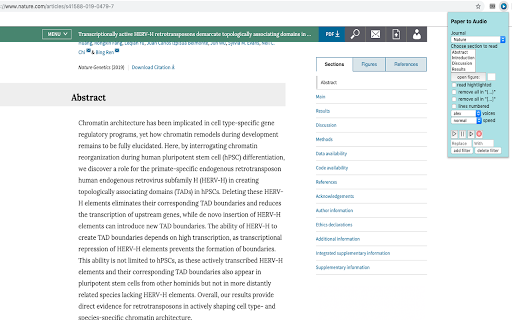
Allows one to turn the text in academic papers to speech. Can be done by selecting a section (Abstract, Introduction etc.) or… Allows one to turn the text in academic papers to speech. Can be done by selecting a section (Abstract, Introduction etc.) or highlighting text. NOTE: NOT GUARANTEED TO WORK ON ALL COMPUTERS- PLEASE ENSURE IT WORKS ON YOUR SYSTEM BEFORE DONATING. Instructions: 1. Install the app and refresh all tabs that are opened in chrome before using on any of them. 2. Open the page of an academic journal and either highlight the text of interest or select a section of the paper that you would like to be read from the "Choose section to read" menu. 3. Press the play and pause buttons to start and pause the speech. When finished listening- you must click the cancel (X) button to stop the speech so that you can move on and read something else. Speed and voice options are also available. 4. Rewind and fast forward options are available through the according icons. You can also go back and forward paragraphs with the up and down arrows (how many paragraphs you want to rewind/skip can be input in the textbox beside these buttons). NOTE: rewind/ forward options are only possible when reading the paper in terms of sections i.e. not when highlighting/selecting text with the mouse. 5. If you are reading highlighted text you must have the "read highlighted" checkbox option selected- this should work for google docs too. (NOTE: If the document is a PDF- you must highlight the text of interest and right-click and then select "read" option) 6. The app will remove references according to the journal that you select- see below the modifications that will be made Cell: Input: The cat sat on the mat (Williams et al., 2019). It was comfortable (Jones et al., 2019; Fred et al., 2014). Spoken: The cat sat on the mat. It was comfortable. Nature: Input: The cat sat on the mat2,3. It was comfortable4-7. Spoken: The cat sat on the mat. It was comfortable. Science: Input: The cat sat on the mat (1). It was comfortable (2-6). Spoken: The cat sat on the mat. It was comfortable. NOTE: to indiscriminately remove/skip text in circular brackets- select the checkbox "remove all in '(..)'" and the same for square brackets. 7. The app may either pronounce words certain words incorrectly or unwantedly omit certain characters due to selected reference style. To mitigate this, there is a pair of text boxes labelled "Replace" and "With" where you can enter the text that you want to correct so that it can be pronounced correctly or prevent unwanted omission due to referencing. The "Add" and "Delete filter" buttons allow to add/ delete as many "Replace" and "With" text boxes as are needed. Regular expressions are accepted in text boxes (in javascript style). Full tutorial for use is available at: https://www.youtube.com/watch?v=g8FF2T0xBLg

Ausum
Turn any article into a short audio summary, with just one click. Ausum is a free Chrome extension that turns every article into a short audio summary, with just one click. When you find an article you want to summarize, just click the Ausum icon and listen to the summary, instantly. * No Sign-Up Required: getting an audio summary is always a click away. * Avoid Ads: avoid all the distractions and annoying ads on the article, with a better, cleaner experience * Instant Smart Summaries: smart summarization technology ensures you get the most important, accurate highlights of any story. * Save Time: with audio, you’re free to do other tasks, listen while walking, or deep-diving the web. * Download Audio Summaries: all your articles so you could listen anytime, anywhere * Natural Voice: high-quality text-to-speech technology, for a natural listening experience. * Share: share summaries with others. Ausum turns text into lifelike speech. Users can automatically summarize any webpage into audio, as you browse. With just one click, Ausum generates a summary including the important ideas and facts of any long article, research report, document, essay into a downloadable recording you could take with you. Save time and read smarter, with audio. Next time you’re reading the news, science research journals, health reports, or sports analysis… Ausum will convert all your long text into a short-form audio summary so you can listen for the most important, accurate highlights. We are constantly optimizing and improving our text to audio summary extension, so if you see bugs or have suggestions to make Ausum better, please don't hesitate to provide feedback.

Outline: quick notes
An extension that let you save you quick notes while browsing Outline help you to save quick notes while browsing on the internet. The process for taking notes with outline is simple. You simply need to install the extension. And start adding whatever you like on the internet. This project I created for my personal use but later I realise it can be used by anyone. So here it is available for everyone. Why Outline? 1. Privacy focused. The data can only read by you only. Its between you and your browser. Code is open sourced. So you can always look whats going. No one can recover your info. If it's gone, it's gone 2. Rich text formatting allowed. You can highlight according to your convenience. 3. Less clutter info: Not everything you read should be in your notes. Sometimes you just need some pointer which you can review later. You can think outline as quick draft which you can save all your info anywhere you want 4. Easy to find whatever you type Note: This extension rely chrome storage api. So it has its own limitation. If you do not need any specific notes, delete it. So that it does not give your storage warning. More you can read here: https://developer.chrome.com/docs/extensions/reference/storage/#property-local And much more feature will come soon... If you want new feature request or found any bug. Feel free to open ticket here: https://github.com/shubhamV123/outline

Edform for Teachers
Import any PDF to Edform and transform it into interactive auto-graded activity. Edform for Chrome allows you to upload PDF documents to Edform in just a few clicks. After installing Chrome Extension, any PDF file opened in Chrome will have an Open With Edform button. By clicking the button, the file is immediately imported to the Edform, and you can continue working with it by creating an interactive worksheet. The teacher can upload the document into the builder to modify it by adding different question types, video, and audio materials, combining with pages from another document. Then set the assignment in student-paced or live mode when the activity is ready to use, depending on the specific lesson objectives. Moreover, teachers can monitor students` progress, grade their work instantly and provide meaningful written, audio, or video feedback to improve students` knowledge. Edform allows users to integrate with tools they already use, such as Google Drive, Dropbox, and One Drive, and share assignments in Google Classroom and other Learning Management Systems. The platform's interactive features save teachers' time and increase students' productivity.

Sign Learner
Learn sign language passively as you surf the web. As you browse the internet normally, Sign Learner will highlight words on each webpage randomly. Simply hover over the highlighted word and a video with the corresponding sign will appear! Support for either American Sign Language (ASL) or British Sign Language (BSL). ✨ Features: - Learn new signs in sign language and reinforce signs you know in a fun and easy way (4000+ signs) - Focus on learning specific topics, with with available signs split into categories such as Nature, Family, Animals, and more - Need a break from learning? Pause Sign Learner at any time or on any website - Customise your learning experience by changing the size of the video popup and the colour of the highlighted word - Exclude words from being shown that you want to ignore or have already learnt fully - Handy search box to lookup specific signs at any time 🏗️ Coming soon: - Additional context for BSL signs - Support for Australian Sign Language (Auslan) Make the most of your time on the internet and learn sign language along the way! Please note that Sign Learner should be used as a supplement to other learning tools such as an official course and/or lessons with a sign language teacher. If you have any feedback or questions, or find an incorrect or misleading sign, please email me at linus@signlearner.com :) *************** About Privacy *************** When you install Sign Learner, a message appears saying that the extension can “read and change all your data on the websites you visit.” - That's actually just the default permission required, specifically we need it to be able to identify the words on each webpage so that we can add in a sign to show you, and keep you learning. Sign learner does not track, use, or need any personal data from you :)
