
djfpglmdpdpjmkmdgeldibbfaildlkgh
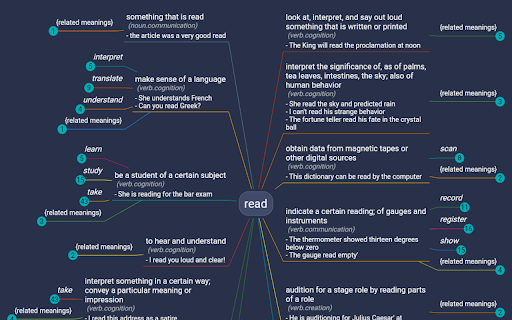
It is a visual dictionary/thesaurus. It uses a mindmap like interface to show relationships between words and definitions. WordMapDictionary is a visual dictionary-cum-thesaurus. It uses a mindmap like interface to show relationships between words, definitions and other definitions. - It uses a unique mind-map style visual interface - While normal dictionaries show definitions of words in isolation. This app presents you with a holistic mindmap around the word. It shows meanings, and how those meanings relate to each other. It allows you to go deep, or broad, or sideways, to see things in different angles. See video for usage: https://www.youtube.com/watch?v=55RTcGoKqtE - Select a word on any page, right click, from the dropdown, click on "Open WM Dictionary". ("Open WM Dictionary" button is only shown if you actually selected the text). - This will open dictionary view on the side. - If dictionary view is already open, you can also select any word (and it will update dictionary view with newly selected word). - To export current word definition map as png: - From app bar, click on export icon. - To share current word definition url: - From app bar, click on share icon. - To search for a word: ## Extension Options From options page, you can configure: - size of dictionary view (in percent width of the page) - side, whether dictionary view is shown on the left or the right side.

keyNote - web, PDF & youtube AI summary
Summarize webpage, youtube and PDF with 8 AI bots e.g ChatGPT, Copilot, Gemini,Claude. Create mindmap & highlights. Export to notion 🪄 Summarize webpage, Youtube and PDF using 8 AI Bots e.g ChatGPT, Claude, Gemini. 📢 Top Features ✪ Summarize webpage, Youtube and PDF by using 8 AI bots ✪ Webpage Summary, Mindmap & Highlight ✪ Free and unlimited usage. (no feature behind Paywall) ✪ No Signup required ✪ Don't ask permission: "Read and change all your data on all websites" ✪ Summarized content is editable. Edit content in markdown format before export. ✪ Live preview markdown editor with syntax highlight ✪ Copy or download summarized content ✪ Export summarized content to notion, Obsidian ✪ Lightweight 100KB only ✪ No tracking & no Ads. ✅ Summary, mindMap and highlight with 8 AI Bots keyNote is a free Chrome Extension that lets you quickly access the summary of the YouTube videos you are watching or any articles with 8 AI Bots. Use this extension to save time and learn quickly. 8 AI Bots: The ultimate tool for easy and efficient web page summarization! With just a few clicks, you can now summarize any web page, Youtube video or PDF document . ✅ Auto Organize notes keyNote auto-organizes your saved summarized content in 3 different ways: 1. Domain-wise 2. Date-wise 3. Folder-wise -> Unlimited sub-folders Right-click on extension's icon then click on "noteboard" icon to open noteboard ℹ️ Support For contact, Please mail us on 📧 noterailhelp@gmail.com Join keyNote on Google Groups: https://groups.google.com/g/keynote You can change side panel position from settings -> appearance ⚠️ This extension is still in beta

Webmapper
Constructs a map of the web using the user's browser history. Webmapper uses your browsing history to construct an interactive, personalized "map of the web as you see it". Every webpage you visit is placed on the map and sized by how often you visit it. Similar pages are grouped into clusters. **Interactive -- click on text to visit pages, or zoom in on domain names** **Zoomable -- use mousewheel / scrolling to zoom in and out on clusters** **Searchable** **Site-Specific -- click on polygons to construct a map specific to a site, e.g. a map of all your Google searches, or Wikipedia entries** **6 quality color palettes** **Map sites visited in the last 10, 20, 30, 50, or 100 days** Developers: Ryan Hamerly, Scott Chung, Sheta Chatterjee, and Milinda Lakkam

MindMap
In today's competitive digital world, it's not enough to have a great website or product. You need to control the consciousness of your users and make them aware that you are a key player in your market. Associating your website with other popular websites is a great tool to achieve this, as it helps users respect your website and the products or services it offers. The extension aims to help you create a map of websites and users' navigation routes, including all the popular websites in your market, and add your website to that map. Then, use the extension to help you clean up the map, modify icons and titles, and publish. Example: As Wine Farm owner "MindWine", I would like to create a site map of all the big brands (Drambuie, Smirnoff, Campari, etc...) and my brand "MindWine". and publish it. That is how you associating your website with other popular websites. Here are the key features of the MindMap Extension: Map Creation: The extension helps you create a map of popular websites and navigation routes in your market. This map includes all the key players, including your own website. Map Cleansing: The extension helps you clean up the map by removing any unwanted sites, modifying icons and titles, and making sure that the map accurately reflects the websites and products in your market. Landing Page Creation: Once the map is ready, the extension helps you create a landing page with resources such as movies and snapshots. This landing page is designed to promote your website and products to users who are interested in your market. Viral Promotion: The extension helps you promote your landing page and map through social media and other channels to make it go viral and reach a wider audience. Recordings: The extension allows you to record user behavior on the map and landing page, which can be used to analyze and optimize user engagement. Click the Navigation Aid icon on the browser toolbar to see a map of navigation trends in your context. Once you click on the navigation guide, a map with routes will be displayed. On the map, you can see the current page displayed in the browser, It is surrounded by a blinking circle, Follow the white running dots! The white dots moving on the routes show you the trends of the community. Which navigations were made by the community to get to the current page? And which navigation trends are recommended from the current page. The extension gives you the tools to Create, Edit Records & Share, the map. Privacy: No navigation data is sent without your consent. The data unknownymous rendered in the community route algorithms to determine the best routes, we can offer.

Ausum
Turn any article into a short audio summary, with just one click. Ausum is a free Chrome extension that turns every article into a short audio summary, with just one click. When you find an article you want to summarize, just click the Ausum icon and listen to the summary, instantly. * No Sign-Up Required: getting an audio summary is always a click away. * Avoid Ads: avoid all the distractions and annoying ads on the article, with a better, cleaner experience * Instant Smart Summaries: smart summarization technology ensures you get the most important, accurate highlights of any story. * Save Time: with audio, you’re free to do other tasks, listen while walking, or deep-diving the web. * Download Audio Summaries: all your articles so you could listen anytime, anywhere * Natural Voice: high-quality text-to-speech technology, for a natural listening experience. * Share: share summaries with others. Ausum turns text into lifelike speech. Users can automatically summarize any webpage into audio, as you browse. With just one click, Ausum generates a summary including the important ideas and facts of any long article, research report, document, essay into a downloadable recording you could take with you. Save time and read smarter, with audio. Next time you’re reading the news, science research journals, health reports, or sports analysis… Ausum will convert all your long text into a short-form audio summary so you can listen for the most important, accurate highlights. We are constantly optimizing and improving our text to audio summary extension, so if you see bugs or have suggestions to make Ausum better, please don't hesitate to provide feedback.
