
dinfdkpilnidebademfldlbpbjkemkod

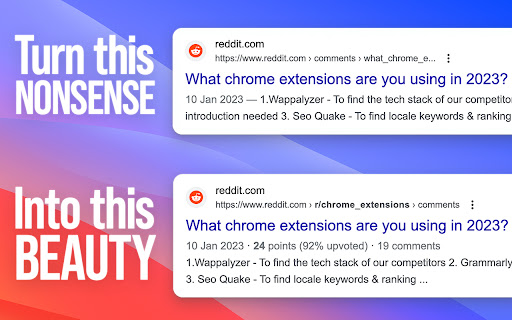


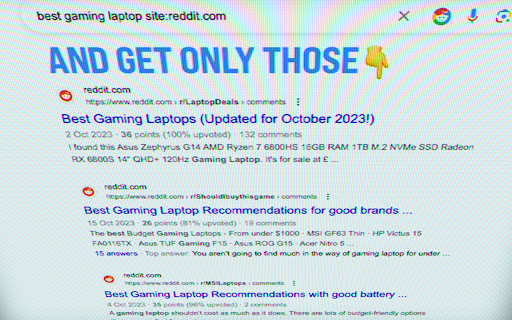
Find Reddit posts with just one click. Preview their quality with zero clicks. This extension adds a "Reddit" button to your Google™ search page. Clicking it you will only see results from reddit.com Additionally it displays the following metadata for every Reddit post: Correct creation date | Score | Upvote ratio | Number of comments If you find it useful, please support it by leaving a rating or by spreading the word! Thanks to marioortizmanero who created the userscript which inspired this extension! Google™ search is a trademark of Google LLC. Use of this trademark is subject to Google Permissions. Reddit™ is a trademark of Reddit Inc. This browser extension is independently developed and is not affiliated with Google or Reddit in any way.

Reddit Redux
A suite of enhancements for new Reddit. User tags, custom themes, account switcher, keyword filter, and more! An extension that enhances your Reddit experience with features including: • Custom user tags • Advanced filters for hiding posts • Better expand/collapse controls for comments • Account switcher • Clear recently viewed subreddits button • Custom theme colors • Post authors in Home/Popular/All feeds • Video playback speed controls • Mute users to hide their comments and posts • A variety of other enhancements! (Redux is only supported for the latest version of Reddit)

New Reddit Enhancements & Chemo (nREC)
Improvements for new Reddit: subreddit filters, ad-block, user-tags, video downloading, and more. Hide trending and sidebars. Add options to hide the trending strip, right sidebar, and/or subreddit sidebar. Blur NSFW. Quick option to blur NSFW thumbnails. Not a replacement for the similar option in the Reddit settings but provides a shortcut to quick turn on/off should the need arise without having to navigate through the settings. Fix image previews. Clicking on image previews take you directly to the image itself, instead of the lightbox element. Direct image links. Bypass Reddit forcing direct image links onto a preview page/template. Add video download links. When viewing a video, download links are provided, using both a direct link and a link through rapidsave.com. On installation, most features are enabled by default. However, features like Reddit Chemo and user tags need to be populated to see their full effects. Features can be enabled, disabled, and modified through the extension's UI (accessed by clicking the extension logo on the browser Toolbar). Most features, such as dark mode, hide trending and sidebars, blur nsfw, fix image previews, direct image links, and add video download links can simply be toggled in the UI using the various controls. Add video download links attempts to add a link to the video (with buttons in the upper-left corner). In the feed, it will attempt to find and apply a direct video link. However, this is only possible with short videos. Otherwise, if the buttons do not appear, try opening the post/comments. Then two links will be provided: one for the direct video (usually without sound as Reddit separates the video/audio feed) and another using RapidSave (which can rectify the video download with audio). To add subreddits to Reddit Chemo's ban list, simply click the "ban" button next to posts in the r/all or r/popular feed from subreddits you do not wish to see. By default, a small strip will be shown in place of the blocked post with an option to remove the subreddit from the ban. To hide this strip, toggle "Show/hide blocked posts" in the extension's UI. To remove subreddits from the ban go to "Edit banned list" in the extension's UI to view the full ban list and remove subreddits from it. The effects of removing subreddits from the ban list may not take effect until a page change or refresh. User Tags. Next to every username (including your own) you will see an empty 'tag' icon (or an active tag, if one was set). To set or edit this value, simply click once and type to edit the text. When in edit mode inside of a tag, click the tag again to cycle different tag colors. Click outside the tag or press 'enter' to save changes or press 'esc' to cancel changes. If the new tag value is set as empty or whitespace, the tag will be removed. All existing user tags may also be viewed and edited from the extension's UI. Click "Edit user tags" to get a list of all existing user tags and edit individual tags as necessary. If you liked this extension, consider donating @ https://ko-fi.com/F1F25YGLA

Karamel: View Reddit comments on YouTube™
Step up your viewing experience by embedding relevant Reddit comments under YouTube videos. Karamel is an open-source extension that adds Reddit comments to any YouTube videos you watch. - View the comments for all posts on Reddit of the video you're watching - Switch between YouTube and Reddit comments with a conveniently placed button - Upvote, reply to, and save comments on the same page! - Supports dark and light theme - Change the default comment mode and sort methods in the options - Open-Source on GitHub: https://github.com/odensc/karamel NOTE: This extension is in no way affiliated with YouTube, LLC; Google LLC; Reddit Inc.; or any company mentioned on this page.

Unedit and Undelete for Reddit
Show original comments and posts from before they were edited or removed Unedit and Undelete for Reddit relies on Pushshift to work. Checking r/pushshift for updates is recommended. View original comments and submissions from before they were edited or deleted directly within Reddit. The unedited post will be displayed inline, right below the current comment or submission's text. This script is compatible with both Reddit's Redesign and Old Reddit. The Pushshift Reddit API is used for fetching the comments and submissions as they will be archived soon after they have been posted.
