
dicgkflojhbopmagcacdklcpdfdcnhko
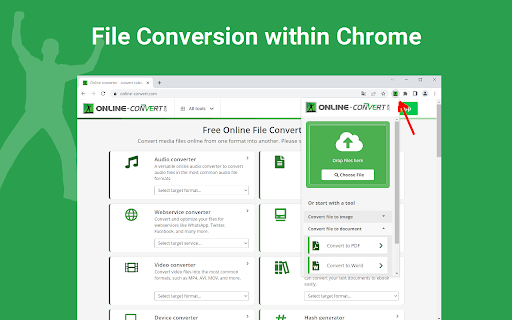
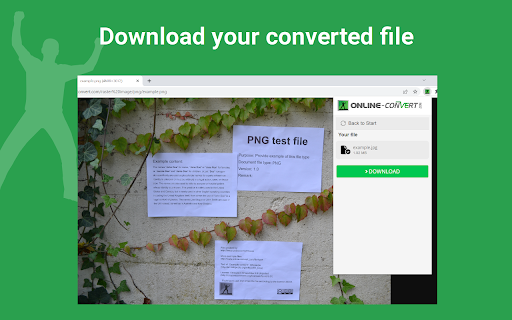
Convert your files from one format to another. The official app from online-convert.com High quality file converter to convert files from one format to another. Integrated with Gmail. Speed up your productivity by adding online-convert.com to Chrome! ★ The tool adds an icon in your extension toolbar and lets you convert files there without the need to visit our webpage. ★ The file converter contains the following conversion tools: - An image converter for raster & vector images - A document converter - A video converter - An audio converter for music - A compression tool to minimize files (e.g. before sending them via email) ★ The integration with Gmail is called when you compose a message and click on the small icon within the compose window. ★ The best about Online-Convert.com is that you can convert across file categories. That way you can convert an image containing text using OCR to a fully editable Word document. If you have any questions, requests or need to get in touch with us, send us an e-mail to time2help@online-convert.com By installing the extension, you agree to our terms at https://www.online-convert.com/terms

Convert and Save Image as
Convert and Save Images to different formats directly from your browser. Easily convert and save images directly from your browser context menu or automatically when downloading. Supports a wide range of input formats including AVIF, BMP, JFIF, and others, allowing conversion to popular formats such as JPG, PNG, WebP, and AVIF (if supported). Transparency is preserved when supported by the output format. Your data stays 100% private: - No external server communication - No data collection or tracking - All image processing is done locally within your browser 1. Right-click on any image in your browser 2. Choose a target format (e.g., "Save as PNG") 3. The image is instantly converted and downloaded - Fast, one-click image conversion - Automatic conversion option for downloaded images - Compatible with many source image formats - Maintains transparency (for PNG/WebP/AVIF) - Customizable default output formats per image type - Works entirely offline - Lightweight and user-friendly interface - Supports dark mode Q: Does the extension work offline? A: Yes. It performs all operations directly in your browser, with no need for internet access. Q: Are my images ever uploaded to a server? A: Never. All image handling happens on your local device, no cloud, no tracking. Q: How do I set default conversion formats? A: Click the extension icon in the toolbar, go to the Options page, and configure your preferences per image format. You can also enable or disable automatic conversion here. Q: What output formats can I save to? A: Supported output formats include JPG, PNG, WebP, and AVIF (dependent on browser support).

Converteasly: Free Online PDF, Image, Office, and File Converter Tools
Ultimate file conversion tool for your browser! Convert files into desire format. Fast, easy, and secure. Converteasly provides free tools that solve all your file-related problems! 🚀 Whether it’s converting images to PDFs, PDFs to images, text to PDFs, merging PDFs, splitting PDFs, protecting PDFs, PDF to Excel, merging DOCX, image tools, Tools for developer and much more — we’ve got you covered! 🔧 Our tools help users convert their files into the desired format with lightning-fast processing 🚀 thanks to our high-performance computing power. Files are uploaded and converted in seconds ⏱! For your peace of mind, both processed and unprocessed files are automatically deleted after 30 minutes. And the best part? Converteasly is 100% free to use — no pesky registration required! 🙌 --- 📲 QR Code Download Feature on Converteasly We’re thrilled to introduce an innovative and seamless way to download your converted or processed files using a QR code! 🎉 This feature provides a fast, secure, and convenient method to download files directly to your mobile devices or any device with a QR code scanner. 📥📱 --- 🌟 Key Benefits of QR Code Download Feature 🌟 - Convenience: Quickly download files without having to type long URLs or use complicated interfaces. QR codes make it super easy to access your files! 🔑✨ - Cross-Device Compatibility: Whether you’re on a smartphone, tablet, or computer, QR codes work on all devices. Just scan and download your files, no matter where you are! 🌍📱💻 - No Need for Email or Manual Links: Say goodbye to emails and long URLs. QR codes provide a direct and error-free method for accessing your file. 🚫📧 - Secure and Unique Access: Each QR code is unique to the file, ensuring that the download link is always correct. Extra security to keep your files safe! 🔒🔑 - Easy Sharing: Share the QR code with friends, colleagues, or clients so they can download the file easily. No need to send attachments or worry about broken links. 📤🤝 --- The QR Code Download feature is a game-changer for Converteasly! ⚡ It makes downloading files faster, secure, and user-friendly, whether you're using a desktop, mobile device, or sharing files with others. Say goodbye to the old download process and embrace the future! 🌟 --- 🛠️ Key Features of Converteasly 🛠️ 1. PDF to Image Converter: Convert PDFs into high-quality image formats (JPEG, PNG, GIF, etc.) with ease. Perfect for sharing or embedding in presentations! 📄➡️📸 2. Image to PDF Converter: Turn images (JPEG, PNG, BMP, etc.) into PDFs with just a few clicks. Merge multiple images into a single PDF for better document management. 🖼️➡️📑 3. Document to PDF Converter: Transform popular documents (DOCX, DOC, PPT, XLS, etc.) into high-quality PDFs. Ensure your formatting is preserved across all devices. 📝➡️📄 4. Image Resize: Resize images to your preferred dimensions. Ideal for website thumbnails, printing, and more! 🖼️✂️ 5. Image Compressor: Compress images without losing quality. Perfect for reducing file size for faster loading times and easier sharing. ⚡🖼️ 6. Format Conversion Tools: Convert between various image formats (JPEG, PNG, GIF, TIFF, etc.) while maintaining transparency, resolution, and color accuracy. 🔄🖼️ 7. Batch Processing: Convert, resize, or process multiple files at once, saving your time and effort. 🕒🔄 8. User-Friendly Interface: Our simple and intuitive interface makes file conversion a breeze. No technical skills required! 🎨👨💻 9. Privacy and Security: Your privacy is our priority. All files are securely processed, and your documents remain confidential. 🔐🛡️ 10. Cross-Platform Compatibility: Access Converteasly on any device with an internet connection. Works seamlessly across desktops, laptops, tablets, and smartphones. 🌐📱💻 11. No Installation Required: No need to download or install any software! Converteasly is entirely web-based, saving your storage space and ensuring you always have the latest updates. 🚫💻 --- At Converteasly, we are committed to simplifying your file conversion tasks, making it easier than ever to switch between formats, optimize file sizes, and enhance your digital workflow. Whether you're a student, a professional, or a casual user, our website provides the tools you need to handle various file formats effortlessly and efficiently. 🎓💼👨💻 Supported Tools :) Unescape JSON, Escape JSON, Image Background Remover, Compress pdf, JSON Comparator, JSON Viewer/Editor, Strings/Texts/Words Comparator, Images To Pdf, Pdf To Images, Pdf To Text, Text To Pdf, Pdf To Docx, Merge Pdfs, Unlock Pdf, Protect Pdf, Pdf Page Deleter, Split Pdf, Jpg/Jpeg To Png, Png To Jpg/Jpeg, Compress Image Size, Resize Image, Rotate Image, Base64 Text Encoder, Base64 Text Decoder, WebP To Jpg/Png, Merge Docx, Docx To Pdf, Docx To Epub, Rich Text Format To Epub, Rich Text Format To Pdf, Excel To Pdf, PPT to Pdf, ODF Formula to Pdf, Jpg/Png to WebP, create digital signature, online white board and Many More!! Start converting and optimizing your files today with Converteasly! 💥

Document Converter Tool - By Convert Helper
Easily convert your documents with our browser-based Document Converter Tool. Take control over your files with the Document Converter Tool! This versatile and user-friendly extension enables you to convert various file formats directly from your browser. PDF Converter: Simplify your work by converting your files to the universally accepted PDF format. DOC and DOCX Converter: Switch between the classic DOC and the modern DOCX formats with ease. DOCM Converter: Preserve your macros by converting documents to DOCM format. RTF Converter: Maintain text style and formatting with the Rich Text Format (RTF) converter. TXT Converter: Strip away all formatting for a bare-bones text file. DOT and DOTX Converter: Convert your document templates to DOT or DOTX as needed. DOX Converter: Ensure compatibility with older versions of Word using the DOX converter. PAGES Converter: Bring your Apple Pages documents into other formats for broader compatibility. With just one click, you can convert from one format to another, saving time and increasing productivity. Whether you are a student, a professional, or anyone in need of quick file conversion, the Document Converter Tool is perfect for you.

Convert PDF to DOCX
Introducing Convert PDF to DOCX, the ultimate tool for anyone looking to change your documents effortlessly. Whether you're a student, professional, or anyone, our extension is here to help you manage your documents more efficiently. It’s designed to make the convert .pdf to .docx as smooth and efficient as possible. ✨ Features and Benefits ➤ Ease of Use: The user-friendly interface makes it easy for anyone to convert from PDF Word hassle-free. Just a few clicks, and your document is ready ➤ Fast Conversion: Time is precious, and our extension ensures that to Word conversion process is quick and efficient. ➤ High-Quality Output: Preserve the formatting and layout of your documents when you save files. ➤ Accessibility: Whether you need to know how to convert pdf to docx on Mac or Windows, our extension works seamlessly across different platforms. ➤ Simplicity: No need for complex software or lengthy procedures. Just upload your documents, and they are ready in seconds, making it perfect for users of all skill levels. ➤ Free of Charge: Enjoy the benefits of a premium tool without any cost. Convert from PDF to DOCX free with our Chrome extension. ➤ Convenience: This extension allows you to convert pdf file to docx directly from your browser. No downloads, no installations, just quick and easy conversions. ➤ Batch Conversion: Save time by converting multiple files simultaneously. Our extension is equipped to handle files of all sizes with ease. 💡 Here’s a quick rundown of what you get: 🔺 Easy-to-use interface 🔺 Fast convert PDF files to DOCX file times 🔺 High-quality output 🔺 No need for additional software convert pdf to .docx 🔺 Works on both Windows and Mac 📄 PDF to Word converter • It is user-friendly design and efficient performance make it the go-to choice for all your document conversion needs. • It’s that simple! With our tool, convert pdf to docx file is quick and effortless. • Whether you’re editing a document, sharing with colleagues, or simply archiving, having the option ensures you have the flexibility you need. • For those looking to convert PDF to DOCX free, this extension is perfect. It offers all the features you need without any hidden fees or charges. • We value your feedback and are here to help you with any issues. If you need assistance on how to convert pdf to docx, our support team is always available. 📍 Getting started with our extension is straightforward. Here’s a step-by-step guide on how to convert PDF to DOCX online: 1️⃣ Download and install the Convert pdf to docx Chrome extension from the Chrome Web Store. 2️⃣ Open the extension and select the file you want to change. 3️⃣ Click on the "Convert" button to start the process. 4️⃣ Save the convert pdf to word docx to your desired location. ✨ For additional convenience, here are some benefits of using PDF file to DOCX converter: - No registration required - Supports large file sizes pdf to word doc - Preserves original formatting - Instant conversions PDF to DOC - Secure and private 🎓 Use Cases 🔹 Students: Сonvert PDF to DOCX to easily edit lecture notes and assignments. 🔹 Professionals: Use the tool to update business reports. 🔹 Writers: converting pdf to docx to make revisions to manuscripts and drafts. 🔹 Multilingual Support: Convert multiple languages, ensuring global accessibility. ❓ How to convert pdf file to docx if it contains images and graphics? 💡 Our converter preserves all images and graphics during the conversion process. The Word document will look just like the original. ❓ What should I do if the conversion fails? 💡 If a conversion fails, ensure your PDF to .DOCX convert is not corrupted and try again. If the problem persists, contact our customer support for assistance. ❓ How to convert pdf to word and retain hyperlinks? 💡 Our converter maintains hyperlinks during the conversion process. Your Word document will have all the links. ❓ How do I provide feedback or suggest features? 💡 We welcome feedback and suggestions. You can contact us through the support section in the extension or via our website. ❓ How to convert PDF to DOC without losing special characters? 💡 Our tool is designed to preserve all text, including special characters, ensuring that your converted document retains the original content accurately. ❓ What formats does the converter support? 💡 Our extension convert pdf to docx documents. ❓ How to save pdf as Word with tables? 💡 Our converter preserves the formatting of tables in your file, ensuring they appear correctly in the Word document. ❓ Does the extension support multiple languages? 💡 Yes, our extension supports documents in multiple languages, ensuring accurate conversions regardless of the language used.
