
dhmkjjjgpjpmlfihigofeokehdehnjjg

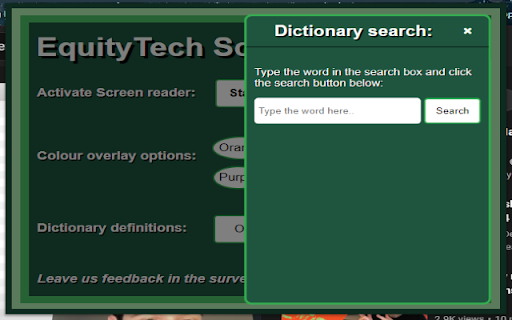
A chrome extension that works on all webpages, has a text to speech feature to read the webpage aloud to you. Also has a colour overlay option that only highlights paragraphs of text to not obscure the images like normal overlays and has a built in little dictionary so you can search a word quickly without having to open another tab. It is also in a dyslexia friendly font, with large buttons and a large interface.

Simple Screen Reader
Accessibility tool to help people listen to highlighted text on any tab in Google Chrome where they either cannot read the screen text or do not want to.

Screen Reader for Google Chrome
This extension provides aid for the visually impaired people. The extensions allow you to click on a text on a web page to read it aloud using the built-in text-to-speech (TTS) service. You can configure which TTS service to use by clicking on the extension's icon and selecting your favorite voice from the configuration dialog. It is a Google Hackathon 2012 in Warsaw, Poland, Chrome extension. Each operating system has a text-to-speech service, so consider using them first. If you need a new feature or spot an issue, you can report it on my GitHub page. I will respond as soon as possible. Remember that it is a side project, and I may have other priorities. But I will try to help as much as I can.

Screen Reader with On-Off Button
A screen reader you can turn on and off with the click of a button. Make web browsing, web development, or website testing more accessible with the Screen Reader with On/Off Button extension. Designed with developers and users in mind, this frictionless, convenient tool provides a quick and hassle-free way to experience websites through screen reading capabilities. This extension reads ARIA labels, as well as visible elements on the page. Key Features: 1. Convenient On/Off Button: Enable or disable the screen reading functionality with a simple and convenient toggle button that appears. Frictionlessly switch between regular browsing and screen reading, providing full control and flexibility. 2. Effortless Accessibility: Enable screen reading functionality to have web content read aloud, allowing developers to easily identify and verify the accessibility of their websites. 3. Streamlined Navigation with Keyboard Accessibility: Navigate through web pages using intuitive keyboard shortcuts and easily track the currently focused element with a customizable highlight, simplifying the testing process. The extension can also be fully accessed with mouse interactions. 4. Rapid Insights: Retrieve essential information about elements on the page, including tags, text content, links, form controls, and more. Gain quick insights into the structure and content of websites. 5. Meta Description Reading: Instantly access website descriptions provided in meta tags, enabling a quick overview of page content before diving in. 6. User-Friendly Experience: Enjoy a user-friendly interface and intuitive controls, ensuring a seamless and convenient experience while leveraging screen reading capabilities. 7. Designed for Convenience: Tailored specifically for both developers and users looking for a straightforward screen reader solution that’s easy-to-use, and easy to download. Note: The Screen Reader With On/Off Button is not intended as a comprehensive screen reader solution for visually impaired users. It is designed for those looking for a quick, convenient, and simple screen reader tool. Experience the power of frictionless screen reading at your fingertips today!

Accessibility Screen Reader
A comprehensive screen reader extension for web accessibility with voice navigation and on-screen text display 🔊 Text-to-Speech Capabilities * Chrome TTS API integration with Web Speech API fallback * Customizable voice selection from available system voices * Adjustable speech rate (0.1x - 3.0x speed) * Pitch control (0.1 - 2.0 range) * Volume control (0% - 100%) 📝 On-Screen Text Display * Floating window that shows spoken content in real-time * Remains visible while the screen reader is active * High contrast design for improved readability * Toggleable via settings in the popup interface 🎯 Element Detection & Announcement * Automatic element type detection (buttons, links, headings, forms, etc.) * Smart text extraction from labels, ARIA attributes, and content * State announcement (checked/unchecked, expanded/collapsed, selected) * Page load summaries with element counts ✨ Visual Highlighting * Dynamic element highlighting with customizable styles * Focus indicators with smooth transitions * Hover highlighting for interactive elements * CSS-based styling that doesn't interfere with page layout ⌨️ Keyboard Navigation Shortcuts * **Ctrl+H**: Navigate between headings (h1-h6) * **Ctrl+L**: Navigate between links * **Ctrl+B**: Navigate between buttons * **Ctrl+F**: Navigate between form fields * **Ctrl+I**: Navigate between images * **Ctrl+P**: Navigate between paragraphs * **Ctrl+T**: Navigate between tables * **Ctrl+M**: Toggle screen reader on/off Ideal for: * People with visual impairments * Users who prefer voice interaction * Developers testing the accessibility of their websites * Anyone who wants a more accessible web experience
