
dhejejdjocpapoejnoodlmodkikffieg
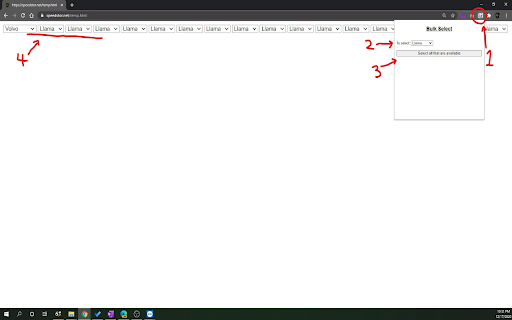
If there are many duplicates of the same kind of dropdown selects, you can use this extension to select them all at once. To use it: 1. click on the extension 2. choose the select option you want 3. click the button below the select 4. Done! All the select items that has that option available would be selected to that Update: It now also triggers the onChange event, cuz i forgot the first time :)

Multiselect
Taking too much effort to check and uncheck multiple checkboxes in a long list? Multiselect will help you get the job done quicker. Hold down Alt key and hover mouse cursor over the checkboxes to check them. To uncheck, press the Shift key and hover over those checkboxes.

Toggle checkboxes
Productivity tool to toggle all checkboxes (only non-disabled & readable once) on any page. This extension will help you Check OR Uncheck all checkbox fields on the page using a single click. It will only work for checkboxes which are readable and are not disabled to respect integrity of the UX provided by website providers. It shall also not work with websites which use custom checkbox elements than traditional checkbox elements. Update: Version 1.1 now also supports 1. 🔄 Toggle all 2. ✅ Check all 3. ❌ Uncheck all As part of page context menu options. This is a small yet a powerful productivity tool, use with caution only where its needed at your own responsibility. Hope this saves some time for you ❤️

Check Range
Shift-click first and last checkbox to select/deselect range. The "Check Range" extension is designed to enhance the checkbox selection experience in webpages. It provides users with the ability to select checkboxes within a range by simply holding the Shift key. All you have to do is select the first and last checkbox while holding the Shift key and the extension will select all the checkboxes in the selected range.

Checkbox Automator
Automatically select checkboxes, accept, and confirm Automate checkbox selection and submission with a simple hotkey for enhanced productivity.
