
dhegojkfhodaifdnkoigmdoncoonbifd
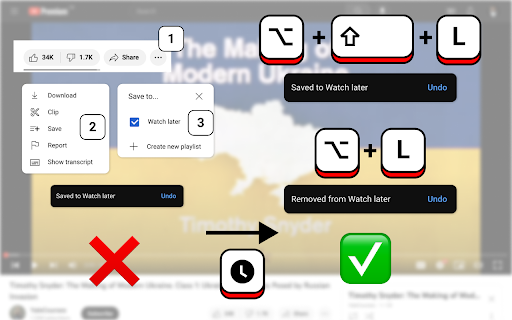
Add and remove current video or YouTube Shorts from the Watch Later list using a keyboard shortcut. For Mac: - ⌥ Option + ⇧ Shift + L to Add Video - ⌥ Option + L to Remove Video For Windows: - Alt + ⇧ Shift + L to Add Video - Alt + L to Remove Video For ChromeOS: - Alt + K to Add Video - Alt + L to Remove Video As the result the notification about successful list update should appear. Works on both regular videos and YouTube Shorts. Shortcuts can be changed in the extension's options at: chrome://extensions/shortcuts. Extension designed to work on the desktop version of the YouTube™. The following YouTube™ website updates might break the functionality of the extension, please be patient for an update. This extension is open source: https://github.com/WorldThirteen/youtube-watch-later-shortcut-ext.

YouTube Watch Later Manager
Easily remove videos you're no longer interested in or have already watched from your Watch Later playlist. Key Features: * Automatic Removal: You can choose to automatically remove videos you’ve watched past a specified percentage. * Manual Review: You can choose to review each video one at a time. Removing videos in this mode takes one keypress instead of multiple mouse movements and clicks. How It Works: * Auto-Remove Settings: Set a watched percentage threshold to automatically remove videos you’ve mostly watched. * Manual Review Settings: For videos below the threshold, you can choose to manually review and decide or you can automatically keep them. * Process Your Playlist: Click the “Start Processing” button to begin managing your playlist. Videos meeting your auto-remove criteria are handled automatically, while others await your decision. Permissions: This extension requires access to your YouTube Watch Later playlist to function correctly. No data is shared outside your browser.

Multiselect for YouTube™
Move, sort, and copy videos in your playlists faster and easier. This extension will save you a lot of time managing your playlists. The operation has been simplified so that you can complete your tasks even faster. Additional features you've been waiting for. ✔️ Supports the new interface Manifest V3 ✔️ The user experience has been redesigned from the ground up ✔️ Same display dark/light as in YouTube™ ✔️ Selected videos are clearly highlighted ✔️ Icon button to toggle multiple selection on/off ✔️ Action bar ✔️ Context menu 🚀 Keyboard navigation 🚀 Copy, cut and paste videos ✨ Find duplicates 🎁 Select videos with title filter

YouTube Watch Later Quick Delete and Homepage Thumbnail Button
Adds a quick delete button to Watch Later videos and adds a Watch Later button to video thumbnails. Just a little delete button hovering over thumbnails on the watch later videos to easily remove vids from your playlist. Also adds watch later button on thumbnails on the homepage. Buy me a coffee if you like! https://buymeacoffee.com/ikimproductions

YouTube Watch Later Cleaner
A simple Chrome extension to clear down a cluttered YouTube's Watch Later list. Tired of constantly and tediously clicking to clear out your YouTube's Watch Later list? I've been there, and I built this Chrome Extension to help automate it! With YouTube Watch Later Cleaner, effortlessly declutter your playlist in no time. Simply head over to YouTube's Watch Later list at https://www.youtube.com/playlist?list=WL and kick back as this extension does all the heavy lifting for you. 👉 Full Control at Your Fingertips! Whether you wish to clear out a few videos or spring-clean the entire list, the choice is yours! Start or stop the cleanup process as you desire, ensuring you have complete control over your Watch Later experience. 🙌 Your Feedback Fuels Me! 🙌 If my extension brings a sigh of relief to your browsing routine, all I ask for is a review. Your feedback helps me improve and serve more users like you. So .... say goodbye to tedious manual clear-outs and elevate your YouTube experience with YouTube Watch Later Cleaner!
