
dhaoijcpieaecjobjmpfjnblfhjonnmm
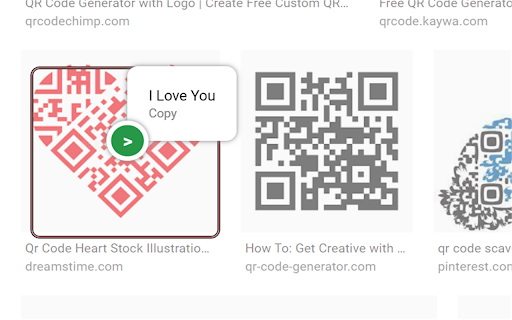

An AI based QR code reader that can effectively recognise all kinds of shaped QR codes, coloured QR codes and rotating QR codes. Simply click on the extension's shortcut after the extension has been installed, and you will be taken to the QR code selection interface. If the QR code in the boxed area is successfully recognized, the result will be displayed in a bubble pop-up box. Right-click to exit this interface.

QR Code (Generator and Reader)
Generate QR Code from the url of current page, link or selected text. And decode QR Code in image. The most advanced QR Code extension to generate various types of QR Code, Scan, History and Advanced Display. Support both Popup and Context-menu based functions. It has below distinctive features: - QR options and configurations - Support multiple QR native codes - Clean and elegant design and user interface - History for reusable QR codes - Formatting options, including colors, complexity, etc. - Highly secured QR codes It may display periodic notification about new QR code features, potential bugs and required configuration details. If you notice any issues or concern, pleas reaching using the Support link on the extension page.

QR Code Reader
a multiple QR- and bar-code scanner that supports scanning from webcam and local images A powerful QR-code (Quick Response code) and barcode scanner supports scanning from the camera or local image files and keeps the history of the last 100 scans. It supports almost all known formats, including text, link, ISBN, coupon, and contact. Privacy: This extension does not rely on any external services to perform detection. There is no server-side interaction whatsoever. Features: 1. Read multiple QR-codes on a single image 2. Supports multiple protocols 3. Saves the history of scanned items 4. Drop local image files to the user interface 5. Uses both native method and ZBar library to maximize the detection power. This extension uses ZBar c-library, to extract multiple QR-codes and barcodes in a single image frame. What is a QR code? It is a type of matrix barcode that is a machine-readable optical label. A QR code contains information about the item to which it is attached. A QR code uses four standardized encoding modes (numeric, alphanumeric, byte/binary, and kanji) to store data efficiently. What is a barcode? It is a method of representing data in a visual, machine-readable form. Initially, barcodes represented data by varying the widths and spacings of parallel lines.

QR Code Reader for Google Chrome™
FREE Simple QR Code Reader which works for both Camera and Image files. No Internet needed. This is a chrome extension for reading QR code from webpage. Are you trying to find out what URL/text a QR code points to? Dont want to use your mobile phone to scan the QR Code? Just install this extension today and you can read the QR Code from any website. - Read a QR code from website - Read a QR code from an image file on your computer - Read a QR code from your web camera. For this to work, you need to give access to the web camera and the web camera will scan the QR code which you hold in front of the web camera Please note if you are trying to read multiple QR codes on a specific webpage, you will need to download each QR code image separately to read it. Currently, our extension just reads the first QR code of the webpage you are on. Disclaimer: Please note this extension is NOT made by Google and is made by an independent development team. All copyrights belong to their respective owners. Google doesn’t endorse or sponsor this extension. This extension QR Code Reader for Google Chrome™ is not owned by, is not licensed by and is not a subsidiary of Google Inc.

Easy QR
Best QR code extension: Free, fast generation and scanning with customizable colors, icons, styles, and one-click download. 🚀 Easy QR Code Extension – Instantly Create & Scan QR Codes (100% Offline) Looking for the fastest and safest way to generate and scan QR codes in Chrome™? Easy QR Code Extension lets you create powerful, customizable QR codes in just one click — completely offline and privacy-first 🔒 No accounts. No tracking. No data uploads. Just fast and secure QR code generation. Why Choose Easy QR Code Extension? ✅ One-Click QR Code Generation Instantly create a QR code for the current webpage with a single click. Perfect for sharing links, product pages, articles, or tools. 🔒 100% Offline & Privacy-Focused Works entirely offline — your data never leaves your browser. No servers, no tracking, no hidden permissions. 🔍 Built-In QR Code Scanner Right-click any image in your browser to scan QR codes instantly — no extra apps required. 🎨 Fully Customizable QR Codes Personalize your QR codes with custom colors, adjustable sizes, and even a unique logo or icon overlay. ⚡ Real-Time QR Code Creation Type or edit text and watch your QR code update instantly. Supports URLs, contact info, WiFi credentials, notes, and more. Powerful Features at a Glance: • Instant QR generation for any webpage • Real-time text-to-QR conversion • Download QR codes as image files • Right-click image QR scanning • No special permissions required • Fully offline functionality How It Works: Install the extension from the Chrome Web Store Click the QR icon in your browser toolbar Generate or scan QR codes instantly 🎉 Perfect For: • Digital marketers sharing campaign links • Developers testing environments • E-commerce store owners • Teachers and students • Business professionals • Everyday personal use Unlike many QR tools, Easy QR Code Extension does NOT send your data to remote servers, does NOT require unnecessary permissions, and does NOT require internet access. Fast. Lightweight. Secure. Download Easy QR Code Extension today and simplify your digital workflow ✨
