
dgnmohofbgnaacababkedheeannmdohi
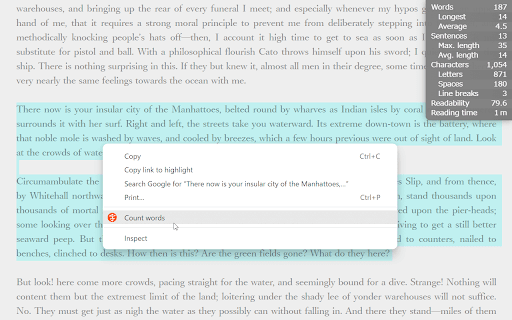
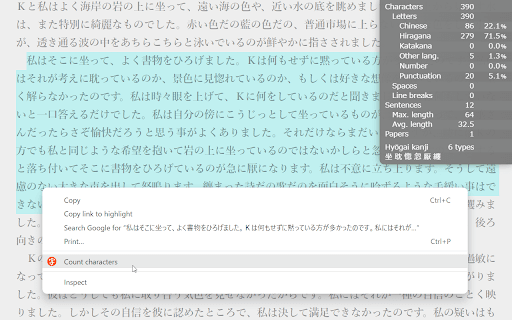

Count words and characters in selected text. Just select range of target text, right-click, and run "Count words" from context menu. This extension can count not only latin words, but also Chinese and Japanese characters. * Number of characters - Number of readable letters - Number and ratio of Chinese characters, hiragana, katakana, other letters, numbers, panctuations - Number of spaces - Number of line breaks * Number of sentences - Maximum length of sentences - Average length of sentences * Readability * Number of sheets of manuscript paper * Japanese difficult kanji * Shortcut key support * "Auto-counting mode" for automatic display without clicking * Can display word count of text entered into a form * Speech-to-Speech function for word and character counts * Recognizes words in many languages * Can set characters to split words * Can set characters to separete sentences * Can set readability measurement method (for English) - Flesch Reading Ease - Flesch–Kincaid Grade level - Gunning Fog Index - Coleman–Liau Index - Automated Readability Index - SMOG - Lensear Write - FORCAST * Can set display color * Compliant to web extensions specification "Manifest V3"

划词小窗搜索
划词点击悬浮图标或右键菜单打开小窗搜索,可自定义搜索引擎实现包括无广告小窗搜索、划词翻译、划词搜电影在内的各种个性需求。 划词小窗搜索全新版本 4 === 支持更多数据源格式(包括普通网页) === 除了原有的 IFRAME、AJAX、新标签页打开 三个类型,新增 DOMParser 类型,您可自定义 CSS Selectors 从普通网页获得搜索结果展示到小窗内。同时也内置对 Google Custom Search JSON API 的支持,现在您可以通过 AJAX 模式接入谷歌自定义搜索接口。 版本 4 已内置 Google、Bing 和百度三个搜索引擎 DOMParser 配置,无需额外配置即可在小窗内使用这些搜索引擎。 === 支持更多样式自定义设置(包括大小和位置) === 现在小窗可以总是在您期待的位置出现了。版本 4 新增了大小和位置的设置,还增加了暗黑模式 CSS 示例,以及临时折叠等易用性设置。 === 更加安静了 === 在此前版本中悬浮图标允许只跟右键菜单一起出现,而版本 4 更进一步,允许关闭悬浮图标,只通过右键菜单来调起小窗,在您点击右键菜单之前它就跟不存在似的。 === 可用性和隐私性也提高了 === 版本 4 已升级到 Manifest V3 以满足 Chrome 新版本要求。同时优化了代码逻辑以满足更严格的 Content Security Policy,在不破坏网站 CSP 的前提下适配了更多网页。小窗内链接也全部新增 noopener noreferrer 属性以确保访问不被跟踪来源。

Word Counter - counts what you type
Shows a count of words and characters when you type in a text box on a website Shows a count of words and characters as you type. Or select some text on a webpage to see the count of words, characters and estimated reading time. Or tap on the extension button to open a window to write in. (Supports markdown formatting too!) New: App window to write longer text, with word count, word limits, markdown support, and more... New: Show estimated reading time for text. Reading time is calculated based on a reading speed of 200 words per minute. 1. Removed permission for reading clipboard. Planned feature has been cancelled, so don't need this permission anymore. 2. Made word count non-selectable, so it doesn't get included when doing select all (Ctrl/Cmd + A) on a webpage.

Word Counter
Word counter online tool checker to find number of words and characters Efficient Word & Character Counter for Content Creation in 2025. The Word Counter Chrome extension helps you quickly calculate the total number of words and characters in any selected text or document. In 2025, where content precision and efficiency are key,, this extension is ideal for writers, students, and marketers. This text analyzer for Chrome offers a fast, accurate way to manage content length with a single click. With an easy-to-use interface and 100% accurate results, the Word Counter extension is the perfect addition to streamline your writing tasks. It's an ideal SEO word counter for anyone optimizing their content. Simple Interface: Designed for ease of use, so you can focus on your content, not the tool. Instant Word & Character Count: Provides accurate word and character counts in real-time with the accurate word counting tool. Secure & Private: Counts words and characters without collecting data, ensuring privacy. Free & Accurate: Completely free with accurate counting, whether for short posts or lengthy assignments, making it the perfect free word counter. Content creators rely on word limits for accuracy in articles, blog posts, and SEO elements. This tool helps maintain target word counts for blogs and calculates character limits for meta titles and descriptions. It's a great word count tool for anyone in content marketing. Marketers and ad copywriters must stay within strict character and word limits for social media and advertising platforms. The Ad copy word counter helps maintain these guidelines to enhance engagement and reach. Whether it’s for essays, assignments, or other academic writing, students can keep their submissions within required limits, ensuring conciseness and clarity in their work. Install: Add the Word Counter extension from the Chrome Web Store. Select Text: Highlight any text or document section to calculate words and characters. View Results: Instantly see word, character, and stop word counts displayed in an easy-to-read format. 1. What is Word Counter used for? Word Counter is a tool to calculate words and characters, helpful for writers, SEO experts, students, and marketers who need accurate word counts for various writing tasks. 2. Does Word Counter store my data? No, Word Counter doesn’t collect or store any personal data. It simply calculates word and character counts based on selected text. 3. How do I calculate the number of stop words in my text? Simply select the text you want to analyze, and Word Counter will display the count of common stop words, helping you streamline and improve your content. 4. Is Word Counter free to use? Yes, Word Counter is entirely free to use with no hidden fees or charges.

Menu fish
Menu fish is a versatile Chrome extension that allows users to customize multiple search engines. On the configuration page, you can add as many search engines as you like. When you highlight text or images on a webpage, simply right-click to choose from your configured search engines to perform a search. This extension addresses the limitation of Chrome allowing only one default search engine, making your search experience more flexible and convenient.
