
dgllcfdfcgnocdmmglnpbpoalhpdfckg
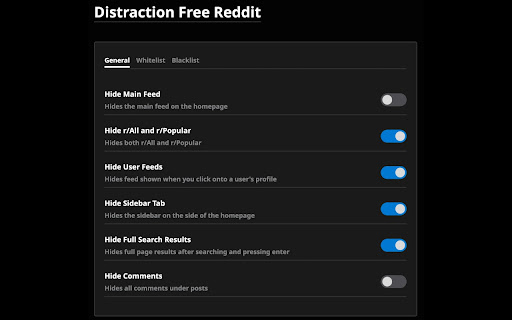
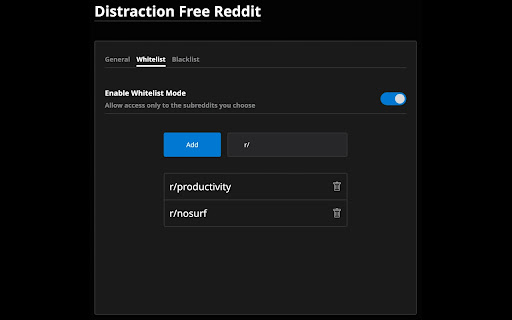

Remove the distracting parts of reddit and focus only on what really matters to you. Distraction Free Reddit is an extension that helps you use Reddit more intentionally. You can block off parts of Reddit to cut out mindless scrolling and increase productivity. The extension includes features like hiding the main feed, hiding r/all and popular, hiding user profiles, hiding full page search, hiding the sidebar, hiding comments, and more. You can also use whitelist or blacklist mode to customise your Reddit experience further.

Control for Reddit
Lets you take control of your time by limiting reddit features Allows you to turn off Reddit features, such as the main feed, subreddit feeds, notifications, and the trending page, in order to allow you to take back control of your time.

Reddit Blocker
Enhance your focus and productivity by automatically blocking Reddit on your browser. Maximize Your Productivity with Reddit Blocker Are you finding it hard to concentrate with all the digital distractions around? Introducing Reddit Blocker, a powerful Chrome extension designed to help you reclaim your productivity by blocking Reddit on your browser. With the ever-increasing allure of quick entertainment, it's easy to find yourself scrolling endlessly. • Stay Focused: By eliminating one of the most popular distractions, TikTok, this helps you stay focused on your tasks. Whether you're working on a project, studying for exams, or trying to meet deadlines, our extension ensures that Reddit won't be a click away. • Boost Productivity: With distractions out of the way, your productivity levels will naturally rise. • Easy to Use: Install with just a few clicks, and instantly improve your browsing environment. Ideal for Everyone Whether you're a student, professional, or just someone looking to cut down on their screen time, Reddit Blocker is perfect for anyone who wants to stay productive. It's particularly useful in educational and professional settings where focus is paramount. Get Started Today Take the first step towards a more productive and distraction-free browsing experience. Install Reddit Blocker now and start focusing on what truly matters. Available exclusively on Chrome.

Distraction Free for LinkedIn™
Hide distractions on LinkedIn™ when you need to focus. This extension hides potential distractions on LinkedIn™, including the newsfeed, suggested news, ads, and suggested people to follow. This lets you get in, get out, and get it done. This extension is free and opensource. It is is not affiliated with or produced by LinkedIn™. I've gotten a lot of value from LinkedIn™ in the past, and hope this extension will help you use it even more effectively. View the code on github: https://github.com/mthurmond/distraction-free-for-linkedin --> Try my other two extensions to remove distractions. Both are free & open source: - Hide My Email for Gmail™: https://chrome.google.com/webstore/detail/gmail-inbox-hider/koobmglbcddgeoopgphanmhjppfaehaa?hl=en&authuser=0

UnDistracted - Hide Facebook, YouTube Feeds
Rise above the time-sinks This Chrome extension assists in managing time spent on distracting platforms like Instagram, Facebook, YouTube, Twitter, and LinkedIn. The extension identifies the most attention-grabbing elements on these platforms and allows selective hiding of these sections or full blocking of the websites. Note: No browsing history is accessed, and no browsing-related data is sent or stored. New feature (paid): Block gambling and NSFW sites
