
dgfmiekjljfokambomhmielfjlbjlebb

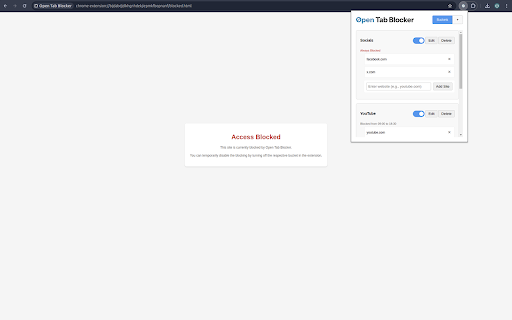
Open Tab Blocker is a Chrome extension designed to help you manage your browsing habits by grouping tabs into buckets and restricting access to certain sites based on predefined rules. This extension helps improve your productivity by limiting distractions and promoting focused browsing. Features: - Group tabs into customizable buckets. - Set rules to restrict access to specific sites during certain times. - Select which days of the week, and up to 2 different time frames on those days to block between. - Supports full domain or partial URLs (e.g. to specifically block all https://youtube.com/shorts/). - Block access to restricted sites altogether. - Easily switch between on/off tab buckets. - NEW Friction mode: disabled by default but when enabled, requires typing a random sentence before unlocking a bucket, deleting a site or bucket, or when disabling the setting again after. - NEW Unlock history: disabled by default but when enabled, records each unlock and lock for 7 days with timestamps to show when and for how long you procrastinated. - NEW Focus sessions: when you enable a focus mode for 15/25/45/60 minutes it enables all buckets regardless of time schedules until the focus time runs out. - NEW Take a break: disabled by default but when enabled you can take one 5 minute break per day at any time, it then prevents taking another break for the rest of the day. Group sites by buckets, each site can be a domain/hostname, or prefix of a URL which allows for more granular site blocking.

Web Site blocker
Easy way to block distracting websites to prevent access while you work The Web Site Blocker Chrome extension empowers users to permanently deny access to websites or implement scheduled restrictions. Safeguard yourself from distracting or harmful content or shield your children from inappropriate material. - URL Blocking: Block distracting and harmful websites, including subdomains. - White List: Activate this option to block all websites except those included in the whitelist. - Password Protection: Secure the options page with a password to prevent easy removal of blocked sites. - Custom Rules Keyword based control. Allow or block access to a specific site only if the URL contains specific keyword - White & Black Time Configuration: Customize your daily schedule with the Scheduling feature, allowing you to set specific days and times for accessing certain sites. Stay focused and maintain daily routines effortlessly.

SiteBlock
Find yourself visiting websites unrelated to your current task, even without thinking? Place a barrier in your way by blocking the sites with SiteBlock. Set the list of sites to block in the Extension Options. Access it through the Chrome menu, under Extensions -> Manage Extensions -> SiteBlock -> Details -> Extension Options. Changelog: - 0.3.1 - improve look of settings page - 0.3.0 - option to use Chrome sync storage to sync settings across devices - 0.3.0 - first dot and asterisk in an entry was handled differently than subsequent ones. Now all dots and asterisks in an entry are handled the same way. - 0.2.9 - add an example of how to block just x.com (//x.com)

SiteBlock
Stay focused and eliminate distractions with this simple site blocker extension! Easily block any website by adding keywords like “social media” or “news” — the extension will automatically block matching sites when you try to visit them. Enjoy unlimited site blocking, a convenient right-click menu option, and effortless control over your browsing habits. Take back your time and boost your productivity — install the extension today!

WebBlock
Some website blockers are too strict, so you disable them, only to never enable them again. Some are too lax, so you figure out how to bypass them and they become useless. WebBlock finds the perfect balance: it let's you go on blocked websites, but first you have to do nothing for 1 minute. The boredom is the perfect deterrent from binging youtube, but doesn't get in the way of real work!
