
dgboealbpckjkjfhabahfgnjlaeghglh
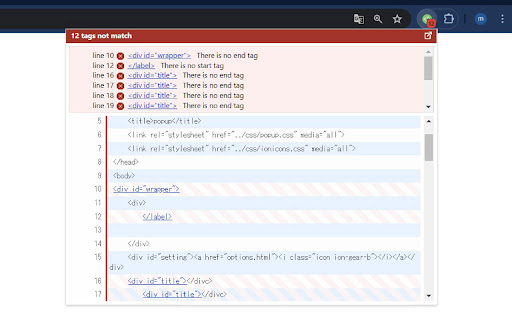


Check the HTML start and end tags for problems. This extension displays errors in the HTML code of the page you are viewing, such as mistakes in the opening and closing tags. ## Main Features - Displays results in a separate tab - Shows the number of errors on the icon - Automatic checking - Settings for sites you want to automatically check - Exclusion settings for specified sites - Custom warning rules - HTML File Analysis ## Caution The code is checked using JavaScript, so no data is sent externally. Behavior may be unpredictable on pages that use forms, such as login screens.

HTML Closing Tag Checker
Checks if there are any unclosed HTML tags in the current page or in the HTML tags entered The HTML Closing Tag Checker (HTML Error Checker) is a convenient tool that easily checks for unclosed tags within the HTML of any web page. You can quickly verify the HTML of the page you're currently viewing using the toolbar icon in your browser or via the right-click context menu. You can easily check HTML tags using the following methods: - Check the currently displayed web page directly. - Check dynamic pages after JavaScript execution. - Check HTML source code by pasting it directly. - Automatically check HTML on a specified website. This tool performs all HTML parsing and checking locally within your browser. Therefore, no data entered is sent or stored on external servers. (Note: While this tool operates on our site "tool-place.net," we do not collect or store any data entered by users. Please use this tool with confidence.)

UI Build Assistant
You can create layouts easily!

Check My Links
Check My Links is a link checker that crawls through your webpage and looks for broken links. Check My Links is a powerful link checker that scans any webpage, Google Sheet, Docs and instantly identifies broken or invalid links. Whether you're editing a webpage, auditing content, or managing SEO, Check My Links helps you verify every link on the page with a single click. New Feature: Now it can detect the link from Google Doc and Excel sheet too and verify them. ✅ How it works 1. Open the webpage you want to validate. 2. Click the Check My Links icon in your toolbar. 3. The extension will scan all links on the page, highlight the valid ones, and clearly mark any broken or problematic links. 4. View results instantly on the page. 🎁 Features * One-click scan for all webpage links * Highlights valid, broken, and redirected links * Download or view detailed reports for broken and invalid links * Customize highlight colors * Option to disable color highlighting * Faster, accurate link validation - perfect for developers, content editors, and SEO teams 🔐 Advanced Features After a fresh install, the extension will not show product information or tutorials. After a few days, it may display helpful product tips as info. If you prefer a clean interface, you can hide these info using the Advanced Feature Key available here: https://selectorshub.com/how-to-get-check-my-links-advanced-features-key/ 🚫 Default Excluded URLs To prevent unnecessary noise during scanning, the following URLs are excluded by default. If needed, you can remove these exclusions from the extension’s settings: 1. doubleclick.net 2. appliedsemantics.com 🔗 More Details Learn more about the tool here: https://selectorshub.com/checkmylinks/ 💬 Need Help? If you face any issues or have questions, reach out anytime at support@selectorshub.com

Responsive Viewer
A Chrome extension to show multiple screens in one view. the extension will help front-end developers to test multiple screens while developing responsive websites/applications. Clarification on privacy: This extension does not collect, store, or track any of your personal data. Your privacy is fully respected.
