
dfkbikhbioijfgpknopghlanhailecnc
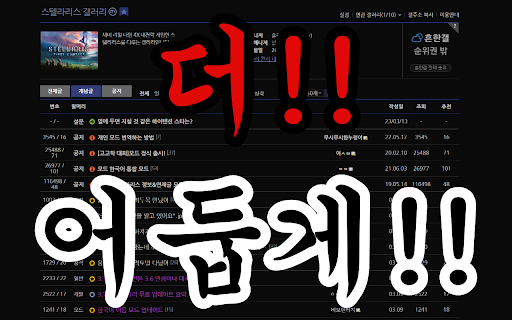
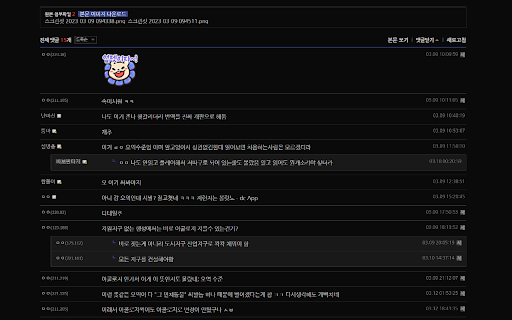
야간모드도 밝다! 어둠의 자식들을 위한 더 어두운 다크모드 야간모드도 눈이 아프시나요? 글자가 작아 안 보이시나요? 오른쪽 쓸데 없는 정보가 불편하시나요? 차단을 했는데도 보이는게 킹받으시나요? 당신을 위해! 디씨 다크모드! 더 어둡게! 더 크게! 더 간결하게! 더 클린하게! 화면을 바꿔드립니다! Adguard와 함께 사용하세요! -------------------------------------------------------------- 기능 : 1. 더 어두운 테마 2. 오른쪽 머시기 뜨는거 없애기 3. 차단한 상대 아예 안 보임 4. 나눔고딕 글꼴 적용 5. 글자 크기 확대 6. 제목 왼쪽에 조회수/추천수 정보를 표시 7. 그림 개념글을 노란색으로 표시 차단 설정의 경우 디시 웹페이지에서 지원하는 차단설정을 사용하시면 됩니다. 차단 해제는 갤러리 정보 상단의 설정 > 차단설정을 이용하시면 됩니다. ※※※ 글꼴 적용이 안 될 때! ※※※ 나눔글꼴(나눔고딕)이 설치되어 있어야 글꼴이 적용됩니다. 나눔글꼴은 무료 폰트로 아래 링크에서 설치하실 수 있습니다. https://hangeul.naver.com/2017/nanum

Google Classroom Dark Mode
Bug Fixes: - Fixed Service Worker not initializing. This was due to an issue when converting the manifest version from V2 to V3. No more flashbang when you first load Google Classroom! - Fixed more theming issues that are becoming more prevalent. Everything should be fully functional (as of Oct. 28th, 2025). Let me know if you see any other bugs! Feel free to shoot me an email, open a bug report or leave a review! The extension does not collect any of your data. It uses the storage function to save your selected colour mode on the extension, or if you have it disabled, so the next time you come to classroom your settings are saved and reapplied. All the code used for the dark mode is original, therefore there will be bugs and areas that are not the correct colour, style, etc. Please let me know if there is something that is does not look visually correct.

Dark Mode - Night Eye
Dark Mode: Switch to dark reading for night & day browsing. More than dark theme style, it ensures optimal eye protection. Night Eye brings dark mode to almost any website, helping you browse, read, work, and study more comfortably in low-light environments. Instead of simply inverting colors, Night Eye analyzes each page and converts bright interfaces into a smooth dark theme while preserving important images, videos, and media. You can also fine-tune the look of each website with brightness, contrast, saturation, warmth, dimming, and other visual controls. Night Eye is used by over 1,000,000 users across major browsers and has been actively maintained since 2018. ➤ Dark mode for websites that do not offer one ➤ Custom brightness, contrast, saturation, warmth, and dim controls ➤ Blue light reduction for late-night browsing ➤ Schedule dark mode to turn on and off automatically ➤ Support for PDFs ➤ Integration with websites that already have built-in dark themes ➤ Sync with your operating system or browser color scheme ➤ Import and export settings between browsers ➤ Per-website and global customization ➤ No ads ➤ No selling of user data Dark Mode Converts website colors, icons, and small visual elements to create a comfortable dark browsing experience. Filtered Mode Keeps the original website colors while allowing you to adjust brightness, contrast, warmth, and other visual settings. Normal Mode Turns Night Eye off for the current website and restores the original page appearance. Night Eye gives you control over how each website looks. You can apply settings globally or customize individual websites. Images Night Eye focuses on converting small images, icons, and interface elements. Larger media such as photos, videos, and social media posts are preserved so websites remain usable and natural. Brightness, Contrast, and Saturation Adjust the visual intensity of websites to match your personal preference and reduce discomfort during long browsing sessions. Blue Light / Warmth Reduce cold screen light during evening or late-night browsing by increasing warmth. Dim Lower overall page brightness when browsing in a dark room or when your screen feels too bright. Some websites already include their own dark themes. Night Eye can work with supported built-in dark themes, giving you easier control from one place. Night Eye Lite is the forever-free version of Night Eye. It allows dark mode on up to 5 websites of your choice, with no ads and no hidden charges. New users can try Night Eye Pro for 3 months with no credit card required. Paid plans are available for users who want more websites and additional usage options: • Night Eye Pro • Night Eye Pro Max • Night Eye Ultimate - one-time purchase option For the latest pricing and plan details, visit: https://nighteye.app/how-to-start/ Night Eye needs permission to read and change website content so it can detect page colors and apply dark mode. This is how the extension changes bright pages into darker, more comfortable versions. Night Eye does not sell your data and does not use third-party analytics such as Google Analytics inside the extension. Your visual preferences, such as website-specific color settings, brightness, contrast, saturation, warmth, and dim level, are stored locally on your device. These settings are used to remember how you want each website to look. For more information, see our privacy policy: https://nighteye.app/privacy-policy/ Need help or found a website that does not look right? Contact our support team and we will help you resolve the issue. You can also follow product updates and release notes here: https://nighteye.app/changelog

Dim screen - Nighttime mode
Use Dim screen - Nighttime mode to reduce eye strain. Brightness control, display dimmer, and schedule night light for browsing! Looking for a seamless way to reduce eye strain and enhance your nighttime browsing experience? Dim screen - Nighttime mode is the ultimate solution for effortless and brightness control and blue light reduction. This powerful extension lets you adjust your screen brightness to a lower level than usual, apply a blue light filter, and customize display settings for a comfortable viewing experience. 🌙 Why Choose Dim screen - Nighttime mode? • Works as a specialized night light, reducing glare and preventing eye fatigue. • Features a screen shader that softens the brightness without affecting readability. • Includes a blue light blocker to minimize exposure to harmful wavelengths. • Offers adjust brightness controls for tailored customization. • Allows automatic activation and deactivation based on a customizable timer. 🔆 Key Features of the Extension ✔ Advanced screen dimmer – Lower brightness beyond your device’s default settings. ✔ Glow protection – Activate the blue light screen filter for healthier monitor time. ✔ Customizable eye saver – Effortlessly adjust brightness levels with an intuitive interface. ✔ Eye care filter – Reduce monitor glare and protect your vision from long exposure. ✔ Multiple modes – Use it as chrome reader mode for a better experience. ✔ Auto-scheduling – Enable automatic brightness and chrome night shift adjustments based on the time. 💡 How to Use Dim screen - Nighttime mode? 1. Install the extension from the Chrome Web Store. 2. Click the extension icon to open the side control panel. 3. Adjust your screen brightness using the slider or apply preset dimming levels. 4. Enable/disable the blue light filter for additional eye comfort. 5. Customize auto-scheduling for the night shift chrome extension to activate at preferred times. 🛠 Additional features ⟢ Seamlessly integrates with chrome screen protector blue light options. ⟢ Works as a blueliteblocker extension to minimize display strain. ⟢ Functions as a screen darkener for users sensitive to glare. ⟢ Works as a screen color changer, allowing you to modify hues for better visibility. 👨💻 Who needs to use Dim screen - Nighttime mode? ☑️ Nighttime workers – Our tool works like your personal reading mode. ☑️ Professionals – Maintain productivity with adjustable display brightness. ☑️ Avid readers – Activate chrome reader mode to improve reading conditions. ☑️ Stream viewers – Protect your eyes with a blue lite blocker while watching videos. ☑️ Students – Use our blue light application to stay focused without harming your eyes. 📂 Effortless chrome side panel integration ⚡ Quick & simple access – Open the Chrome side panel with a single click and instantly manage your blue light chrome settings without navigating through complicated menus. ⚡ Blue light blocker adjustments – Toggle the blue light filter chrome on or off, fine-tune brightness, or apply a warm display tint—all from the side panel without disrupting your workflow. ⚡ Smooth experience – The lightweight design of Dim screen - Nighttime mode ensures seamless performance, letting you modify display settings in real time for enhanced comfort. 📌 Why Dim screen - Nighttime mode is the good choice? 🔹 Offers better customization than the built-in display dimmer. 🔹 Ensures blue light protection without distorting colors drastically. 🔹 Functions as a chrome eye protector blue light tool for safe monitor use. 🔹 Includes a protector software option to safeguard eye health. 🌍 A healthy solution for comfortable browsing Whether you're using this reading mode for night-time reading, looking for a blue light blocking extension, or simply adjusting the screen dimmer for the perfect brightness level, Dim screen - Nighttime mode has you covered. Enhance your browsing experience with effortless control and improved visual comfort. 🔎 Frequently asked questions ❓ Does this extension work with all websites? ❗ Yes, the extension applies its screen tint across all web pages. ❓ Does this extension offer more features than the default options? ❗ It goes beyond default night light and night shift options. ❓ Can I schedule automatic adjustments? ❗ Yes, enable the built-in blueliteblocker extension to adjust automatically. ❓ Does it support chrome blue light filter? ❗ Yes! Our extension works alongside blue light software, giving you additional control over brightness and display dimming for an even more comfortable viewing experience. ✨ Experience a new level of display comfort with Dim screen - Nighttime mode! Don't strain your eyes with harsh brightness and excessive blue glow exposure. Dim screen - Nighttime mode is your perfect companion for a soothing and optimized browsing experience. Install now and enjoy seamless brightness control and blue light protection!

Amazon Dark Mode
Toggle dark mode for Amazon - Perfect for nighttime browsing Transform Amazon's bright interface into a sleek, customizable dark mode experience. Perfect for nighttime shopping or anyone who prefers a darker theme. 🎨 Fully customizable colors - personalize every aspect of the dark theme to match your preferences ⚡ Instant theme switching - toggle between light and dark mode with one click 🔄 Real-time updates - changes apply instantly across all Amazon tabs without requiring refreshes 🌐 Works globally - supports all Amazon marketplaces worldwide 👀 Easy on the eyes - reduces eye strain during extended browsing sessions ⚙️ Simple settings - intuitive color picker interface for easy customization Whether you're doing late-night shopping or simply prefer darker interfaces, Amazon Dark Mode provides a comfortable, modern browsing experience while maintaining Amazon's full functionality. The extension is lightweight, privacy-focused, and stores all settings locally on your device. Transform your Amazon shopping experience today with a personalized dark theme that's easy on your eyes and customizable to your preferences.
