
hpgefbikkgjccgfpkbimnblbpdomgobb
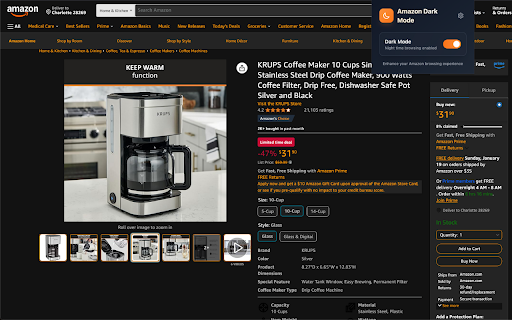

Toggle dark mode for Amazon - Perfect for nighttime browsing Transform Amazon's bright interface into a sleek, customizable dark mode experience. Perfect for nighttime shopping or anyone who prefers a darker theme. 🎨 Fully customizable colors - personalize every aspect of the dark theme to match your preferences ⚡ Instant theme switching - toggle between light and dark mode with one click 🔄 Real-time updates - changes apply instantly across all Amazon tabs without requiring refreshes 🌐 Works globally - supports all Amazon marketplaces worldwide 👀 Easy on the eyes - reduces eye strain during extended browsing sessions ⚙️ Simple settings - intuitive color picker interface for easy customization Whether you're doing late-night shopping or simply prefer darker interfaces, Amazon Dark Mode provides a comfortable, modern browsing experience while maintaining Amazon's full functionality. The extension is lightweight, privacy-focused, and stores all settings locally on your device. Transform your Amazon shopping experience today with a personalized dark theme that's easy on your eyes and customizable to your preferences.

Amazon Dark Mode - Night Theme
Enable dark mode on Amazon. Turn Amazon's bright pages into a comfortable night theme for late-night shopping. Amazon Dark Mode adds a simple dark theme for Amazon in Chrome. Wondering if Amazon has dark mode? Amazon does not always provide a native dark mode for desktop users, so this extension helps you turn the bright Amazon website into a darker, more comfortable browsing experience. Use Amazon Dark Mode as a dark mode for Amazon, Amazon night mode, Amazon dark theme, or Amazon dark mode browser extension. It is designed for people who browse Amazon at night, shop on Amazon from a desktop computer, read product reviews, compare products, or do product research and want to avoid Amazon’s bright white background. • Enable dark mode on Amazon • Turn Amazon’s white background into a dark theme • Use Amazon night mode in Chrome • Make Amazon more comfortable for late-night shopping • Browse product pages, search results, reviews, cart pages, and wishlists in a darker interface • Reduce glare from Amazon’s bright website • Use a focused dark theme made specifically for Amazon Amazon Dark Mode is a lightweight Chrome extension for users who want a simple way to make Amazon dark. It helps create a more comfortable shopping and browsing experience without needing to change your entire browser. If you are looking for: • amazon dark mode • amazon dark mode chrome extension • amazon dark mode browser extension • dark mode for amazon • amazon night mode • amazon dark theme • how to enable dark mode on amazon • how to make amazon dark mode • does amazon have dark mode • amazon white background dark mode then this extension gives you a simple way to browse Amazon with a dark theme. Install Amazon Dark Mode and make Amazon’s website easier to use at night.

DocsAfterDark
Beyond dark mode for Google Docs Relieve eye-strain from the default Google Docs experience with DocsAfterDark. Customize the look of your documents without modifying the original file. DocsAfterDark features a modern, sleek dark mode and a vibrant light mode. Try out the "midnight" dark mode variant for true-black backgrounds. Accent colors shared by both modes can be customized using the color slider in the settings popup. Customize the document background to a darker (or lighter) shade. Or, input your own custom CSS (background-color) color. Choose between the colorful, grayscale, and black invert modes to render document content in dark mode. The colorful invert mode preserves the essence of colors, but note that the colors will not be exact to the original document. Globally enable/disable the extension, change to dark/light mode, and access all of the above customizations in the settings popup, which can be opened by clicking on the extension’s icon in your browser’s toolbar. Temporarily enable/disable the extension for the current document using the toggle button in the bottom left corner of the page. The source code and release notes are available on GitHub at https://github.com/waymondrang/DocsAfterDark. If you enjoy using DocsAfterDark and would like to support its development, please consider donating on Buy Me a Coffee at https://www.buymeacoffee.com/waymondrang. Please note that this extension does not currently work for any other Google Workspace products (e.g. Sheets, Slides).

Pinterest - LIGHT & DARK THEMES
You can click on the extension logo to change the theme from among a dozen themes. If no themes are displayed in the pop-up, it is likely due to JavaScript being disabled. Please enable it. Many thanks to Filipermaster and maguzzz for their contributions. For commercial purposes, use Gmail email. For support or simple questions purposes, Github or « pdt.derived241@passmail.com » instead. Sorry to you all who waited for an update, I’ll try to keep it up to date. 03/10/26

Dark Mode for Chrome
Dark mode for all websites. Use dark theme for night and daily browsing with dark reader. Night shift mode. Dark Mode and Dark Reader makes all the websites you browse into dark/night mode so that you can browse the internet without straining your eyes. It is an extremely useful chrome extension for those who use internet especially at night. The Dark theme extension. Works with all websites! You need to refresh all the tabs, which were opened BEFORE the dark reader was installed. You can also restart the Chrome to refresh all the tabs at once. Otherwise, dark mode and night shift mode will work only with the newly opened tabs. If the website has built-in night theme, you can control it directly from extension and if it doesn't like Gmail, Google Docs, Office Online, GitHub and millions others, we will convert the colors to provide you with smooth transition on dark mode. What will you get from Dark Reader extension: 1. An easy way to create dark mode on every website. In addition, you can customize your black theme visual from Brightness, Contrast, to Saturation. 2. A Night Shift mode which changes the website's color to warmer, making it much more pleasing to watch. You can choose to use either dark theme or night shift mode, or both. You can also quickly activate these modes with simple keyboard shortcuts. 3. You can set up schedule for each dark theme and night shift mode, and decide when you want to auto-activate dark theme. Also Dark for YouTube extension converts YouTube theme to a highly customizable dark charcoal/blue theme. This extension is built on top of the default YouTube theme, so it is very light-weighted compare to using themes injected by stylish or stylus extensions Note: Remember to disable any similar Night Theme extension to prevent compatibility issues! We hope you enjoy it.
