
delmpfioapnibhcbepefgjofgdlifbdh
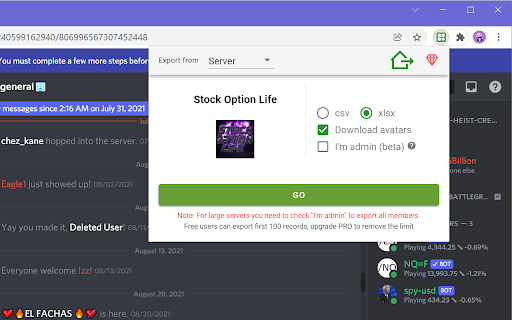

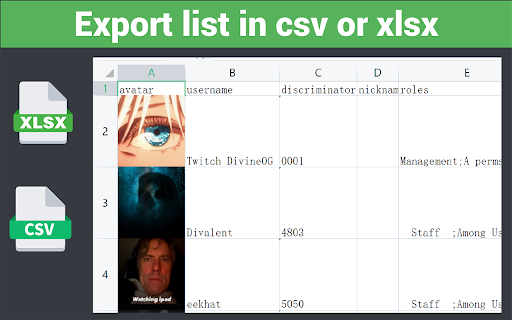
To export list of members that contains username, roles, activity, avatar, join date from Discord servers, and save as csv/xlsx Boost Your Discord Server Management with dTools – The Ultimate Member List Saver! 🚀 Are you tired of manually tracking each member in your Discord server? Say goodbye to the hassle! dTools is here to simplify your life. With just a few clicks, you can export a complete list of members from your Discord server, making your management tasks easier than ever. 🎯 Key Features Effortlessly export member IDs and usernames. Save member roles in a snap. Download avatar pictures directly to your device. Keep track of member activity seamlessly. Capture and export member join times with ease. 🛠️ How to Get Started Install the Extension: Add dTools to your Chrome browser. Visit Any Discord Server: Open a new tab and go to your desired server. Activate the Tool: Click the extension icon and then hit ‘GO’. Download Your Data: Once the data loads, your CSV/XLSX file will download automatically. Prefer manual control? Simply click the button to save it. 📜 Terms of Use For detailed terms, visit https://automatism.works/dtools/terms-of-use.html. Make your Discord server management smarter and more efficient with dTools. Install now and start saving time today! 🌟

Discord Exporter - Export Chats, Files & Members
Discord export extension for Discord chat export, Discord member export, and Discord file export. Discord Exporter is a Chrome extension built for Discord export, Discord chat export, Discord message export, Discord member export, and Discord file export. Search Discord messages, export Discord chats by date range, batch download attachments, and save Discord member lists from the servers and channels you can access. Install Discord Exporter to: • Search and preview Discord chats before export • Export Discord chats for moderation, backups, compliance, research, support, and community operations • Use a built-in Discord attachment downloader to batch save images, files, videos, and other shared media • Export Discord members in clean formats such as CSV, Excel, JSON, HTML, and image-ready outputs • Keep one practical Discord export workflow directly inside Discord Why people choose it: • Faster and cleaner than copying messages or collecting member lists by hand • Helpful for moderators, community managers, researchers, support teams, operations teams, and power users • Built for repeatable Discord export work where search speed, clearer output, and control matter If you need one reliable Discord export tool to search, export, and organize chats, attachments, and members, Discord Exporter gives you a simple way to get the job done.

Discrub - Discord Message Manager
Manage, search, and export your Discord messages with ease. Discrub is a Discord data management tool. It runs as a browser extension that activates on Discord, letting you export messages, search and filter conversations, purge messages and reactions, work with offline data packages, and analyze your message history. Discord Data Package - Drop the official Discord ZIP (Privacy & Safety, Request All My Data) directly into Discrub - Handles large packages (multi-gigabyte, tens of thousands of entries) and packages from any Discord locale - Browse every server, channel, and DM in your archive without touching the Discord API - Rich rendering: markdown, mentions, custom emojis, reply quotes, embed previews - Multi-attachment messages render every attachment, not just the first - Optional rehydration to fetch reactions, edits, and replies from Discord, with smart caching - Bulk delete or bulk edit straight from the package - Export package channels to HTML for portable archives - Mention analytics across an entire package Export - Formats: HTML, CSV, JSON, media-only - 9 built-in presets plus custom preset creation - Downloads avatars, attachments, emojis, and media for offline viewing - Thread messages exported as separate files - HTML exports include search, image lightbox, system message rendering, and dark/light theme toggle - Bulk export across multiple channels with filter support - Streaming downloads stay flat in memory regardless of file size Message Feed - Discord-style chunked feed with role colors, role icons, reply indicators, and inline system messages (pins, joins, boosts, thread-created) - Voice and Stage channel chat browsable alongside text channels - Virtualization for smooth scrolling on large channels - Click-to-jump on reply bars, pinned-message notices, and thread-created notices - Find threads even when their starter message has been deleted, via the Load Thread modal - Focused view mode that hides chrome for full-width reading Search and Filter - Search hits Discord's API: filter by content, author, mentions, has-types (image, video, link, file, embed, sound, sticker, snapshot, poll, forward), date range with time-of-day precision, pinned status, author type - Lazy pagination: results stream in as you scroll, with optional Load All - Refine narrows already-loaded messages client-side, with no API calls Purge - Search-based message deletion with per-user targeting - Attachments-only mode strips attachments while keeping text - Reactions mode removes specific users' reactions - Multi-channel bulk purge with filter support - Archived threads auto-unarchive during purge and re-archive when done Reactions - View who reacted, with avatars - Remove individual reactions or batch-remove across selected messages - Admin bulk removal of all reactions or all of a specific emoji Privacy - Discord token stays in the browser - No data sent to external servers - All processing is local Additional - Dark and light mode (matches Discord theme) - Forum channel support showing both active and archived posts - Guided tour and contextual help icons - Pause, resume, and cancel for long operations - Status log with real-time operation feedback - Configurable operation delays - Discrub Classic (v1) built in for legacy users Click the Discrub icon while using Discord in your browser to start.

dFriend - Add Friends for Discord™️
Bulk add discord friends tool. Extract discord group members and add them as your friends. 1. Open discord.com and log in to the application. 2. Paste your target User ID list, or load members from your current channel. 4. Click "START" to begin your automated tasks. V2.0.0 Change log - Fix the critical add friend stuck issue. ✓ Bulk send friend request for Discord ✓ Load members from your current channel ✓ Import Discord User ID from CSV file ✓ Auto skip your friend list and request sent ✓ Save adding history to local storage ✓ Continue task progress from history Kindly do not use it for SPAMMING which is Discord™ strictly prohibited. https://discord-add-friend.extensionsfox.com/#faq If you have any questions, please keep in touch via help@extensionsfox.com. All data is processed in your local computer, never passing through our web server, and no one knows what you sent.

DiscordSaver - Export Discord Chat Messages
A extension to export Discord chat messages to CSV/Excel/JSON/HTML, support both DM (private chat) and channel. ✓ Export chat logs from discord channel or direct messages (DM). ✓ Save and download chat messages in CSV/EXCEL/JSON/HTML format. ✓ Provide date range to quickly get the chat log you need. Visit any Discord channel or direct message, click the extension to select start date and end date, then click "Export". DISCORD TOOL FAMILY you can visit other tools on the tool menu. ✓ dSender - Send bulk DM for Discord ✓ dFriend - Bulk add friends ✓ dSaver - Export user list to CSV If you have any questions, please keep in touch via help@extensionsfox.com.
