
climphjcnadennjbigobenjklkmllgoc

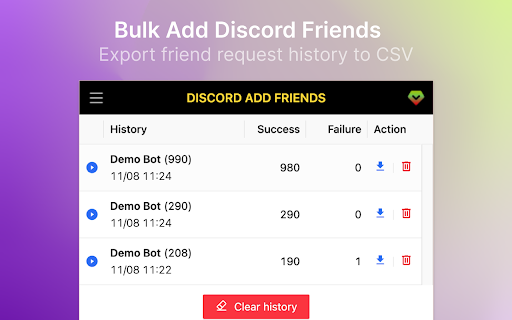
Bulk add discord friends tool. Extract discord group members and add them as your friends. 1. Open discord.com and log in to the application. 2. Paste your target User ID list, or load members from your current channel. 4. Click "START" to begin your automated tasks. V2.0.0 Change log - Fix the critical add friend stuck issue. ✓ Bulk send friend request for Discord ✓ Load members from your current channel ✓ Import Discord User ID from CSV file ✓ Auto skip your friend list and request sent ✓ Save adding history to local storage ✓ Continue task progress from history Kindly do not use it for SPAMMING which is Discord™ strictly prohibited. https://discord-add-friend.extensionsfox.com/#faq If you have any questions, please keep in touch via help@extensionsfox.com. All data is processed in your local computer, never passing through our web server, and no one knows what you sent.

UnDiscord - Messages Deleter
Try the UnDiscord extension to delete all messages in Discord. A quick Discord messages history deleter. 💎 Looking for a fast and hassle-free way to delete your Discord chat history? Whether you want to clean up group chats, private DMs, or entire channels, the UnDiscord Chrome extension is the ultimate solution. In just a couple of clicks, you can delete all Discord messages and start fresh — no manual deleting needed! 🤯 With the Undiscord extension, you no longer need to scroll through thousands of messages or run complicated scripts. 🛡 This powerful Discord messages deleter helps you clear entire conversations instantly — from direct messages to server channels. 🥷 Perfect for gamers, server admins, or anyone who values privacy and order. 🌟 Key Features of the UnDiscord: 1️⃣ One-click full chat deletion 2️⃣ Supports direct messages and channels 3️⃣ Secure and user-controlled 4️⃣ No coding knowledge needed 5️⃣ Works right in your browser with Discord Chrome extensions ❓ Why Use UnDiscord? ● Quickly delete all Discord messages ● No need to go message-by-message ● Keeps your workspace clean and minimal ● Ideal for both personal and server use ● Lightweight and privacy-focused ⚡ If you’ve ever asked how to delete all messages on Discord, the Undiscord extension is your answer. ❓ How to Use UnDiscord? Using the UnDiscord extension is as easy as 1-2-3: 1. Install the Undiscord Chrome extension from the Chrome Web Store 2. 3. Open Discord in your browser Launch UnDiscord and select the conversation or channel you want to clear 💡 Just like that, UnDiscord delete all messages for you — safe and fast. 💬 Frequently Asked Questions ❓ Is UnDiscord safe? 💡 Yes! The extension operates entirely on your local machine and doesn’t transmit your data elsewhere. You stay in control. ❓ Can you delete Discord messages with one tool? 💡 Absolutely. Undiscord delete all messages from your Discord history in moments — even direct messages. ❓ How to delete multiple Discord messages with someone? 💡 Use the Undiscord and select the user DM. Click, confirm, and watch the messages disappear. ❓ Where Can You Use UnDiscord? ▸ Discord delete all messages from user in DM ▸ Delete all Discord messages from a channel ▸ Discord Chrome on PC and Mac ▸ With most Discord Chrome extensions ▸ Inside your browser — no extra software ✅ No matter if it’s a group chat or a one-on-one conversation, undiscord handles it all. More Reasons to Try UnDiscord: 🎁 Save time with batch deleting ⏰ Eliminate old chats in seconds 🔒 Boost your privacy by erasing sensitive messages 🗑 Say goodbye to clutter in Discord servers 💯 Works even if the chat has thousands of messages 🧹 Want to Clean Up Fast? If you’ve ever wondered: ● How to delete all messages in a Discord channel ● How to mass delete Discord messages ● How to delete all Discord messages from someone in DMs ● How to delete multiple Discord messages with someone 📌…then UnDiscord is built for you. 💊 Deleted Messages Discord Plugin Alternative. Think of UnDiscord as a smarter, browser-based deleted messages Discord plugin. You don’t need to tinker with settings or install third-party software — everything works from your browser via the Undiscord. Say Goodbye to Message Overload 🚨 If your messages history is out of control, now is the time to act. Whether you’re clearing chat logs before leaving a server or just tidying up your space, UnDiscord gives you a clean slate in seconds. 🚀 Try UnDiscord Now. Don’t waste time with manual deletions or risky scripts. Join thousands of users who already rely on the Undiscord to manage their conversations. ✅ Fast ✅ Simple ✅ Effective Install UnDiscord today and take full control of your Discord messaging experience.

Discord Media Downloader – Discord Video & Image Download Tool
Discord Media Downloader for Discord Video and Image Download. Bulk Discord Video & Image Download tool. Discord Media Downloader is a lightweight browser extension designed to simplify Discord Video and Image Download directly from Discord channels. With this Discord Media Downloader, users can quickly save videos, images, GIFs, and attachments while browsing conversations. Unlike bots or complex scripts, this Discord Media Downloader works directly inside your browser and requires no special permissions. If you need a reliable way to perform Discord Video and Image Download, this tool provides a fast and simple workflow. This Discord Media Downloader focuses on making Discord Video and Image Download simple and efficient. • Detect media automatically inside Discord channels • Bulk Discord Video and Image Download from chat history • Save high-resolution images and original quality videos • Works with videos, photos, GIFs, and attachments • Scroll and capture media quickly while browsing Whether you're collecting references, archiving content, or saving media for later, Discord Media Downloader helps streamline Discord Video and Image Download without manual copying. Using Discord Media Downloader for Discord Video and Image Download takes only a few steps: Click the Download Media button provided by the extension Start the Discord Video and Image Download process Media files will be saved directly to your device The Discord Media Downloader interface is designed to stay simple so users can perform Discord Video and Image Download without technical setup. Discord Media Downloader runs locally inside your browser. • No external servers involved • No account login required • No tracking or data collection • All Discord Video and Image Download actions stay on your device This ensures a secure experience while using Discord Media Downloader for everyday media saving. The core Discord Media Downloader is free to use. For users who perform frequent Discord Video and Image Download, a Premium upgrade is available with additional capabilities: Premium is optional and designed for users who rely heavily on Discord Video and Image Download workflows. Q: Does Discord Media Downloader require a bot or admin access? No. The Discord Media Downloader works directly in your browser and performs Discord Video and Image Download without server bots or special permissions. Q: Can I save multiple media files at once? Yes. The extension supports batch Discord Video and Image Download when media files are visible in the channel. Q: Does it work on private servers or DMs? If media is visible in your Discord view, Discord Media Downloader can process the Discord Video and Image Download normally. Q: Is the extension safe to use? Yes. All Discord Video and Image Download actions happen locally inside the browser, and the extension does not transmit your data. If you are looking for a simple tool to manage Discord Video and Image Download, this Discord Media Downloader offers an easy solution. It allows users to save Discord media quickly, organize files locally, and streamline everyday media collection tasks.

Discord User List Exporter - DiscordKit
Discord User List Exporter. Export Discord members and download your full Discord user list to CSV or Excel instantly. Export Discord user list to CSV/Excel instantly. Save Discord members with full Discord profile info and Discord PFP (avatar). If you’re looking to export user list from Discord for backup, analysis, or community management, this Discord User List Exporter is built for speed and accuracy. Whether you’re a community manager, moderator, or data analyst, this extension helps you export members and download your full Discord user list with rich member metadata—right from your browser. 🔥 Why Choose This Discord User List Exporter? Need to export members from a large server? Manual copying is impossible. This Discord User List Exporter automates the process so you can export user list reliably and repeatedly. - One-click export user list to CSV or Excel - Built for Discord members list export (discord user list export) - Export Discord members with avatars (Discord PFP / avatar URL) - A perfect companion to Discord Chat Exporter tools: chat exporters save messages, we help you export members and user details ✨ Key Features (Export Members Like a Pro) - 📤 Export User List to CSV/Excel : Download Discord user list in CSV or Excel instantly - 👤 Full Discord Profile Info : Export members with rich metadata (beyond basic username) - 🖼️ Discord PFP / Avatar Support : Export Discord PFP (avatar URL) and member avatar info - 🏷️ Roles Included : Export user list with roles for auditing and analytics - 🗓️ Join Date Included : Export members with join date to track growth and onboarding - 🔒 Runs Locally : Export user list operations happen on your device (no “upload my server list” workflows) 📂 What Data Do You Get? (CSV / Excel Fields) When you export members and download the Discord user list, you can get fields like: 1. 🟦 Open Discord in your browser (discord.com) 2. 🏰 Navigate to the server whose Discord user list you want to export 3. ▶️ Click Start Export to begin collecting Discord members 4. ✅ When done, click Download CSV or Download Excel to export user list instantly Tip: For very large servers, the export members process may take some time depending on server size and network conditions. - 📦 Backup Community : Export Discord user list regularly to keep a safe backup - 📊 Analytics : Export members to Excel to analyze growth, roles distribution, join trends - 🔁 Migration : Export user list when moving communities or reorganizing servers - 🧹 Moderation Ops : Export members with roles/join dates to support audits and cleanups 🔐 Privacy & Safety - 🧩 Local-first : The extension performs export user list operations locally in your browser - 🚫 No selling member data : Your exported Discord members list is generated for you to download - ✅ Respect Discord TOS : Use responsibly and only on servers you have permission to manage/analyze 💳 Pricing (Free vs Pro) - 🆓 Free : Export user list up to 100 Discord members - ⭐ Pro : Export members without limits for large servers (ideal for big communities) You can start free and upgrade anytime inside the extension. 🧩 Q: Does this export the Discord user list to CSV or Excel? A: Yes. This Discord User List Exporter can export user list to CSV and export members to Excel. 🖼️ Q: Does it include Discord PFP (avatar)? A: Yes. The export includes Discord PFP / avatar URL and related avatar info. 🏷️ Q: Can I export members with roles and join date? A: Yes. The Discord user list export includes roles and server join date when available. 💬 Q: Is this the same as Discord Chat Exporter? A: Different purpose. Discord Chat Exporter tools export chats/messages, while this tool focuses on exporting the Discord user list and Discord members details. 🆓 Q: Is it free? A: Yes. Free plan exports up to 100 members. Pro unlocks unlimited export members for huge servers. To reduce risk when you export user list / export members: - 🕒 Avoid exporting Discord members repeatedly in a short time - 🐢 Use moderate speed and take breaks between large exports - ✅ Only export Discord user list on servers you manage or have permission to analyze - 📜 Always follow Discord’s Terms of Service and Community Guidelines We do not guarantee immunity from Discord limitations or enforcement actions. Use responsibly.

dTools - member list saver for Discord
To export list of members that contains username, roles, activity, avatar, join date from Discord servers, and save as csv/xlsx Boost Your Discord Server Management with dTools – The Ultimate Member List Saver! 🚀 Are you tired of manually tracking each member in your Discord server? Say goodbye to the hassle! dTools is here to simplify your life. With just a few clicks, you can export a complete list of members from your Discord server, making your management tasks easier than ever. 🎯 Key Features Effortlessly export member IDs and usernames. Save member roles in a snap. Download avatar pictures directly to your device. Keep track of member activity seamlessly. Capture and export member join times with ease. 🛠️ How to Get Started Install the Extension: Add dTools to your Chrome browser. Visit Any Discord Server: Open a new tab and go to your desired server. Activate the Tool: Click the extension icon and then hit ‘GO’. Download Your Data: Once the data loads, your CSV/XLSX file will download automatically. Prefer manual control? Simply click the button to save it. 📜 Terms of Use For detailed terms, visit https://automatism.works/dtools/terms-of-use.html. Make your Discord server management smarter and more efficient with dTools. Install now and start saving time today! 🌟
