
delikkpjcjknociohoedlpnnkiehcmec
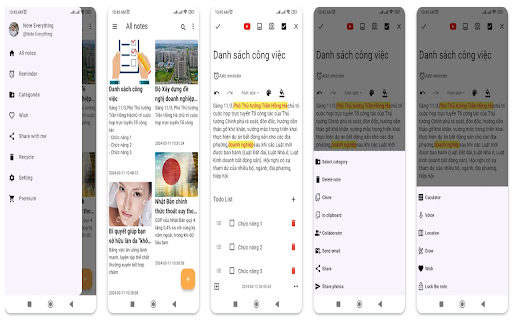
Note Everything! Note Everything application is lightweight and User Interface easy uses. It helps you to save everything in your life as work, family plans, appointment with your friends,... Pattern lock : Limit permission to access the application or each note. Login facebook : get profile information Categories manager : create/delelte/modified category Note : create note of each category Photo/Camare feature Sketch feature To-do-list Create shortcut of note in order to start quicklier. Setup reminder for each note Widget that helps you see notes on the smartphone screen add reminder feature add themes more add record feature add search feature Import/Export Google Drive Import/Export memory Select/Delete a lot notes from main Setting font size for application Receive sharing data from other apps Add color for category Implementation some small features Sync google drive customer theme of note improve paint feature add contact feature add calculating feature

Simple Quick Note
Simple quick note extension with a character counting feature This extension is designed for quick notes that will be saved and synched across all your desktop devices If you have any questions, please contact me by email

My-Notes
My-Notes - Put your story into notes... It is a simple and useful application that saves a quick note right without leaving a browser. This extension can sync with Google Drive and encrypt the data if desired... to keep it safe, and secure. Features - Markdown it! A plain text format editor for writing structured documents. Based on the CodeMirror with markdown-it renderer followed by the CommonMark spec. - WYSIWYG-style editing. A Rich content editor ideally produce clean, semantically meaningful documents while still being easy to understand. Based on the ProseMirror with the bridge the gap between editing explicit, unambiguous content like Markdown, and classical WYSIWYG editor. - Automatically saves notes to Google Drive into data file If Authorized on options page. - Can encrypt all data synced to the cloud, using AES-GCM encryption with the only key that the user carries. - No one can know about sensitive information until decrypted. - Please be noted, if a key is lost, it will be impossible to recover the data. Please remember that key and keep it safe. - Drag & drop to reorder the notes in a desired order. - Dark and Light themes. - No data is collected from a user. - Offline mode.

Task and Notify
Easily add recurring Task-Reminders. To use the "Task and Notify" extension, - Click on the extension icon in the browser toolbar… Easily add recurring Task-Reminders. To use the "Task and Notify" extension, - Click on the extension icon in the browser toolbar to open the popup. - Add new tasks in the popup by entering the task name and selecting the desired notification time. - Tasks can be set for specific times and will recur daily if not manually deleted. - Click the "Submit" button to add the task to the list. - The extension will notify you with a popup and sound alert when the task's time arrives. - Manage your tasks in the popup, including deleting unnecessary ones. - Access additional settings by clicking on the gear icon in the popup to open the settings popup. - Customize the theme, font, font size, and time format in the settings popup according to your preferences. - Click the "Save" button in the settings popup to apply your customizations. Enjoy the convenience of task reminders and notifications to boost your productivity! Note: If a task is added and not deleted, it will automatically recur every day at the same time.

Sticky Snippets · Note-it Aside · Customer Service, Sales & IT Support
Save snippets, reuse replies — one click from any tab. For customer service, sales, and IT support teams. Note-it Aside is a Chrome side panel extension for sticky notes, text snippets, canned responses, reusable templates, tasks, page capture, and page summaries. It is built for people who work in web apps all day and need fast access to the text they save and reuse most. Use it to save quick replies, internal notes, checklists, troubleshooting steps, product copy, selected text, and other frequently pasted text. Instead of switching between tabs, documents, and chats, open the side panel and keep your notes beside the page you are already working on. When you explicitly use note capture or summary features, the extension can read selected text or readable page content from the current page so you can save it to notes or generate a summary. No sign-up is required, and your data stays local by default unless you choose an optional feature such as cloud backup, folder sharing, or Instant Transmit. Best for - Customer support and customer service teams - IT support and operations teams - Sales and business development teams - E-commerce admins and back-office workflows - Anyone who repeats the same text in browser-based tools - One-click copy from the Chrome side panel - Folders to organize notes and templates by workflow - Notes, templates, and tasks in one place - Reusable text templates with inline placeholders, dropdown choices, date and time tokens, and linked variables from other notes in the same folder - Note styling with colors, font size, and bold text - Drag-and-drop sorting for notes and folders - Save selected text from any webpage with the context menu - Insert saved notes, snippets, and templates from the browser right-click menu - Capture readable page content into notes from the current tab - Generate AI page summaries on supported Chrome versions and compatible pages - Cloud backup to Google Drive or Dropbox - Read-only folder sharing by link, with import into Note-it Aside - Import and export backup files - Instant Transmit to mobile with a QR code - Interface available in 50+ languages - No account required; local-first storage by default Regular note apps are built for long-form writing. Note-it Aside is built for fast browser work: reusable replies, text snippets, reference notes, and lightweight task tracking beside the page you are already on. - Templates: a new note type for reusable parameterized text. Type a body with {name} style placeholders and fill them in inline, right under the textarea. No dialogs, no mode switch. - Placeholder choices: use {name:dear customer} for a text field with a default, or {level:pleasure|honor|responsibility} for a dropdown. {date} and {time} resolve automatically. - Linked variables: any plain note in the same folder with a title becomes a named variable inside your templates. Edit the source note once and every template that references it updates instantly. - Live preview and one-click copy: the rendered output updates as you change field values, and the existing copy button copies the filled-in text. - Share templates with folders: templates travel with folder sharing and render the exact same inline fields on the public web link. - Template gallery: browse free ready-to-use templates at https://noteitaside.com/templates. - Templates are included at no cost.
