
dejblhmebonldngnmeidliaifgiagcjj


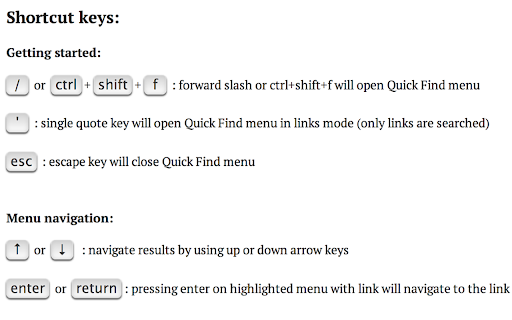

For a more easily readable description please visit: Motivation -------------------- I’ve always wanted the ability to see all the search results in a text search rather than just seeing them highlighted and scattered across the page and out of view. This was the start of the idea and it soon became mashed up with all the great Firefox quick find features that Chrome is missing. If you like it please rate it and if you have any feature requests, questions or bugs you file it here: https://github.com/peterdotjs/quick-find/issues Description -------------------- Next generation text search. A new text search tool for your Chrome web page. Start a search and simply press enter/return on a highlighted link and you’ll instantly navigate to that page. A mashup of Firefox quick find features (case match, links only search, highlight all, search selected text) as well as awesome new ones (scroll/navigate through all search results with context) - brought to Chrome. enter or return : pressing enter on highlighted menu with link will navigate to the link Tips ------------------- Quick Find search box is pre-populated with any selected/highlighted text prior to opening the search menu. Toggle occurs only when cursor focus is on the Quick Find menu. Limitations ------------------------- Extension only works on sites that allow content scripts. The chrome webstore page itself for example doesn't even allow content scripts to be run. After you've installed it make sure you are using it on a newly loaded or refreshed page. The script won’t be loaded on existing tabs without a refresh. Other website shortcuts or extensions may conflict with these shortcuts. A future enhancement can be to select your own shortcuts to open the menu. Additional Notes ------------------------------- Anonymous page view tracking is used to improve the extension and user experience. You can opt out in the options menu.

Multiple Search and Highlight
Highlight multiple words separated by comma, space or arbitrary separator with persistent history This extension is meant to highlight multiple terms on large documents as fast as possible. This version uses native highlighting which guarantees the highliest possible searching performance without altering the DOM tree. Features: 1. Does not manipulate DOM tree 2. Fast response on large document trees 3. Fast response on multiple queries 3. Supports regular expression highlighting 4. Supports a few different word separator 5. Supports keyboard navigation (Enter to search for the next match and Shift + Enter to search the previous match) 6. Works completely offline Privacy: This extension works completely offline. There is no server-side interaction whatsoever. Query History: This extension automatically saves your search queries per domain (After pressing Enter or Shift + Enter). It offers the previous queries when the popup appears on the same domain. To alter the storage method, visit the options page. Keyboard Shortcuts: This extension supports keyword-only usage: -> Open chrome://extensions/shortcuts in a browser tab -> Find the extension and assign a keyboard shortcut 1. You can open the search panel by configuring a shortcut for it. 2. You can also automatically search for the last search query without opening the search interface 3. There is a keyboard shortcut to hide search results as well in this interface. -- When the interface is open: 1. Press the Enter key to find the next match 2. Press the Shift + Enter keys to find the previous match 3. Press the Esc key to close the search panel 4. Press the Shift + Esc keys to close the search panel and keep the highlights Introduction: This extension can be used to dynamically mark search terms with optional custom regular expressions support and offers you built-in options like diacritics support or separate word search. The interface is similar to the default browser's find interface. You can press the Enter key to select the next occurrence, or press the Shift + Enter combination for backward matching. This extension works offline and has no server-side interaction whatsoever to protect user privacy. Also, it only gets activated once the user opens the popup. There is no resource usage when the extension is not being used. To enhance the searching capability of the extension, sub-queries are only being applied to the page once.

find+ | Regex Find-in-Page Tool
A find-in-page extension with support for regular expressions. {find+} is a powerful Find-in-Page extension for Google Chrome allowing you to search a web page or document by regular expression. It has been designed to look and behave much like the native CTRL-F tool, but extended with various useful features. With {find+}, you can match any legal JavaScript regular expression against text in the page, use find-and-replace to replace text in the page, copy occurrences of a regex to your clipboard, store frequently used expressions, and configure the extension the way you like. As a software developer, looking through lengthy stack traces, continuous integration build history, or large text files is something we do very regularly. The Chrome Find-in-Page tool works well in most cases, but offers very little when looking for very specific (or very general) keywords. A few notes: - This tool was designed and built for developers. If you're not familiar with using regular expressions, this tool is not for you. - This tool does not support dynamic pages. The purpose of this tool is to search for patterns in structured text, not in pages like Google Sheets or similar sites. - This tool will struggle with significantly large pages. In these cases, using another tool might be more appropriate.

Super Highlight Search
In-page text search tool. High contrast highlighting makes it easy to find! KEYBOARD SHORTCUTS: ==================== ENTER or ↓(Down arrow): Finds the next match SHIFT+ENTER or ↑(Up arrow): Finds the previous match ESC on page: Clear the results UPDATES: ======== v1.0.6 - FIXED: The background not cropped if over 32000 pixels height. v1.0.5 - FIXED: Search for pages including IFRAME does not work. v1.0.4 - FIXED: When typing quickly, search results shown as hits even though it is not a hit sometimes. - UPDATE: Icon creation from canvas to svg for clearer display. v0.3.7.0 We've caught up with Chrome 61, finally. Selection follows document scrolling.

Selection Search
Search for the selected text in search engines With this extension you can easily search for text you have selected. When some text is selected you can left click the selected text to get a popup where you can choose a search engine to search with. In the options page you can customize the look of the menu, which mouse button that should activate the menu, which search engines to show, and a lot of other things. When you install this extension you will get a warning that this extension can: "Access your data on all websites." This is needed because the code for the popup-menu needs to be added to every website for it to work. If you want to report a bug/issue, please use the following site: https://github.com/Pitmairen/selection-search/issues Alternatively you can use the support section on this site (chrome web store), but I get no notifications about new posts, so I may not notice the message. Some people have asked for ways to make donations to the project. If you want to make a donation you can do so by buying me a coffee: https://www.buymeacoffee.com/pitmairen 0.9.7 - Improve support for IME input in toolbar popup (See issue #173) - Change to use a html class to shown/hidden the popup menu to make it easier to override the display property of the popup with custom CSS. 0.9.6 - Fix issue where icons in some cases could fail to load because the fallback icon loading did not work. This may improve the icon loading for some users. 0.9.5 - Add option to trigger "open all" feature on submenus with middle click only. - Make back button in toolbar button go back only one level at the time - Fix issue where "open all" on sub menus could crash if the submenu contained separators - Change default search engines on new installs to use https 0.9.4 - Add ability to customize the toolbar popup with css - Include separators in the toolbar popup. Hidden by default, but can be made visible with custom css. 0.9.3 - Fix issue where some icons failing to load could trigger a loop in the image loading, which could cause high CPU usage and pages failing to load. 0.9.2 - Improvements to icon loading. The icons are now loaded in the background worker, similar to how it was done in the 0.8.* versions of the extensions. This should make the icons load faster and with less chance of icons failing to load. Note: The icons are cached in the sessions store provided by the browser. This storage has limited capacity. If you have a lot of search engines or have many large custom icons, you can hit the limit. This will cause some icons to fail to load. If this happens try to use smaller icons if you have custom icons. If that does not help report the issue as it may be possible to make the usage of the storage more efficient if necessary. You can also hit the limit if you make a lot of changes to your search engines in one go, but this should be fixable by just restarting the browser as this will cleanup old entries in the storage. 0.9.1 - Fix issue with context menu items requiring two clicks to work - Fix issue where the context menu items was not added properly - Fix issue where hitting enter in the toolbar search box would not open the first search engine - Changed icon loading to use the icon urls directly, instead of loading the icons in the background, as the background loading does not work properly with manifest v3. This will probably also fix some issues where custom svg images would not load. 0.9.0 - Major rewrite of internals to migrate the extension to manifest V3, as required by Chrome for the extension to continue to work. - No new features or bug fixes in this release. 0.8.63 - Added new buttons to allow adding new search engines/separators/submenus at specific positions in the search engine list 0.8.61 - Added option to enable the search engine popup blacklist/whitelist to also affect the search engine hotkeys. The options is located under Popup menu -> Advanced -> Blacklist/whitelist. 0.5.58 - Fix issue where the popup could be partially positioned outside the top of the browser window and become unreachable. Mostly an issue for very large popup menus with many search engines. 0.8.57 - Fix mycroft integration. - Add an additional source for search engine icons that is used if the default source does not have an icon. 0.8.56 - Added special search engine marker for sites requiring encodings other than UTF-8. Simply append {SPECIALENCODING} to the end of the search engine url. This enables the feature and the browser should be able to auto detect the correct encoding. 0.8.55: - Possible fix for freezing tabs for searches opened in new foreground tab 0.8.53: - Added option to open search in new window - Make it possible to add search url to the submenu root item. If a search url is added it will open when clicking the submenu root item, unless the openall on click option is checked. - Improved replacement of bracket placeholders ({%s}). If "}" must be used inside the placeholder it can now be escaped using "}". - Improved regexp placeholder replace converter. The old "re:" converter still works for backwards compatibility. The new improved converter is called "replace:", and is documented under "More Variables" at the top of the options page. 0.8.51: - Fix issue with saving changed settings on options page For full changelog see:
