
deifcolkciolkllaikijldnjeloeaall


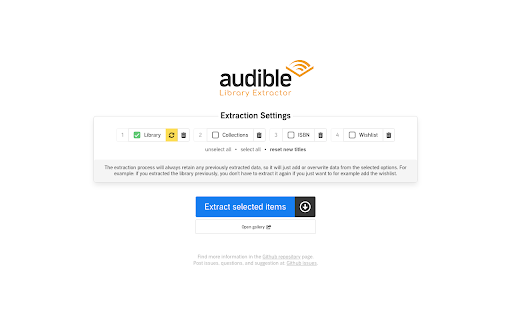

Extracts your Audible library metadata and automatically generates a locally viewable gallery that can also be uploaded online. Note: this extension is not affiliated with Audible. 1. Go to your Audible library and click the "Audible Library Extractor" button right below the search input 2. In the next view you can choose what to extract and start the extraction process by clicking the big blue button. The gallery with all your library & wishlist books opens into a new tab automatically after the extraction is done. You can find this documentation any time by right-clicking anywhere in an open tab under the "Audible Library Extractor" menu item.

DevirtualizeAudible
If you are as annoyed by me that when you're looking for new audiobooks you see pages and pages of "Virtual Voice" narrations, then this is the add-on for you. When you're browsing audible.com this add-on looks through the search results and removes the ones which are "narrated" by a "Virtual Voice". This may result in a blank page of search results if the entire page was "narrated" by "Virtual Voice" titles. Just go on to the next page and see one or two actual audiobooks amongst the growing virtual horde.

Audible for PC, windows and Mac - Free Download
Audible for Windows PC and Mac extensions come with pro-grade recording, with Record, save, and Audio Playback features. This extension allows you to record any audio easily and save it to your PC. Using stopping and play features, you can stopping the recording and playing back the recorded audio for review, it offers convenience. You can also find the playback speed option, allowing you to speed up the audio playback and review your recorded audio quickly. Features for Audible Extension: 1. Easy audio recording and saving to PC 2. Stopping and playing features for convenient recording review 3. Playback speed option for quick audio review Note: This chrome extension is only developed for Audio lovers FAN.

Goodreads ratings for Amazon
Goodreads ratings for books in Amazon pages. Goodreads ratings for Amazon is a small extension that shows Goodreads ratings in Amazon pages. It also provides with a link to directly visit the Goodreads page. Works with most Amazon domains. NOTES FOR LATEST VERSION ======================== Fixing stuff and supporting more Audible domains. ABOUT PERMISSIONS ================= This extension just asks for the minimal permissions needed. If you have any doubt about it just take a look at the source code at github. https://github.com/rubenmv/extension-goodreads-ratings-for-amazon/ LEGAL STUFF =========== Goodreads ratings for Amazon is licensed as Apache 2.0. For bugs report visit the github project page at https://github.com/rubenmv/extension-goodreads-ratings-for-amazon/issues or send me an email to rub3nmv@gmail.com

Readwise Highlighter
Save a page to Readwise Reader This is the official Reader browser extension made by and maintained by the Readwise team. You use the Reader Highlighter extension to: • Save articles to Reader – the first ever read-it-later app built for power readers. If you’ve ever used Instapaper or Pocket, Reader is like those, except it’s built for the modern era and brings all your reading into one place including: web articles, email newsletters, RSS feeds, Twitter threads, PDFs, EPUBs and more. You can get started with Reader here. • Highlight and annotate the open web. All highlights that you make using this extension will be synced with the Readwise ecosystem and, optionally, to your note-taking app of choice such as Obsidian, Notion, Roam Research, Evernote, Logseq, and more. Note: You must have an existing Readwise account to use this extension. If you are not already a subscriber, you can get a free 30-day trial with no credit card upfront. At the end of the trial, you will not be charged unless you choose to subscribe.
