
degimalgkelhibdpeofjmkmhdfneidca

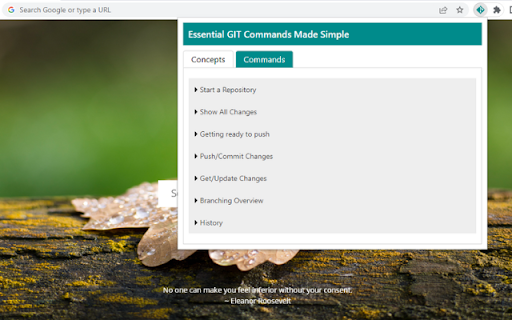
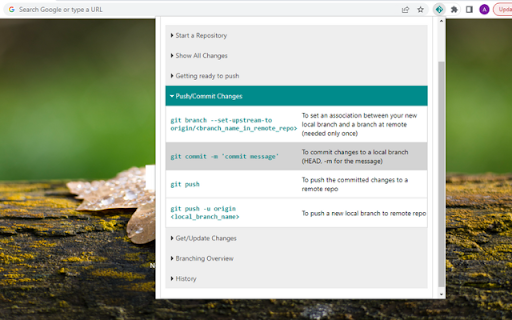
This extension gives an overview of essential GIT Commands. This extension gives you an overview of all the essential GIT Commands that you will need for you day-to-day git activities.

Ultra Button
A button for everything. You can now access most of chrome features in one Ultra Button. Functions Including: Bookmarks, Extensions, Downloads, History and Tabs. Mouse Middle Button Behaviors Bookmarks: Open bookmark in background Extensions: Remove extension Downloads: Remove download record History: Open history in background Tabs: Close tab or window ~~~~~~~~~~~~~~~~~~~~~~~~~~~~~~~~~ The icons in this extension were downloaded from Noun Project. https://thenounproject.com/ v 0.9.0 add download notification You can enable it in the options v 0.4.1 add session control You can now restore closed tab or windows

Shortcuts for Chrome
Navigation menu of Chrome URLs: internal pages of the Google Chrome browser. Chrome browser navigation is optimized for non-technical users. For users who want to inspect what is happening with indexedDB, service workers, or Bluetooth devices etc., this menu brings shortcuts to those hard-to-find, internal browser pages. This menu lists all Chrome URLs in a single, flat list, configurable menu. This application is free and open-source software, built by Chrome users for Chrome users. ✔️ Pin your favorites on top for fast access ✔️ Drag and drop pinned links to change their order ✔️ Discover hidden browser features you never knew existed ✔️ Automatically matches dark/light mode based on browser setting

Android Developer Toolbox
A quick access toolbox of Android developer tools, calculators and information. Android Developer Toolbox is a quick access to Android™ developer tools, calculators and information. Some items include density calculator, dp to px and px to dp calculator, dangerous permissions, and Android™ release information. Always more to come! The Android robot is reproduced or modified from work created and shared by Google and used according to terms described in the Creative Commons 3.0 Attribution License.

Enhanced GitHub
Display repo size, size of each file, download link and option to copy file contents Extension that provides useful features on top of GitHub Website. 1. Displays repo size. 2. Displays each file size in every active branch (not applicable for folder / symlink) 3. Show download link for each individual file (not applicable for folder / symlink) 4. Copy file's contents directly to Clipboard (just won't work for markdown files) 5. Download file 7. Coming soon...please suggest by opening an issue on https://github.com/softvar/enhanced-github/issues Enhanced GitHub Chrome Extension doesn't collect/share/care about your data at all. Asks for GitHub Access Token only for private repos and if Rate Limiting is your concern. 1. "*://*.github.com/*" - for running on github.com domain. 2. storage - for storing GitHub access token on your local system. GitHub Access token is required for private repos and for handling API rate-limiting issues. 3. webRequest - to support GitHub being a single-page-application now. 4. webNavigation - to support GitHub being a single-page-application now. Read the detailed blog to support SPA and for requesting permissions #3 and #4 - https://medium.com/@softvar/making-chrome-extension-smart-by-supporting-spa-websites-1f76593637e8 * Note: From v1.0.0 onwards - Click on download icon/button while pressing Alt / Cmd(for Mac)/ Ctrl(for Windows) because GitHub has stopped downloading of files directly. * From v3.0.0 onwards, this extension wants webRequest permission so that it can properly handle SPA behavior of GitHub website. * From v4.0.0 onwards, it support GitHub New Design. Please check the detailed CHANGELOG - https://github.com/softvar/enhanced-github/blob/master/CHANGELOG.md OPEN-SOURCED and LICENSE: For more updates, please stay tuned! For any queries/issues - open an issue on https://github.com/softvar/enhanced-github/issues For any query, drop me an email at varun2902@gmail.com
