
deapdjogdpbladobfaghcncapindpgfd
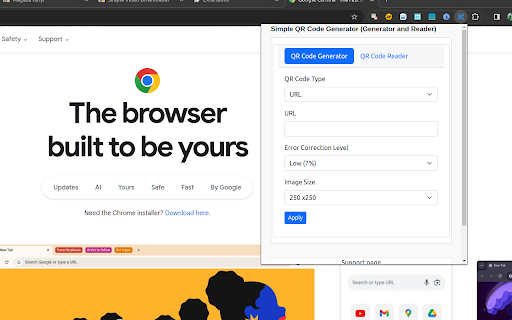
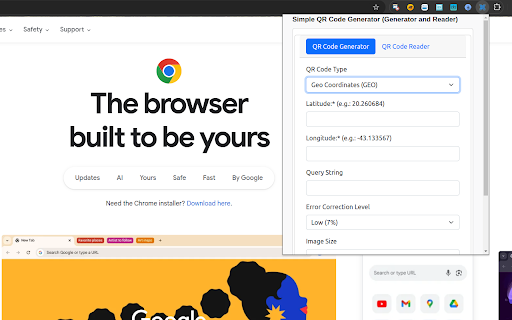
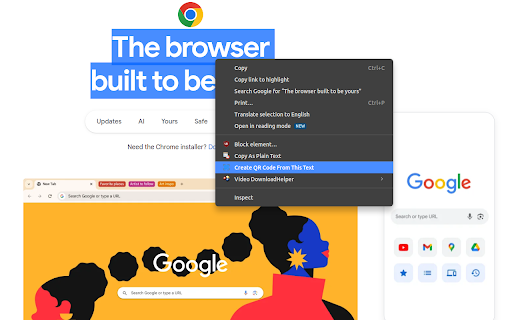
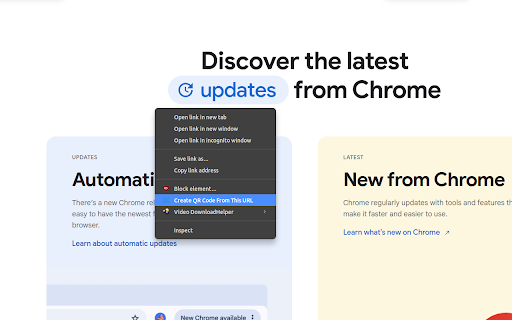
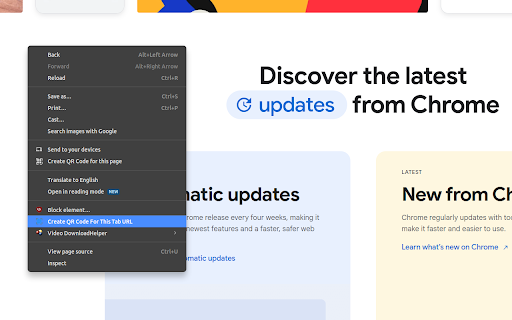
A Simple QR Code Generator (Generator and Reader). You can convert your browser into a full featured qr code reader app A powerful and simple QR code generator that helps you to easily generate and scan QR codes. A Simple QR Code Generator (Generator and Reader). You can convert your browser into a full featured qr code reader app This amazing plugin provides seamless integration of a QR code generator and scanner. Simply convert the current webpage, text, or link into a QR code, and then scan QR codes immediately from the webpage. * Create QR codes for your current webpage. * QR codes on the website can be conveniently scanned with a right click. * Create QR codes for any input (text, link, or website). * Create QR codes from any text on active tab * Create QR codes from any link on active tab * Create QR codes from active tab url * Download QR codes as pictures. * Decode or Read any QR code from your edge * Free forever.

2FA
2FA Authenticator - generate secure codes in your browser. Fast, offline two-factor authentication for all your accounts. 2FA Authenticator: Your Secure Two-Factor Authentication for Chrome Protect your online accounts with 2FA Authenticator — the ultimate two-factor authentication extension built directly into your Chrome browser. Generate secure TOTP and HOTP codes instantly, without switching devices. 2FA Authenticator makes two-factor authentication simple, fast, and reliable for everyone. 🔒 Security & Privacy • Manifest V3, minimal permissions ("storage" only) • No tracking, no analytics, no telemetry • No content scripts — extension cannot read web pages • TOTP secrets remain in your browser, never transmitted • Public security disclosure policy at authenticator.sh/security 🛡️ Effortless Two-Factor Authentication ⚡ Enable 2FA protection for all your accounts in seconds ⚡ Generate one-time passcodes (OTP) with a single click using 2FA Authenticator ⚡ Support for TOTP and HOTP protocols — the gold standard of two-factor authentication ⚡ Never worry about losing access to your 2FA codes again 🔑 Secure Code Generation with 2FA Authenticator 🔒 Generate time-based one-time passwords (TOTP) directly in Chrome 🔒 2FA Authenticator supports all major platforms: 2FA, Facebook, Amazon, GitHub, Dropbox, and more 🔒 Each 2FA code refreshes automatically every 30 seconds 🔒 Your two-factor authentication codes are always accurate and perfectly synced ⚡ Lightning-Fast 2FA Access 🚀 Open 2FA Authenticator from the browser toolbar — instant access to all your codes 🚀 No need to reach for your phone — two-factor authentication is now in your browser 🚀 Copy your 2FA code with one click and paste it into any login form 🚀 Save precious time every day with 2FA Authenticator's streamlined workflow 🔍 Easy QR Code Scanning - Add new accounts to 2FA Authenticator by scanning QR codes - Use your webcam or upload a screenshot — 2FA Authenticator handles both - Set up two-factor authentication for a new service in under 10 seconds - 2FA Authenticator automatically detects and parses QR codes for seamless setup 🛡️ Privacy-First 2FA Security 🔐 All 2FA Authenticator data is stored locally on your device 🔐 Your two-factor authentication secrets never leave your browser 🔐 No external servers, no cloud storage — 2FA Authenticator keeps everything offline 🔐 Full encryption ensures your 2FA keys remain private and protected 📦 Backup & Restore Your 2FA Data • Export your 2FA Authenticator accounts securely for backup • Restore your two-factor authentication data when switching devices or browsers • Never lose access to your 2FA codes — backup with confidence • 2FA Authenticator makes migration between devices simple and safe 🌐 Universal 2FA Compatibility 🌍 2FA Authenticator works with thousands of websites and services 🌍 Compatible with any platform that supports TOTP-based two-factor authentication 🌍 Use 2FA Authenticator with any account 🌍 Replace 2FA Authenticator, Authy, or any other 2FA app — all inside Chrome 🎨 Clean, Intuitive 2FA Interface • 2FA Authenticator features a modern, user-friendly design • Organize your two-factor authentication accounts with custom labels and icons • Search through your 2FA codes instantly — even with hundreds of accounts • Dark mode and light mode support — 2FA Authenticator adapts to your preferences 🚀 How to Start with 2FA Authenticator: 📥 Step 1: Install 2FA Authenticator from the Chrome Web Store 📥 Step 2: Click the 2FA Authenticator icon in your browser toolbar 📥 Step 3: Add your first account by scanning a QR code or entering a secret key manually 📥 Step 4: Use your 2FA codes instantly — two-factor authentication is now at your fingertips Setting up two-factor authentication has never been easier. 2FA Authenticator guides you through every step, so even if you're new to 2FA, you'll be protected in minutes. 💡 Why Choose 2FA Authenticator? ⭐ Instant 2FA codes — no phone required, two-factor authentication lives in your browser ⭐ Offline functionality — 2FA Authenticator generates codes without an internet connection ⭐ Top-tier security — your two-factor authentication secrets are encrypted and stored locally ⭐ Universal compatibility — 2FA Authenticator supports every TOTP-enabled service ⭐ Zero cost — powerful two-factor authentication completely free ⭐ Lightweight & fast — 2FA Authenticator uses minimal resources and never slows down Chrome ⭐ No account required — start using 2FA Authenticator immediately, no sign-up needed ⭐ Regular updates — 2FA Authenticator is constantly improved for better security and performance 🔐 Why Two-Factor Authentication Matters: In today's digital world, passwords alone are not enough. Two-factor authentication (2FA) adds a critical second layer of security to your accounts. With 2FA Authenticator, you generate a unique, time-sensitive code that must be entered alongside your password. Even if someone steals your password, they cannot access your account without the 2FA code from your authenticator. 2FA Authenticator brings the power of two-factor authentication directly into Chrome, eliminating the need to carry a separate device or install a mobile 2FA app. Whether you're securing your email, social media, banking, cryptocurrency wallets, or work accounts, 2FA Authenticator provides robust two-factor authentication protection for everything. 🏆 2FA Authenticator vs. Other Authenticator Apps: Unlike mobile-based 2FA apps, 2FA Authenticator lives right where you need it — in your browser. No more switching between your phone and computer. No more typing codes manually. With 2FA Authenticator, your two-factor authentication codes are just one click away. Compared to other browser-based authenticator extensions, 2FA Authenticator stands out with its focus on security, speed, and simplicity. Every aspect of 2FA Authenticator is designed to make two-factor authentication as seamless as possible while keeping your data fully protected. 🔧 Advanced 2FA Authenticator Features: • Support for SHA-1, SHA-256, and SHA-512 algorithms in 2FA code generation • Customizable code refresh intervals for advanced two-factor authentication setups • Manual entry of secret keys for services that don't provide QR codes • 2FA Authenticator supports 6-digit and 8-digit OTP codes • Bulk import and export for managing large numbers of 2FA accounts • Counter-based HOTP support alongside standard TOTP two-factor authentication 📢 Trusted by Thousands of Users Worldwide 2FA Authenticator is trusted by security-conscious individuals, developers, IT professionals, and everyday users who understand the importance of two-factor authentication. Join the growing community of users who rely on 2FA Authenticator to keep their digital lives secure. Your security matters. Your time matters. 2FA Authenticator delivers both — powerful two-factor authentication with zero friction, zero cost, and zero compromise. Install 2FA Authenticator today and take control of your online security with the most convenient two-factor authentication solution for Chrome. 🔐 2FA Authenticator — Two-Factor Authentication Made Simple, Secure, and Smart.

QR Code Generator
A super handy QR Code Generator / Creator for you. Converts your current page into a QR Code with one quick click. Generates QR Codes from free text and URLs on the fly. The highest-rated QR Code Generator in the Chrome Web Store. ✓ Trusted by 800,000+ weekly active users. ✓ Privacy-friendly: no unnecessary permissions required. ✓ Adapts to your operating system’s Dark Mode to protect your eyes. ✓ Generate a QR Code for your current page with just one click. ✓ Free for everyone. ✓ Scan, analyze, decode, and read QR Codes. ✓ Scan QR Codes directly with your camera. ✓ Save and view your QR Code scan history. ✓ Create QR Codes in real time: Simply type to generate. ✓ Right-click to create a QR Code for your selection. ✓ Color and size customization. ✓ Option to download the QR Code as an image (PNG/SVG/SVG Code). ✓ “With Logo”: Customize your QR Code with a logo. ✓ Super fast and works offline. ✓ Supports hotkeys. Assign them at chrome://extensions/shortcuts ✓ Print your QR Code directly. ✓ Option to disable context menus available in Settings » Advanced. If you like this extension, please write a review and rate us five stars. I’m looking forward to reading your comments. - Added camera-based QR Code scanning. You can now scan QR Codes directly with your camera. - Added scan history. You can save and view all QR Codes you have scanned. - Thanks to our user Braden Wardle, we've fixed an issue where the print feature did not function correctly. - Fixed minor style issues. - Thanks to our user "E", we've fixed the 'Multiple Fixed Popups' feature malfunction in v.10.3.10 - Fixed uninstall URL typo. Updated on Oct 26, 2024: - Resolved text rendering problem in dark theme. - Corrected issues with auto-switching between light and dark themes. - Removed the donation link to improve the UI's appearance. If you want to support us, just rate us five stars! :) Updated on Mar 23, 2024: - Resolved a problem where the context menu was not functioning. - Significantly enhanced the reliability of our scanning feature – we're confident it's among the top online QR scanners now! - User Interface Enhancements. - Fixed the bug where customized color settings were not working. - Resolved the issue with QR codes containing Chinese, Japanese, or Korean characters not being scannable. - Corrected the transparent background bug. - Addressed the bug where the export size was incorrect. - Improved the success rate of scans. - Other minor fixes. Updated on Jan 18, 2024: - Now compatible with Manifest v3. - Improved QR-scanning feature significantly. - Added SVG export support (SVG or SVG Code). Updated on Feb 14, 2021: - Bug fixes. - Optimized code and resources. Updated on Feb 5, 2021: - Improved print feature. - Toggle between dark/light/auto modes as you wish. - Optimized code and resources (probably the fastest QR Code Generator in the Chrome Web Store). Updated on Jan 21, 2021: - Improved print feature. - Bug fixes. - Optimized code and resources. Updated on Jan 19, 2021: - Improved dark mode design. - Optimized code and resources. - Added a print button in the fixed popup window. Updated on Jan 10, 2021: - Automatically uses your OS's dark mode to protect your eyes. Updated on Jan 2, 2021: - Improved QR Code reader (decoder) when scanning a QR Code in an image. - Bug fixes and optimization. Updated on Nov 23, 2020: - Shortcut setting at chrome://extensions/shortcuts (we will add a link to this page in our next version). - Quick QR Code Generator is now rebranding to QR Code Generator. - Bug fixes and optimization. Updated on Nov 15, 2020: - Added the white frame (aka the “Quiet Zone”) around the generated QR Code. - Bug fixes. Updated on Jun 25, 2020: - Fixed a bug that would display the wrong UI on the options page. Updated on Oct 2, 2019: - Added “Open in a fixed window” feature. You can keep this QR Code on your screen without closing it. Updated on Aug 28, 2019: - Fixed a bug that would cause the Chrome Extension panel to show an error message. - New icon design. Updated on Aug 9, 2019: - Added Bulk QR Code Generator feature. You can generate more than one QR Code and download them in a “.ZIP” file. Updated on Aug 4, 2019: - Added “HD” / “With Logo” feature. Now you can generate your QR Code with a logo. - Bug fixes. Updated on Apr 5, 2019: - As requested, the downloaded image now has the size as a suffix. For instance: exported_qrcode_image_350.png. - Added “Runs offline” badge. - Fixed a bug where the QR Code scanner/reader was not showing up after restarting Chrome. - Added QR Scanner/Reader feature as you demanded. - Fixed the bug where the QR Code image size wrongly reset to 20px. - Added an option to turn off the context menus if you don’t like them. - Fixed a bug that may cause the size of your downloaded image to be unchangeable. - Added a Donation button. Thanks for supporting me. - Using “activeTab” to replace “tab” permission. There will be NO “read your browser history” warning any more :) - Able to copy the image directly (try to paste it anywhere else, like “Photoshop”). - Removed the “default hotkey” feature - now you can customize it on your own. Just one click from the “settings”. - Added ContextMenu feature - now you can “Quick QR” anything with two simple right clicks. - Focus the input zone after the popup shows up - so you can type whatever you want to turn into a QR Code. - Now, you can use ALT+Q to open the QR Popup. If you want to change your shortcut, please go to chrome://extensions/configureCommands - Fixed a bug where the popup window might get blocked when clicking on the icon. - Now, you can enter more than one line instead of a single line. - Fixed a bug where the “save image” feature did not work correctly after making modifications to the QR Code. - Instantly updates the QR Code when you are typing. - Access the options in the popup (get what you need on the fly). - Fixed a bug that created images that couldn’t be transparent. - Transparent background. - Customizable colors and size. - You can find them in the Options page (Right-click on the icon and click “Options” to access). - Redesigned the layout. - Fixed small bugs.

Offline QR Code Generator/Editor
Offline QR Code Generator/Editor (URL and Text) Features: **Absolutely Offline and Fast** **Context Menu Support (Any Selected Text to QR)** **Absolutely simple, powerful and Ads-Free!** **Life-time support, Free For Ever** **Easy to use*** **Allow QR Modification (Click the Image)** **No Author links or other shits** This Simple Chrome Extension (Clean UI with no Author or other links) allows you to get the QR image for the current Tab URL. You click the extension icon and then you will get the QR image. Simple as that, no deep shit. You can right click to copy, open in new tab or save the image. This plugin requires No Internet Connection (via qrcode.min.js) You can also select any text and click the 'Get QR' in the context menu. If no selection is found, the current tab URL will be converted to QR. The QR image will be shown in the same page and again, you can click the QR image to modify the text. If you don't like context menu, you can hide it in the option page. From version 0.6, the QR will NOT be shown using Bootstrap Modal because it may conflict with the page and slow down the browser. Just remember, less is more. Please rate it. Suggestions, Feedback and ratings are much appreciated. You can also click the QR image to modify the text. If you like this plugin, could you buy me a coffee? :) https://www.paypal.me/doctorlai/5 bitcoin:1J88t5UAgKBHhMgzkyH9bpY5mPdCYAe5XQ Update History 22-Dec-2021 1.3.3 Manifest V3 - Remove Context 18-Mar-2019 1.3.2 Remove Bootstrap, Add Quiet Zones 10-Sep-2017 1.2 Add Version 28-Jan-2017 1.1 Add Locale 17-Nov-2016 1.0 Fix Multiple Context Menu 16-Nov-2016 0.9 Add Options Page - Allow Hiding the Context Menu 16-Nov-2016 0.8 Add Context Menu - Get QR of Current URL 16-Nov-2016 0.7 Allow Modification when you click the QR image (in page) 16-Nov-2016 0.6 Remove Modal because of Conflicts 15-Nov-2016 0.5 Add Context Menu (Any Selected Text to QR) 13-Nov-2016 0.4 Update Text after QR is modified 13-Nov-2016 0.3 Offline using qrcode.min.js 13-Nov-2016 0.2 Code Cleanup 13-Nov-2016 0.1 Init Release

Make QR Code
Create QR codes with Make QR Code extension easily, generate or scan one in a snap. Make QR Code has all you need. 🚀 Introducing Make QR Code: Your all-in-one solution for seamless QR code interactions in Chrome. With this extension, you can swiftly generate a code from your current page URL or make a custom one from data you provide. But out extension isn’t just about creating codes, it boasts a powerful scanner too. Scan codes directly from web pages or uploaded files, delve into their content, or instantly follow the linked URLs. 🤝 Networking: Elevate your connections by creating encoded, easlily-scannable links to digital business cards or vCards. 🎨 Personal Portfolio: Freelancers and artists can generate QR links to portfolios, be it on LinkedIn or a personal website. 🎉 Events: Generate encoded links to invitations with embedded RSVP forms, directions, or additional details. 📚 Learning: Students and lifelong learners can embed QR links in notes, granting easy access to supplementary online resources, videos, or literature. 🛜 WiFi: Let your guests access your network easily. Swap complex Wi-Fi passwords for a simple QR scan. 💲 Payments: Amplify the checkout process with QR-based payment solutions. 📦 Product Enhancement: Enhance product labels with QR links leading to detailed information, video demos, or user manuals. 🎯 Marketing & Promotion: Direct potential customers to special offers, landing pages, or app downloads via QR. From event ticketing to real estate listings, loyalty programs to feedback surveys, and intricate supply chain tracking—this extension got you covered. 🔗 Popular Platforms: Effortlessly craft QR links for platforms like YouTube, LinkedIn, Pinterest, Twitter, and more. Want a QR code directing to your latest Instagram post, TikTok video, or Medium article? You are looking at the right tool. Direct audience traffic to Spotify playlists, SoundCloud tracks, or Anchor podcasts. Showcase designs on Behance or Dribbble, or list products on Etsy—all made easy and at your fingerprint. Whether scheduling on Calendly, hosting on Zoom, or pinpointing a location on Google Maps, Make QR Code simplifies the process. - 🎥 YouTube & Streaming Platforms: Generate codes seamlessly to direct viewers to your latest YouTube video or a complete channel. Enhance user engagement and streamline their journey from QR scan to video playback. - 💼 Professional Networking: Encode links tailored for platforms like LinkedIn and Pinterest. Professionals can easily create QR codes linking directly to their LinkedIn profiles, making networking more efficient. Similarly, showcase your curated boards on Pinterest just by letting others scan a code. - 🐦 Social Media: Stay ahead in the social media game, by creating codes links for Twitter, directing followers to specific tweets or profiles. Additionally, if you wish to highlight your latest Instagram post or a buzzing TikTok video, generate QR codes and make sharing effortless. - 📝 Content Platforms: Content creators can leverage Make QR Code for platforms like Medium. Guide readers directly to your articles, essays, or stories, enhancing their reading experience with a simple scan. - 🎵 Music & Podcasts: Direct your audience to Spotify playlists, SoundCloud tracks, or Anchor podcasts effortlessly. Whether you're a budding artist, a renowned musician, or a podcast host, Make QR Code offers an easy solution to increase your reach. - 🎨 Design Portfolios: As a designers, showcase your designs on Behance or Dribbble easily by creating QR codes. Let potential clients or employers scan and view your work portfolio in an instant. - 🛍️ E-commerce & Listings: Sellers on Etsy can utilize the power of this extension to direct shoppers to specific product listings or entire shops. Enhance the shopping experience and boost sales with easily scannable QR codes. - 📅 Scheduling & Meetings: Streamline your scheduling process with Make QR Code. Whether setting up appointments on Calendly, hosting webinars on Zoom, or providing directions via Google Maps, transform user experience with easy-to-create QR links. ⭐ Why Choose us?: With features enabling you to create, generate, link, and scan, Make QR Code stands out as the ultimate companion for Chrome users.
