
ddjjembcdeddfaebkemgchgfbabbkppl

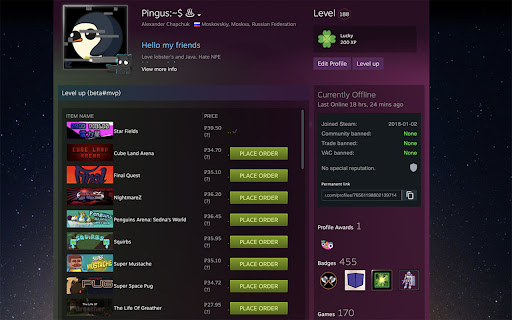
Automating some actions for Level up your Steam account. This is extension of Google Chrome browsers for Steam users. Automate processes for getting badges. Features: - Automated purchase of cards for not unlocked Badges. This feature allows you to scan your inventory and get the cheapest badges at Steam market place. (Demo at screenshot's)

Steam Booster Packs Profit Finder
Profitably exchange your gems for booster packs from your collection of games Our Extension helps you see the sale price of booster packs from your Steam library for profit or to recoup some or all of the cost of a purchased game. Extension functions: * The "Profit" and "Fast Profit" buttons sort booster packs by price relative to gem value by profit * "Profit" shows the best starting prices for the sale * "Fast Profit" shows the best request prices for an instant sale * Sorting by: name, gems, price and request * Displaying a color scale on prices to show the profitability of crafting booster packs * Displays the remaining time until the next booster pack is received when hovering over it (new booster pack become available for exchange every 24 hours) Get the most out of your game library!

Augmented Steam
Augments your Steam Experience Augmented Steam is a browser extension by IsThereAnyDeal that improves your experience on the Steam platform by providing helpful information and tons of customization options. - Price details (current best, historical low) for any game or DLC sourced from many authorized stores - More visible highlighting of games you own or have wishlisted or ignored (also works with your IsThereAnyDeal Waitlist and Collection!) - Fine-tuned product search with search filters such as review count / score and Early Access - Sort and filter options for the market, games, friends, groups, achievements, badges and reviews - Links to popular websites with additional related information, plus the ability to add your own custom links - Quick / Instant Sell items in your inventory - Custom profile backgrounds and styles, visible to all users of Augmented Steam - Take and store notes about any game - Maximize information relevance by hiding unwanted content blocks from app pages or the homepage - Automatically skip age gates for NSFW content - Batch actions for various scenarios, e.g. registering multiple product keys or adding multiple DLCs to your cart at once - And many more! Augmented Steam is a fork and spiritual successor of Enhanced Steam, which has come to its end of life in February 2019. A note about affiliate links: One of the features of Augmented Steam is showing you the best price out of the selection of stores, as well as the best historical price. We have affiliate relationship with some of these stores, and the extra links that are added may be affiliate links. You can turn this feature completely off, or filter which stores you want to be included. We will never modify the existing links, or links from other extension, with our own affiliate links.

Steam Owned
Checks if you own a game on Steam on various websites Checks if you already have a game in Steam, Epic, GOG library, itch.io, Fanatical Works on many websites. You can run it manually via the extension icon on any website. https://alexa.weezeewig.com/SteamOwned/SupportedWebsites.html This extension only looks at your list of games and wishlists. This information is kept on your computer and not sent anywhere. You can see which sites it has access to in "settings" > "extensions" > "details" Go to one of the supported websites. Click on the "library" icon on the top right of the browser. Epic Games needs a separate login. The normal one doesn't work. A tab will be opened for you to login. If something goes wrong, click on the "puzzle" on the browser -> "steam owned" -> "clear cached games" Tell me if you want any other sites added. Warning: It will be incorrect if the game name is different than the same game in the store. ie. "Train simulator" on Steam is "Train simulator 2016" on humblebundle. "ABZÛ" on Steam is ABZU on humblebundle. etc... 2026-05-18: Better results display. Fix Epic wishlist 2026-04-08: Fixed crash when gog wasn't logged in. Opens a tab to login to Epic. 2025-12-03: Steam changed their website. Updated for this. 2025-09-23: Grab multiple pages from GOG if there are any. 2025-08-28: Changed the login page for steam to get wishlist, sometimes you need to login separately to get the wishlist. 2025-06-14: Stopped using the steam API because it was getting an error on over usage. 2025-05-10: Fixed getting stuck if we're not logged into Fanatical. Added timeouts if a website is down. 2025-02-05: Fix getting Steam wishlist 2024-08-20: Added fanatical support 2023-08-06: Fixed EPIC games support

SteamChecker
FEATURES: Shows owned/wishlisted games: * on the Humble Choice pages (https://www.humblebundle.com/membership/home) * on the main game bundle pages * in the Humble Bundle Store and Search pages * keys in your Humble Bundle library (https://www.humblebundle.com/home/keys) Besides looking through every one of your steam games, searching for a specific title to see if you own it or not, there is no way of determining if a bundle you're about to get on HumbleBundle.com has games in your Steam library. Although it may be cheap, spending money on a 10-game bundle where you already owned 9 of the games always makes me frustrated, so I created this extension! This will gray-out any game you own on Steam that is on any of the weekly bundles, store pages, and keys to let you know if you own the game or not. Additionally, it will highlight wishlisted games you may have forgotten about so you don't miss a great deal on a wanted game! HOW TO USE: There will be a new extension icon in Chrome. Click on that to input your 64bit SteamID or steam profile name (NOT nickname) if you have set your URL. Click "Save" and you're done! This information can be found in your profile URL "steamcommunity.com/id/XXXXXXXXXX/" or "steamcommunity.com/profiles/XXXXXXXXXXXXXXXXXX/" NOTE: Humble Bundle uses a different naming format than Steam does for some games, but I will try to keep the alias file as up to date as possible whenever new bundles come out or new games are added to a bundle. If you see that games aren't showing up in a bundle, don't hesitate to contact me! The extension currently doesn't support steam DLC collections (Season Pass, Master Collection, Collector's Edition, etc.). VERSION 1.0 CHANGES: * Manifest V3 update * Changed how styles are applied for easier maintenance VERSION 0.9 CHANGES: * Added support for the Humble Choice subscription page * Fixed game aliases not loading in some circumstances VERSION 0.8 CHANGES: * Added support for the Humble Bundle Store and Search pages * Fixed for new Humble Bundle keys layout * Fixed single quote in game title issues
