
ddbjkeokchfmmigaifbkeodfkggofelm


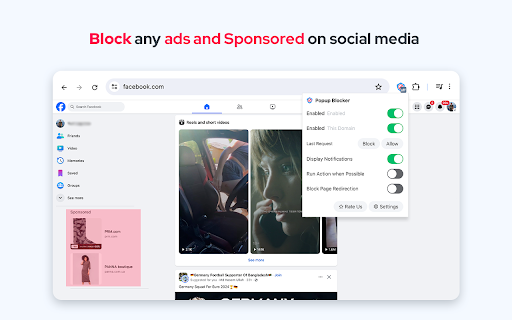
Block annoying popup requests from any website and enjoy fast browsing! Streaming, shopping, and WordPress sites often open unwanted pop-ups or redirect users to ad pages. This Chrome extension prevents all types of popups and popunders before they appear. When a popup is blocked, you'll see a badge count and an optional page notification. If multiple identical requests are made, the badge counter increments. For previously visited sites, the extension automatically allows or denies requests based on your prior decisions. What happens if a website tries to open a popup while using this extension? The extension blocks the popup request and displays a notification in the top right corner of the page. Enjoy distraction-free browsing! You’ll have the option to: - Deny the request - Allow the request - Open the request in a background tab - Redirect the current page to the requested source Do I need an Adblock? This extension doesn't hinder network requests or ads similar to adblock extensions. It serves a specific purpose, safeguarding you from popups and popunders. For an enhanced browsing experience, pair this extension with Adblock. Think of it as an additional tool to minimize distractions and interruptions. Notes: - By placing your mouse over a notification, the counter stops counting so that the user can review the popup request. - By placing your mouse over a notification, you can get the full URL in the tooltip (when the full URL is not visible). - You can ignore page notifications for a site by adding the hostname to the whitelist (renamed to exception list). - This extension does not block overlay pop-ups like cookie messages. - It works offline. There are no server-side activities whatsoever Please, rate us! We work hard to provide you with the best experience. If you like our extension, please provide us with a 5 star rating!

Popup Blocker
This extension automatically closes tabs and windows opened by ad-requiring sites You may be browsing normally and then you click somewhere on the page and then a new tab opens, suddenly, pointing to an ad, without you initiating it. This extension automatically closes those tabs/windows. It's not an Adblocker; it's a tab/window-containing-ad closer. ;) Once a site has that behaviour (where it opens random popups/tabs annoyingly), simply click on the extension and click "Add Site". Once that is done, the extension manages all tabs and windows opened from that particular site, automatically closing them if needed. To remove a site from the "monitored list", you can always click the extension again and click "Remove Site". Note that I intentionally created the extension to be lightweight, doing nothing but its intended task. Note that after adding a site, all new tabs opened that start with the protocol+hostname of that site will be allowed; all others won't. This means that if https://www.adopeningsite.com is added, then all sites starting with https://www.adopeningsite.com like https://www.adopeningsite.com/clickads or https://www.adopeningsite.com/hoverads will be allowed to open in a new tab. The others will be automatically closed. To purposely open a new tab that has its protocol+hostname different from that of the site, right click the link and choose "Purposely open in a new tab".

Adblock - adblocker for Youtube
Adblock for Chrome extension, an essential tool for your browser that combines power and simplicity to enhance your online experience. By installing this extension, you'll unlock a world where your favorite sites can be enjoyed without intrusive advertisements or unwanted distractions. Witness the magic unfold as you browse the web seamlessly and uninterrupted. Our advanced algorithm ensures a robust surfing experience tailored to your preferences. Not only does our extension block annoying content, but it also provides valuable insights into the security status of websites, empowering you with safe and secure browsing. Adblocker for Chrome is more than just an ad-blocking tool; it is a modern masterpiece designed to elevate your online journey, offering next-level security and an exceptional user experience with just a single click. Using the Adblock extension is effortless. Once installed in Chrome, simply click on the extension icon (Adblock Plus) at the top right corner to activate its features. We go the extra mile by blocking every type of ad, even those that go unnoticed, saving you time and boosting your browser's speed. Note! You might need to disable your other ad blockers (e.g., AdBlock Plus, uBlock, etc.) because they often use the same blocking rules, which can prevent this one from working effectively! It is an Adblock for YouTube application with a huge team of the developer behind it. It is a tool that ensures that you do not see the ads that appear on the screen while watching videos on YouTube. We value your feedback, suggestions, and queries. Please don't hesitate to contact us, as your input helps us continually improve our services for you.

AdBlock - Block Ads Plus
AdBlock for Chrome. Removes all annoying Ads in all websites. Blocks banners, pop-ups, chat windows, etc. Skips and blocks video Ads Fast and low memory consuming Ad Blocker for Chrome browser. Add out new AdBlock - Block Ads Plus to your Chrome and forget about annoying Ads. Protect your data and surf safely. We represent top-notch technology to block following types of ads on all websites: - Banners - Video ads and pre-rolls - Pop-ups and pop-unders - Chat windows - Hidden redirects AdBlock is an advanced and light-weight Advertisings Blocker which works on all websites, social networks, video hosting platforms, etc. Our Smart Ads Detecting Technology automatically triggers to block: - Redirects from malware - Redirects and malicious actions of adware and other advertising software - Hidden affiliate redirects AdBlock - Block Ads Plus is not just a handy tool which makes your Internet surfing ads-free, it also protects your private data and personal info. We block: - Excessive personal data collection - Transfer of your personal data and info - Collection and transfer of your browsing history AdBlock not only restricts and removes advertisings but also protects your personal data. Using AdBlock - Block Ads Plus means: - Faster Internet connection - Enhanced data protection from being collected by third-party services - Protection from unwanted tracking Use AdBlock - Block Ads Plus to get rid of ads and stay safe.

Popup Blocker for Google Chrome™
This is the top extension to block annoying popups, popunders & overlays in an easy & effective way. Block all popups once you install this extension and enjoy your internet surfing experience once more. Whitelist websites that you wish to support, so you can whitelist selected websites and see popup ads on those websites. Notification will popup when a popup ad has been blocked, and you can choose whether to unblock the ad. You can also alert our servers whenever you find a popup which has not been blocked correctly. This allows us to update our technology to ensure the popup blocker is working at 100%.
