
dckfkngmahjdokkkmconmfjdmicjcmgf
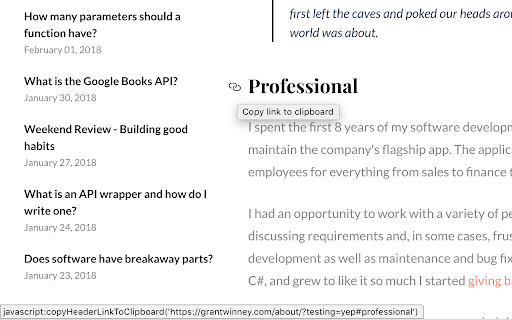
Automatically generates links for all headers on the page, to make it easier to share specific sections of the page. Most of the time, when you see a header on a webpage, it has an ID associated with it. You can use the ID to create a link to that section, but finding the ID usually means viewing the source code for the page, finding the header element for the section you want, and appending the ID to the URL before sharing it. This extension scans the page and generates links for all headers on the page, assuming they have an ID or Name assigned. - Hover over any header, and an anchor link will appear. - Click on the "chain" icon to copy the link to your clipboard. If there's no ID or Name in the header tag, it will search any elements nested inside the header tag for the first one with an ID or Name assigned. Failing that, it looks at the immediate parent element (i.e. a header nested in a DIV). If it still finds nothing, then no link will be generated or shown. It'll ask you for permission to read and modify all pages, because that's what it does. It scans the page for headers with IDs (or Names), and then injects one link for each header that has it present. If you need help, have a comment or suggestion, or just want to see the code for yourself, visit the GitHub repo where the source code is hosted. You can open an issue by clicking the "Issues" tab at the top. https://github.com/grantwinney/generate-links-for-headers-in-chrome If you'd like to write your own Chrome extension, but aren't sure where to start, check out this brief tutorial: https://grantwinney.com/making-your-first-chrome-extension

Tab Extract
A simple & lightweight tool to reduce tab clutter, using just the address bar. ● Too many disorganized tabs open? ● Slow to find the tab you're looking for? ● Want to reduce tab and window clutter quickly? Tab Extract helps you easily re-organize your tabs according to the subject or site, or quickly find a tab, or easily remove multiple tabs. How it works: Tab Extract will move all tabs from any window with a keyword match (in their URL or page title), into a new window. To use, type "ex" followed by a tab/space into the address bar, then enter keywords. ✓ "ex facebook news" will extract all facebook tabs and any tab with "news" or "facebook" in their title or URL, into a new window. ✓ "ex ." merges all tabs into the same window. This works because all URLs have a "." in them. ✓ Batch-remove tabs by extracting tabs to a new window using Tab Extract, and then closing the window. ✓ Tab Extract can merge tabs from across different windows into the same window by using a common keyword amongst the tabs. Notes: There is no need to select anything in the auto complete box, just press enter. If your Chrome has saved some "ex " as a search term for autocomplete, clear your history. Migrated from Chrome Extension Manifest v2 to Manifest v3 - Background script now runs as a service worker - Updated minimum Chrome version to 88 - Removed alert() for service worker compatibility (omnibox already provides feedback) Support for Marvellous Suspender suspended tabs - Extension now searches within the original URL and title of suspended tabs - Suspended tabs are moved while maintaining their suspended state Support for Chrome's natively unloaded tabs - Removed status filter to include tabs in all loading states - Fixes issue where unloaded tabs were not being found Fixed compatibility with modern Chrome versions that use tab unloading for memory management

Smart TOC
Displays a table of contents for any website, making it easier to read and navigate long articles, documentations, and online books. - Auto detects article and headings, with our smart algorithm - Highlights current heading - Click to jump to heading - Expand/fold headings, or to specified level - Floating panel, drag, resize, or dock to side - Mouse hover while holding Alt/Option key to glance - Copy to clipboard - Clean user interface - Only runs when you use it The Pro version offers extra features: - Dark mode, automatically - Up to 6 heading levels (free version capped to 3) - Quickly go to headings, with full-keyboard support Click the browser button to toggle table of contents for the current site Any website that conforms to the HTML standard and uses HTML heading tags properly (e.g. Wikipedia.com). You can also enable Smart TOC for local html in the extension settings.

Trufflepiggy - Quick Search
The all-in-one search tool: select and search. Find on multiple websites at once. Easy anonymous setup. Cross-browser sync. ############# NEW in Quick Search v1.9.10: ✅ Update to webExtension MV3, which makes this addon future proof for 2024 and beyond. 🔄 Replaced webRequests with declarativeNetRequests for instant search and more(still only available for beta tester, public one will be with v2.0) ⚠️ KNOWN ISSUES: Depending on your chosen options if the service worker/background script goes to sleep it loses it's knowledge which previous tabs have been opened by the addon. So those can't be auto-closed if you have chosen this option. This info might be stored in the addon storage in a later update but isn't critical for your daily searches. ############# 👁🗨 Get a detailed feature and permission overview on our Quick Search product page: https://trufflepiggy.com/quicksearch Easily boost your productivity and search like a pro with our full-featured search-extension: ⌚️ Save time: Just select and search. No need to open a new search engine tab inbetween, reenter search terms or wait for results you don't want. 📚 Search on multiple sites at once: compare prices and translations and search for images, movies, or papers on all your favourite websites at once with just one click. 🔍 Search via overlay, context menu (right click), or omnibar. You don't need all options. Just turn them off in our addon options. 🖼 Reverse-image search. Just right click on any image and find it instantly on Google images, Tineye, Yandex, Baidu or Bing. 🏎 Quick Access to our complete search library. You want to search on a site thats not among your favourite list? Easy just type "!sitename" or any abbreviation to quickly find and access any site search. 💰Save money: check if the sale price is really the cheapest or if your other favourite and trusted shopping sites have better offers. Often used e.g. to compare Steam Sales with GOG and Humble Bundle prices 👌. ❤️ Use your fav input: you can use Trufflepiggy entirely by keyboard, mouse or mixed. Whatever suits you best. ✍️ Personalise: select from or a growing list of searches or add your own within seconds. 🏆 Another great PRO feature is that you can select text in links. Just click and hold and you can select any text within a link and without any keyboard interaction. 🔨 This product is under active development. There are many features on its way. If you have ideas, suggestions please drop us a line on facebook or twitter. More infos about us on our website. Version 1.9.*: 🌟 You can now delay the opening of search tabs for multiline and group-searches. ✅ New option to activate the first or last loaded item of a group search. 🖼️ Favicons for search-groups. 🔘 You can now temporarily unselect single search-items of a group search. 🐞 Fixed Google Reverse Image URL. 🌟 New lighter, brighter more compact design. 🌟 Multiline Search to search multiple search-terms at once. 🌟 Draggable overlay. 🌟 New options: turn on/off the extras section independently for overlay and context menu, change the conversion timer to make links a selectable text. 🌟 Search all reverse-image search-items at once from your context menu. 🌟 Replaces deprecated webExtension API calls 🏎 v1.7 now loads the overlay locally. A huge speed improvement especially for users outside of Europe. 🌟 v1.7.9 adds encoded plus4space search rule 🌟 v1.7.7 adds more new search-rules: URLs without protocol encoded/unencoded when search term is empty, use - instead of space. 🌟 Quick PDF fix for some new Chromium issues. 🌟 Bugfix when using QuickSearch as website launcher. 🌟 New Search rules: replace spaces with + or _ . 🌟 Custom shortcuts: based on your feedback we have added the option to add 100% custom shortcuts. You can even set different shortcuts based on the OSes you use: one for your Windows/Linux browser and one for your macOS browsers. 🌟 Auto-option loading on options page: When you change your Trufflepiggy - Quick Search options you don't have to reload the options page to see the new settings in action. 🌟 Improved auto-sync: when you keep your browser running for a long period of time it will sync new updated settings or search-items after 24 hours. 🌟 New option to load the latest version from the cloud. 🌟 Improved link2text conversion thanks to feedback from Fausto. 🌟 Link2text conversions can now be reverted also by using the ESC-key 🌟 Security update by replacing innerHTML setters with DOMParser. 🌟 v1.6.3 adds support for multiple search-term occurences in search URLs. 🌟 Improved sync across all your devices and browsers. your setup and search-items now sync whenever you start your browser or switch your account. 🌟 Added manual sync from your context menu. 🌟 Works even if you don't use your native Chrome sync and our anonymous profiles. 🌟 Context Search is fully integrated - so you can search via overlay, context menu (right click) or from your omnibox. 🌟 Anonymous profiles - use everything completely anonymously 🌟 Cross browser & cross device: Quick Search uses native Chrome sync but also allows you to share you setup among different browsers like Firefox, Opera and Safari. 🌟 Favicons for all your search-items 🌟 Now also syncs with the latest Microsoft Edge browser 🌟 Fixing a bug that stores unnecessary information inside chrome.storage

Display #Anchors
Displays anchors for all content in the current web page without breaking the layout. Display #Anchors offers an easy way to see all (invisible) anchors in a page, to make it easier to link to a specific part of a webpage. - Finds all anchors in a page and shows a marker next to it. - Does not alter the layout; so no jumpy pages or expensive repaints. - The anchored content is highlighted on Hover over the marker. - The marker is highlighted on hover over the anchored content. - Click on the toolbar button to remove all markers. - The extension consumes no memory until it's actually used. - Optional option to display anchors in cross-origin frames. 【 Customization 】 - You can set a custom shortcut to toggle the extension (Alt + Shift + A by default). - You can customize the label of the displayed anchor. - You can optionally grant access to all sites, to display anchors in cross-origin frames. Before creating this extension, I've been using the "Display Anchors" feature of Chris Pederick's "Web Developer" extension for Chrome. An unfortunate "feature" of this implementation is that the markers cause changes to the layout, resulting in some loss of time to find the position of the page before activating the anchors (and a broken layout looks ugly). Besides that, the extension had too much overhead (it activates on every page, and consumes memory even when I did not use it). This encouraged me to develop a new extension that offers the desired feature in an optimal way.
