
dcenpocomeaiachcnhogmecpalnobpcb
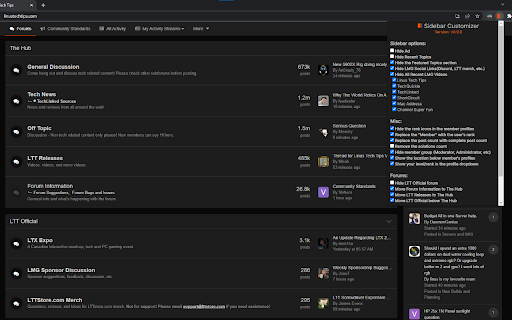
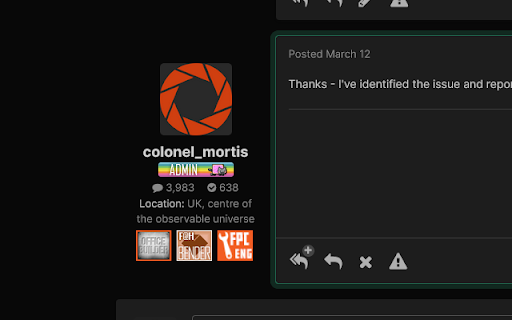
A basic extension to customize what is shown on the sidebar on linustechtips.com This extension allows you to customize parts of the linustechtips.com forum.

ChatGPT Enhanced Conversation History
ChatGPT Enhanced Conversation History is a Chrome extension that makes your ChatGPT conversation history more convenient to use. With this extension, you can search through your chat history and easily find the information you need. Additionally, the extension automatically loads the full conversation history, saving you the hassle of manually clicking "Show More" repeatedly. Search through your ChatGPT conversation history Automatically load the full conversation history Conveniently access all of your chat history without any hassle Improve your productivity by quickly finding the information you need Easy to use and intuitive interface Download ChatGPT History Enhancer today and start enjoying the benefits of enhanced chat history management!

Open in Sidebar
Drop any link to the sidebar for dual-pane access The "Open in Sidebar" extension revolutionizes browsing by allowing you to load any webpage in a convenient sidebar view. Access web content while reading without switching tabs with a click or keyboard shortcut. Drag and drop links or use the built-in address bar for seamless navigation. Enhance productivity by opening online tools like text editors or dictionaries in the sidebar. Reset the view with a single click or load new pages by pasting URLs. Note that some pages with CSP headers may have limitations, but future updates aim to address these. Features: Loads any webpage in a convenient sidebar view Activate the sidebar with a click or assigned keyboard shortcut Drag and drop links or use the built-in address bar for seamless navigation Access web content while reading without switching tabs Enhance productivity by opening online tools like text editors or dictionaries in the sidebar Intuitive interface with an address bar for easy URL tracking Reset the view with a single click Load new pages by pasting URLs into the address bar Search for dropped text with your preferred search engine (e.g. Google, Bing, or DuckDuckGo) Supports split view (two panes)

Scrapyard
Advanced bookmark manager with page archiving functionality. Scrapyard is a bookmarking extension where you can store and organize bookmarks, page fragments, complete HTML pages and PDF documents, or take notes. It is intended as a modern alternative to the legacy ScrapBook add-on. All archived content is accessible on the Android platform if shared through a cloud service. Scrapyard also supports the import of RDF archives of the legacy ScrapBook. See the online help for a more detailed description of the add-on features: https://tinyurl.com/scrapyard-help . The add-on has two storage modes: - Filesystem - in this mode, all archived content is stored inside a user-specified directory in the filesystem. This mode requires the installation of the Scrapyard backend application. - Browser internal storage - in this mode, all archived content is stored inside the browser profile. Although the installation of the backend application is not required, some advanced features, such as archive toolbar, RDF import, or uploading of local files, are not available without it due to restrictions imposed by the WebExtensions API. Please see the extension help for more details. Q: If I choose the "Browser internal storage" mode, how can I physically access the archived content? A: In this case, the archived content is stored in IndexedDB and is managed by the browser. It is not intended for access through the filesystem. Please use Scrapyard import/export facilities to migrate existing bookmarks. If you are into backup, please backup your entire Chrome profile. The path to the current Chrome profile could be found on the chrome://version/ page. Note that in this mode, all archived data is removed when the add-on is uninstalled. Q: I've lost all my data. What can I do? A: Generally, nothing could be done about this. There may be bugs in Scrapyard, cloud file version conflicts, OS crashes, hardware failures, your antivirus may mess with IndexedDB, a cat may eat it. Please back up your data regularly, possibly using third-party software for automation. Q: Suddenly, a half of my data went missing. It seems, that items have disappeared randomly. Is there any hope? A: These are signs that the index file of the filesystem storage was corrupted by a faulty disk operation. Although the probability of this is pretty low, there are no technical means to prevent this from happening. This may happen when the browser crashes or exits at an inappropriate moment. Luckily, the storage index could be completely restored with the "Rebuild item index" link at the "Advanced" settings tab. Q: My browser says: "The native application on port 20202 is not available" what does this mean? This means that the port used by the native application web server is taken by some other application or an already running instance of the native application from an another browser. This may happen if the browser has crashed. There are several possible solutions of this issue. At first, try to reboot the computer. If this does not help, it is possible to change the native application port in the Scrapyard settings.

Boss Hub | Link
BossHub Link| Sidebar, BOSS Link is Trusted by over 10000+ users. Bio Link solutions for personal & business needs. BossHub | Sidebar, BOSS Link is Trusted by over 10000+ users. Bio Link solutions for personal & business needs. Boss Link Supports Features: ✅ Bio link pages Create your own unique & highly customizable bio link page with ease. ✅ Shortened links Yes! You can use our service as a shortener as well. ✅ Host static sites Upload your website files and we will host them for you. HTML, CSS, JS, Video / Audio files. Analytics, password protected Automated tracking pixels and much more... ✅ Built-in analytics Easy to understand, yet detailed and comprehensive analytics for all your links. GDPR, CCPA and PECR compliant. ✅ File links Generate dynamic, advanced & downloadable links to files. ✅ Vcard links Create dynamic digital contact cards, tracked & downloadable. ✅ Event links Dynamically create downloadable & tracked calendar files. ✅ Splash pages Use custom made intermediary pages with countdowns for your links. ✅ Custom domains Connect your own domain or use our predefined ones. ✅ Projects Easiest way to categorize your managed resources.
