
dblnlgpkeilnnoggnilfkibbcamilchn


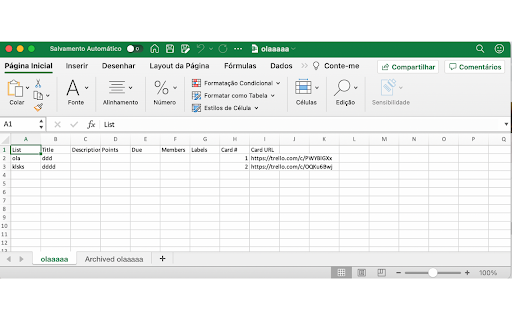
Export your board and cards for Excel FREE and you dont need to pay for that.

Planyway for Trello: Calendar, Timeline, Time Tracking and Reports
Explore the most powerful features: ✔️ Calendar (daily, weekly and monthly views) ✔️ Timeline (grouped by members, boards, lists, and labels) ✔️ Time tracking and reporting ✔️ Workload ✔️ Gantt-like roadmap ✔️ Multi-board view ✔️ Dependencies ✔️ Recurring cards ✔️ Subtasks ✔️ Export to PDF, Excel, and CSV ✔️ Integration with Google Calendar, Outlook, and more Planyway is an intuitive Trello Chrome extension that significantly expands Trello capabilities in personal planning and project management. See why Planyway extension for Trello is an excellent choice for managing your weekly schedule: ✔️ DRAG&DROP SCHEDULING Simply drag cards from Trello board and drop them on the calendar to schedule ✔️ INTEGRATION WITH GOOGLE CALENDAR, OUTLOOK, ETC. See and edit events from Google and Outlook calendars in Planyway. Or, sync Planyway with Google to see and edit Trello cards in Google Calendar. The app also supports 1-way integration with any other calendar for viewing purposes. ✔️ RECURRING TASKS Put Trello cards on repeat to visualize them in your calendar as often as you need automatically ✔️ NOTIFICATIONS AND REMINDERS Set reminders and notifications not to miss anything. You can receive them both on your computer or mobile ✔️ RESOURCE MANAGEMENT Manage work of your team with a powerful timeline view. Group it by team members to distribute tasks easily, see who is working on what, and avoid burnout ✔️ PROJECT ROADMAPPING Visualize your project plan on a Gantt-like timeline view to keep track of how you’re progressing to make sure you deliver work on time ✔️ TIME TRACKING AND REPORTING Track time against estimates to easily identify areas for improvement and make sure you stay on time and within budget. All data can be visualized with reports or exported in Excel or PDF Need help? If you have any questions about Planyway Chrome extension, reach out at support@planyway.com. We’re always happy to help:)

Card counter for Trello
Show card count in your Trello lanes Chrome Extension for Trello https://github.com/matsuoshi/Card-counter-for-Trello always show card count number at the top of your Trello lanes.

Strelloids - Trello on steroids
Strelloids - Trello possibilities expander. Custom tags, colored lists, hiding the lists, scrum points, new views and much more. Strelloids will expand possibilities of your Trello. Custom, colored tags, colored lists, hiding the lists, scrum story points helper, new view modes and much more. In one time you can have different settings for each board. Strelloids was created with the keynote that it would not kill your computer, like some extensions likes to do. v2020.9.26 - Markdown checklist support. [See more](Modules-%7C-Markdown-%7C-Checklist). - Markdown table support. [See more](Modules-%7C-Markdown-%7C-Table). - Expand/Collapse all list on the board. - Auto collapse empty lists. - Import/export plugin settings. - Split popup settings into tabs. - Split "content scripts" into separated files. - Own translation system. v2019.6.13 - Fixed missing toggled labels on cards - Fixed vertical position of inputs for custom tags v2019.3.10: - Added module for card prioritization. - Added GUI in card edit for modules: Custom tags, Card prioritization, Scrum Times. - Added possibility to scroll board in default view mode without holding shift key. - Added global options to change scrum label colors. - Added global options to change scrum sequence buttons in GUI card edit. - Added setting which allow to hide scrum labels based on their type. - Changed custom tags color algorithm to more "random". - Fixed assigning single "?" in brackets into Team 2 in scrum times. - Mucho code improvements. v2019.2.21: - Moved board settings into browser popup, opened by clicking in extension icon. - Added options page, with some global setting of the extension. - Added toggle visibility button into left top corner of the list instead of position inside Trello list menu. - Added new module for using cards as separator on list. - Merged display mode options, into one select. - Added some help messages for popup board options. - Improvement in overall CSS styles. - Replaced UTF-8 icons for scrum points (didn't appear on some versions), with SVG images. - Fixed scrum points rounding for some values (like: 0.6000000000000001).

Official Card Counter Trello with Totalizer
Official Card counter for Trello. Show card counters and the total cards in your board! Show the number of cards, the total cards in every list in Trello and you can click in total cards label and view the details with the percent and the statistic of your cards.
